illumio-tui

The Illumio PCE at terminal speed.

Traffic, policy, labels, IP lists, workloads and events in a btop-style terminal UI and a scriptable CLI. Every request is one you caused, every one is counted, and writes happen only when you arm them.

  • EExplainwhich rule allows or blocks a flow, and a jump to it
  • GGeneratethe allow rules an app’s traffic needs, fan-in ports folded
  • DDraftwhat your draft policy would decide, per flow, before provisioning
  • :Readiness → enforcea verdict per app, five steps to full, a watch and an exact rollback
  • mMarkssquelch known noise, flag what matters, locally
  • MBulklabels and enforcement for many workloads, one confirm
  • fFind rulesevery rule that names a label, IP list, service or workload
  • IImpactthe workloads behind a rule, per side, with t to switch it off
release
v0.5.7
platforms
macOS · Linux · Windows
screens
5
writes
opt-in
licence
GPL-3.0-only

1Install

One binary. Install it with Homebrew, apt, dnf, an MSI, Scoop or winget, or download it, check it, put it on your PATH.

Homebrew (macOS, Linux)

The repository is its own tap:

$ brew tap alexgoller/illumio-tui https://github.com/alexgoller/illumio-tui
$ brew install illumio-tui

Debian, Ubuntu

Download the .deb (amd64 or arm64) from the release page:

$ sudo apt install ./illumio-tui_0.5.7-1_amd64.deb

RHEL, Rocky, Alma, Fedora

Download the .rpm (x86_64 or aarch64) from the release page:

$ sudo dnf install ./illumio-tui-0.5.7-1.x86_64.rpm

Both packages put illumio-tui in /usr/bin with no dependencies, and are install-tested on Debian 12, Ubuntu 22.04, Rocky Linux 9 and AlmaLinux 8 before each release.

Windows

winget, once the package is merged into winget-pkgs (pending). It installs the MSI below, for the current user.

> winget install AlexGoller.IllumioTUI
> winget upgrade AlexGoller.IllumioTUI     # later, for a new release

MSI (v0.4.1 and later): download illumio-tui-<version>-x86_64-pc-windows-msvc.msi from the release page and double-click it, or install it silently:

> msiexec /i illumio-tui-<version>-x86_64-pc-windows-msvc.msi /qn

It installs for the current user, without admin rights, into %LOCALAPPDATA%\Programs\illumio-tui and adds that folder to your user PATH (open a new terminal). A newer MSI upgrades the installed version in place; uninstalling (Settings > Apps) also removes the PATH entry. The MSI is not code-signed, so SmartScreen may warn when you open it: More info, then Run anyway. Each release installs, upgrades and uninstalls it on a Windows runner before publishing.

Scoop: the repository is its own bucket.

> scoop bucket add illumio-tui https://github.com/alexgoller/illumio-tui
> scoop install illumio-tui
> scoop update illumio-tui     # later, for a new release

Release archives

Every GitHub Release carries one archive per platform, the .deb/.rpm packages, the Windows .msi and a SHA256SUMS file covering all of them. The current release is v0.5.7; the changelog lists what every release brought.

PlatformArchive
macOS Apple Siliconillumio-tui-0.5.7-aarch64-apple-darwin.tar.gz
macOS Intelillumio-tui-0.5.7-x86_64-apple-darwin.tar.gz
Linux x86_64 (glibc)illumio-tui-0.5.7-x86_64-unknown-linux-gnu.tar.gz
Linux x86_64 (static musl, any distro)illumio-tui-0.5.7-x86_64-unknown-linux-musl.tar.gz
Linux arm64illumio-tui-0.5.7-aarch64-unknown-linux-gnu.tar.gz
Windows x86_64illumio-tui-0.5.7-x86_64-pc-windows-msvc.zip

Example for macOS on Apple Silicon; swap the target for yours:

$ curl -LO https://github.com/alexgoller/illumio-tui/releases/download/v0.5.7/illumio-tui-0.5.7-aarch64-apple-darwin.tar.gz
$ curl -LO https://github.com/alexgoller/illumio-tui/releases/download/v0.5.7/SHA256SUMS
$ shasum -a 256 -c --ignore-missing SHA256SUMS     # Linux: sha256sum --check --ignore-missing SHA256SUMS
$ tar -xzf illumio-tui-0.5.7-aarch64-apple-darwin.tar.gz
$ install -m 755 illumio-tui-0.5.7-aarch64-apple-darwin/illumio-tui ~/.local/bin/
$ illumio-tui --version
illumio-tui 0.5.7

macOS may quarantine a binary downloaded with a browser; clear it with xattr -d com.apple.quarantine ~/.local/bin/illumio-tui. On Windows, compare Get-FileHash of the zip with its line in SHA256SUMS, extract it, and move illumio-tui.exe into a folder on your PATH.

From source

With Rust 1.88 or newer:

$ git clone https://github.com/alexgoller/illumio-tui
$ cd illumio-tui
$ cargo install --path crates/illumio-tui

Then point it at your PCE (see Configure) and run illumio-tui for the terminal UI, or illumio-tui health to check the connection from the CLI.

2The terminal UI

Explorer, policy and inventory on five keyboard-driven screens, in the spirit of btop.

Run illumio-tui with no subcommand and it opens on your default profile (--profile prod for another, --theme light for the light palette). Boxed panels with titled borders, dense stats, decision colours, and the API call and byte counters in the header at all times.

A 30-second tour against a demo PCE: one r query, v through the five views, the g key picker, Enter on a flow, then Objects and Workloads. GIF version.
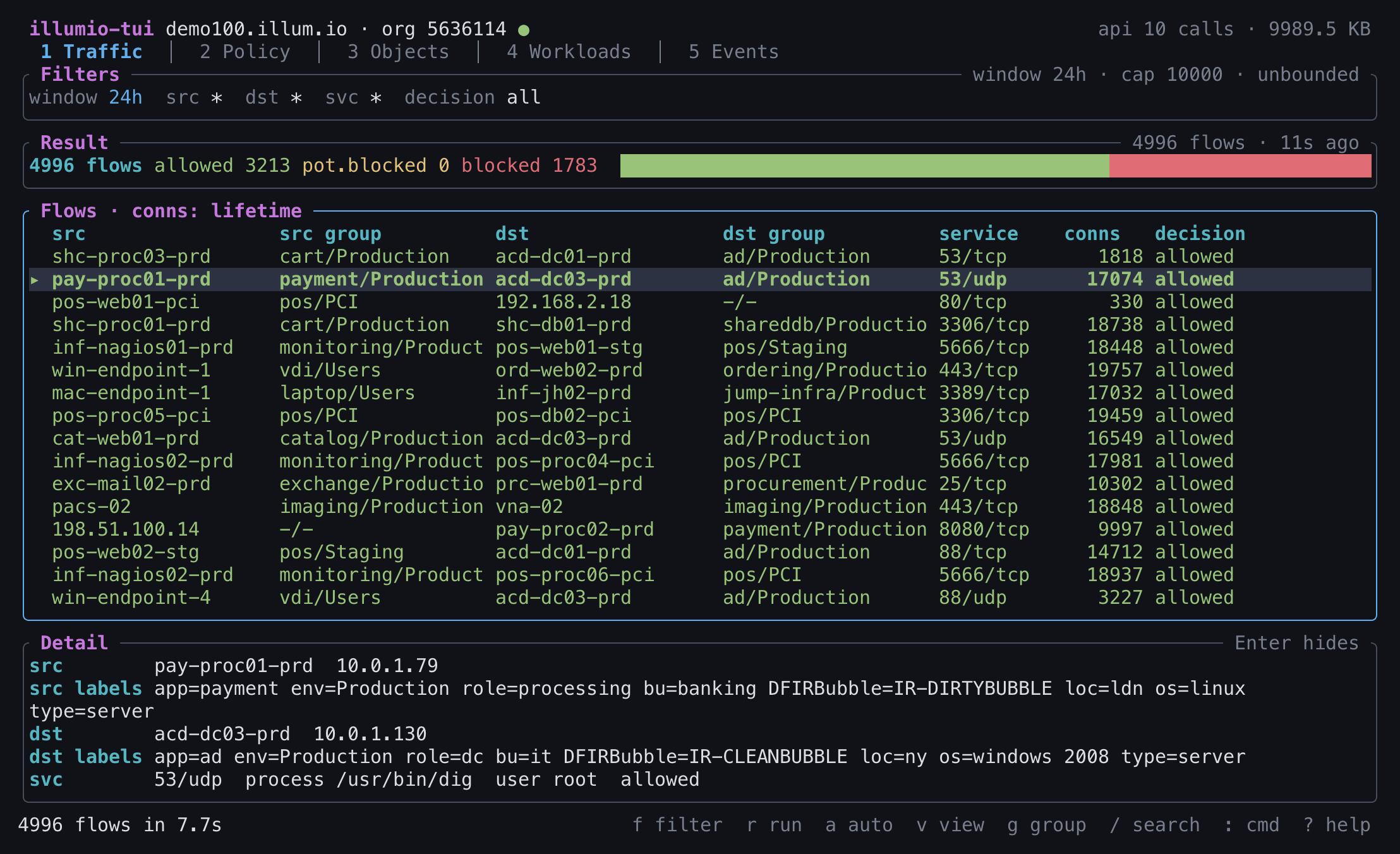
The Traffic screen, Flows view: filter bar, a result of 4996 flows with a decision bar, the flow table with one row selected, and the detail panel showing both label sets, process, user and bytes
1 Traffic, Flows view with the detail of the selected flow.
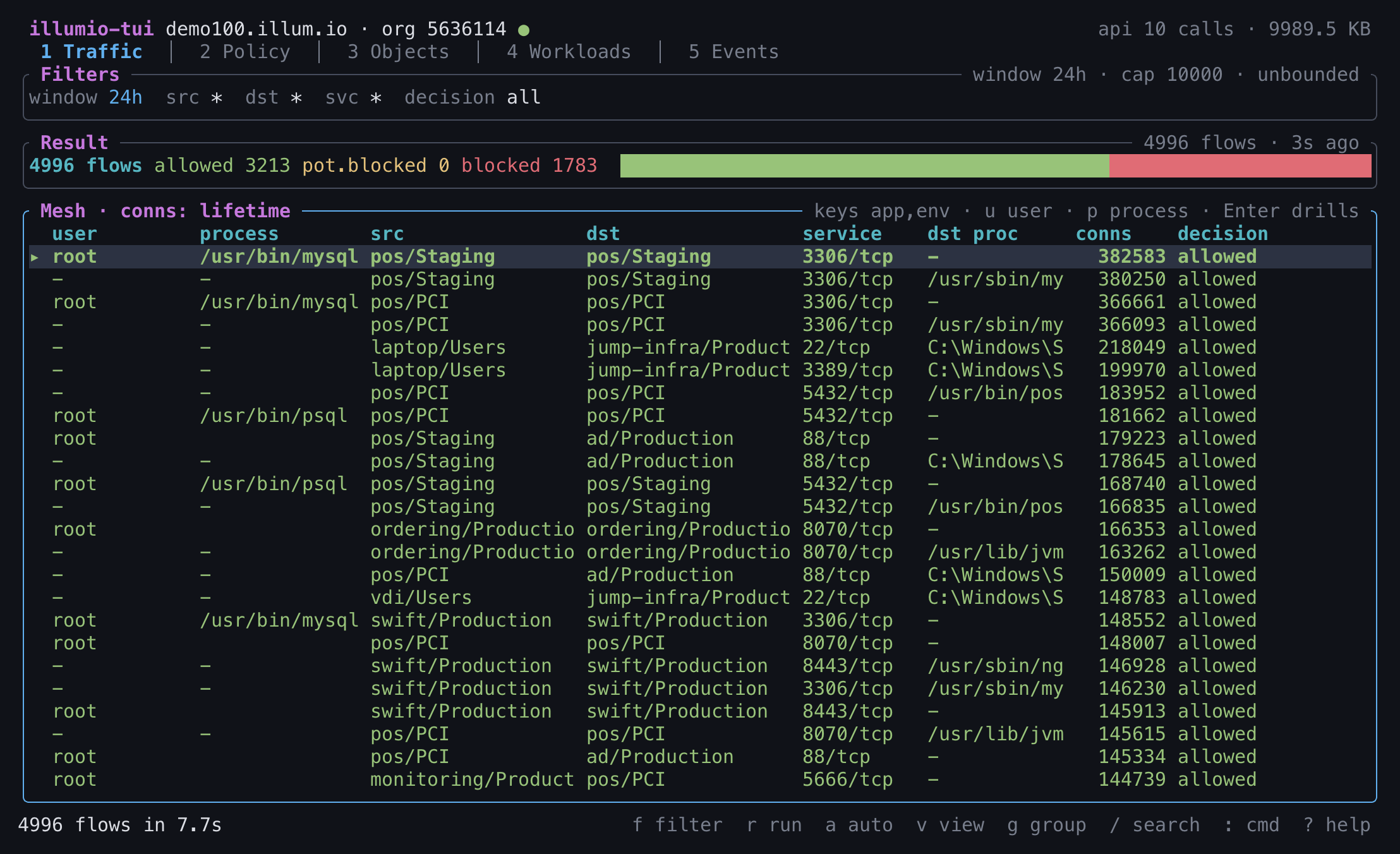
The Traffic screen, Mesh view: rows of user, process, source group, destination group, service, destination process, connections and decision
Mesh: who talks to whom, by user and process.
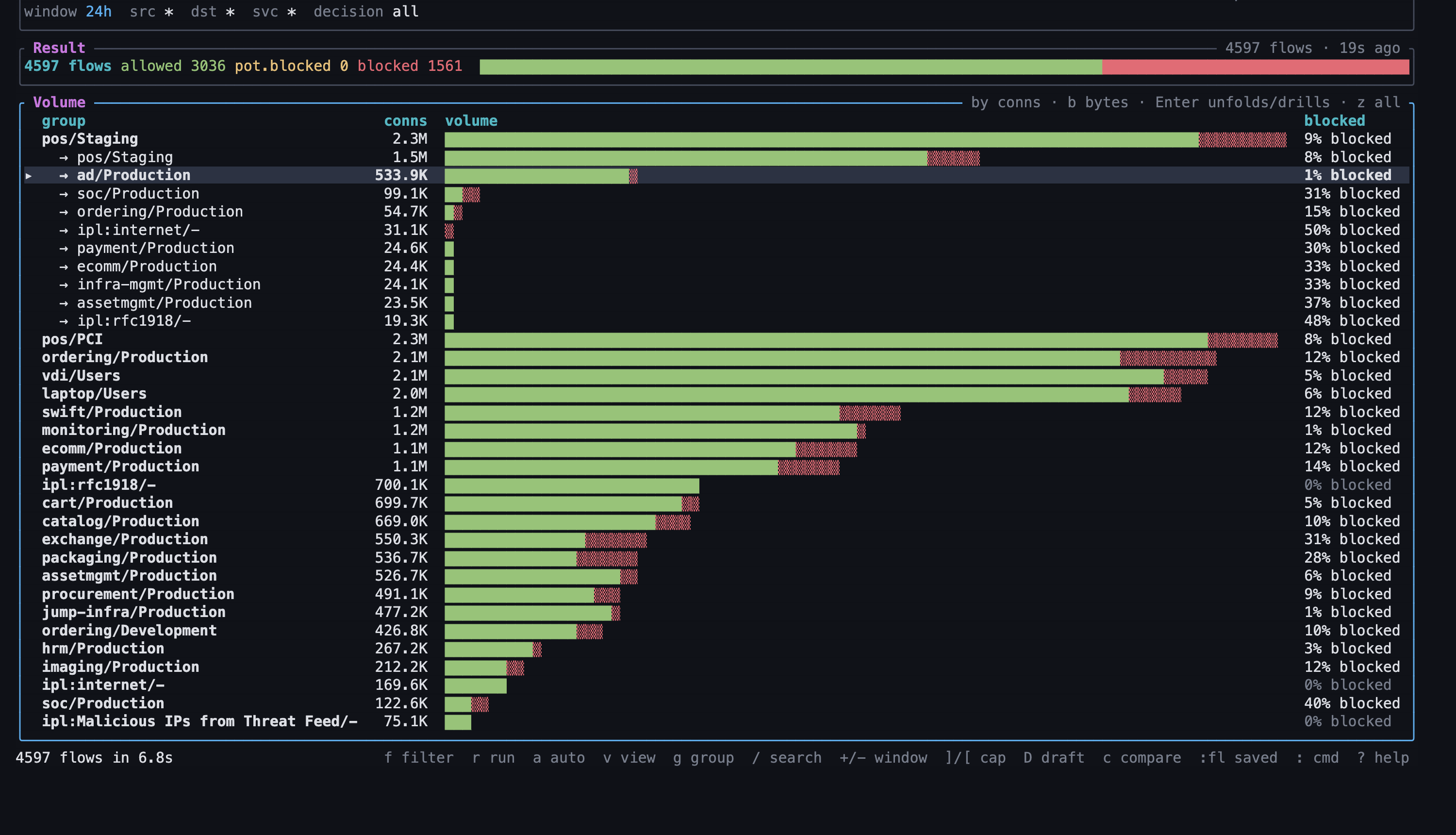
The Traffic screen, Volume view on the demo PCE: one row per source app and environment, heaviest first, with connections, a bar split into allowed and blocked, and the blocked share; pos/Staging unfolded to its destinations
Volume: one bar per source group, destinations unfolded under it.
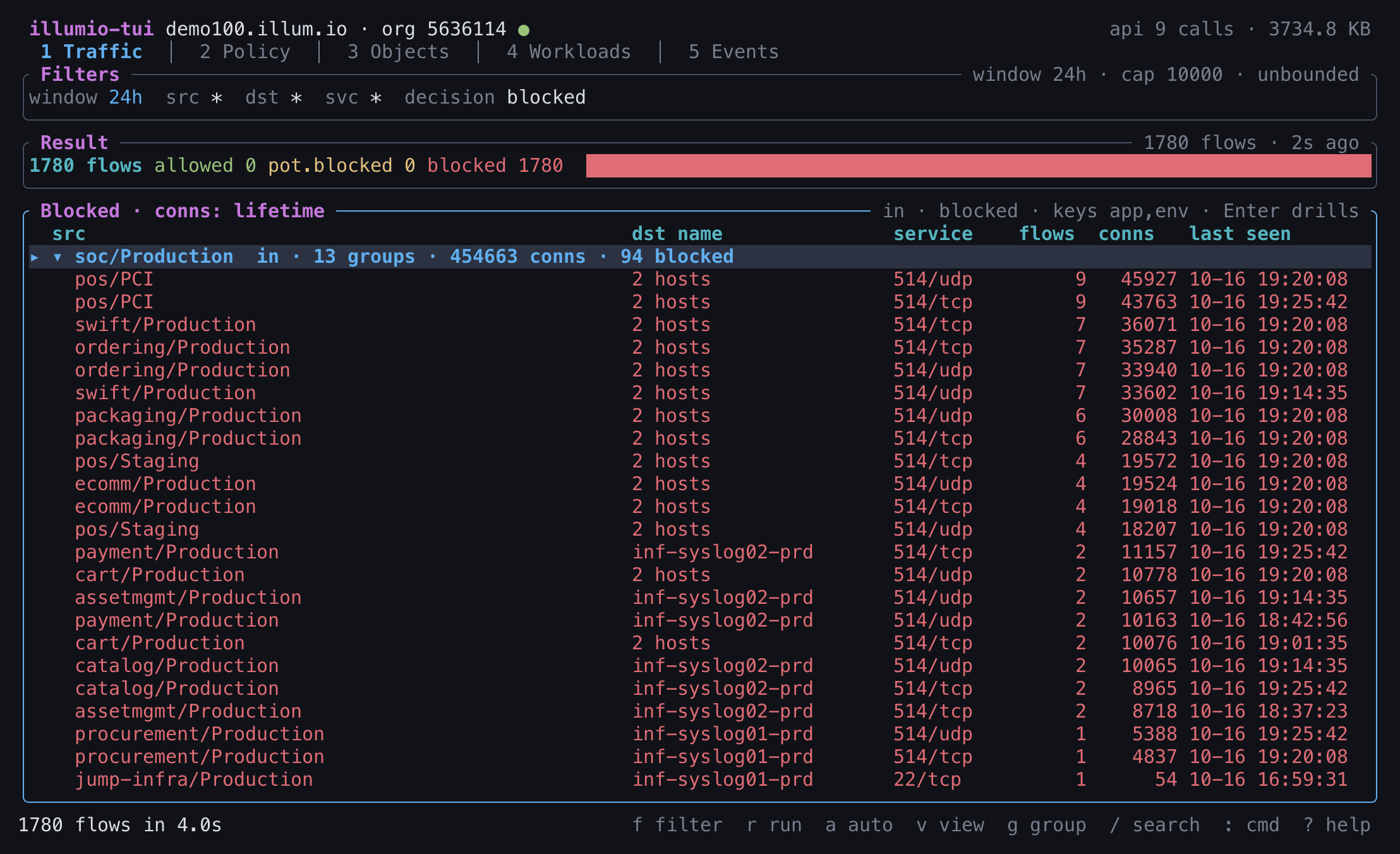
The Traffic screen, Blocked view after a query filtered to blocked flows: 1780 blocked flows grouped by destination app and environment and service, with last seen time, destination host or host count, flow and connection counts and the source groups
Blocked, after f set the decision to blocked: blocked flows by destination group and service, with their sources.
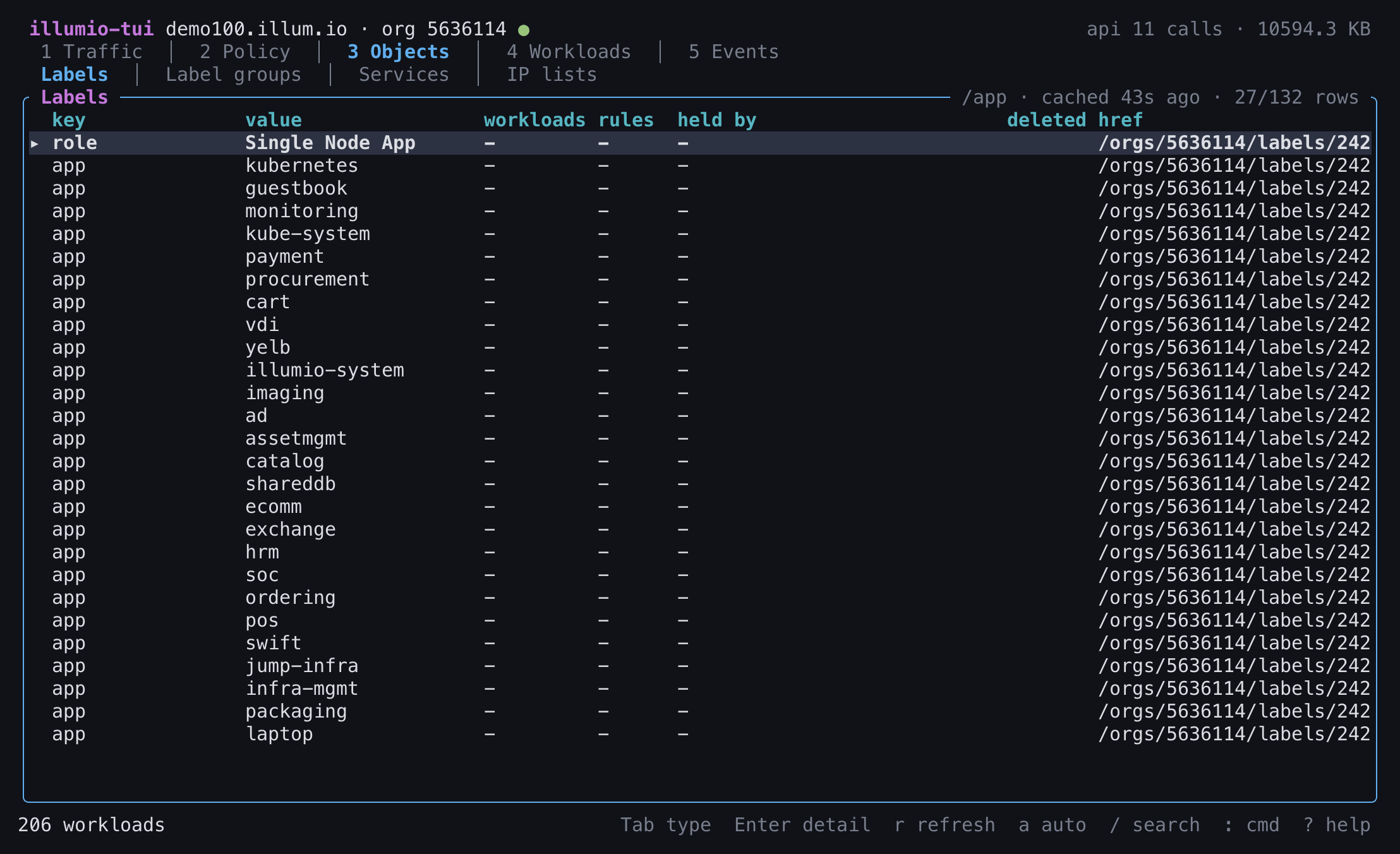
The Objects screen, Labels tab, searched for app: key, value, workload and rule counts, and href per label, 27 of 132 rows
3 Objects, Labels tab with a /app search.
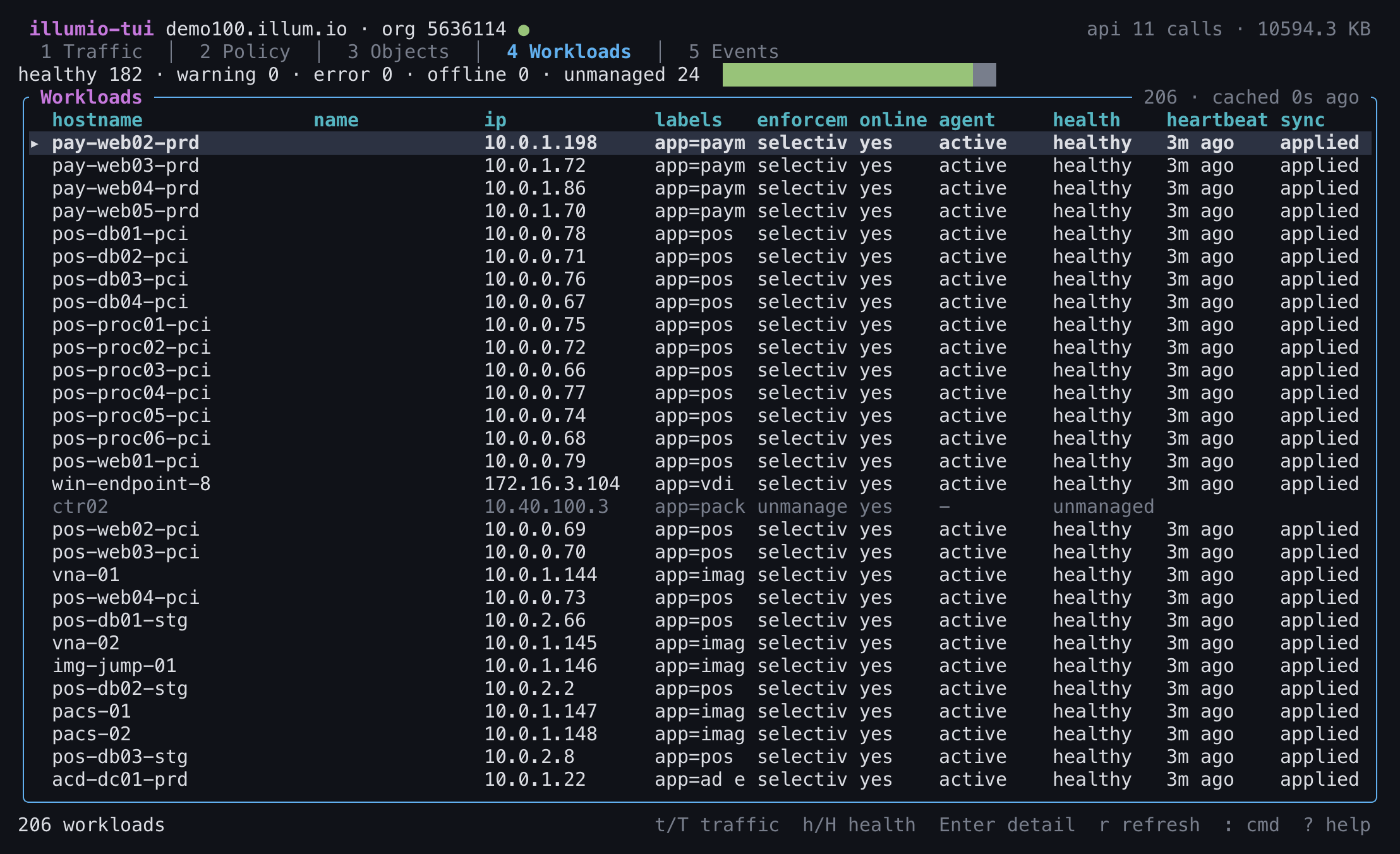
The Workloads screen: a VEN health summary line with a bar, then hostname, IP, labels, enforcement, online, agent, health, heartbeat and sync columns for 206 workloads
4 Workloads with VEN health.
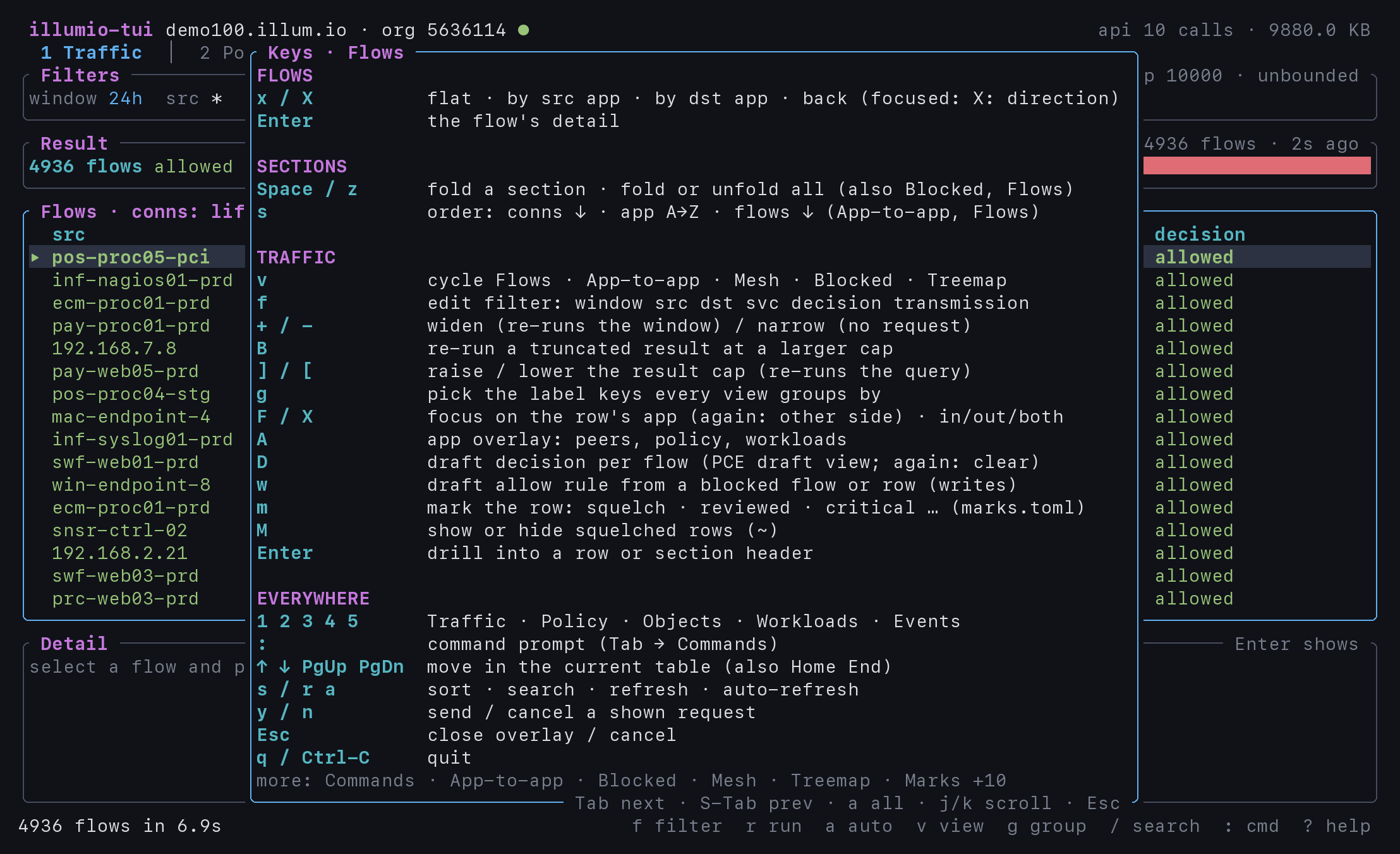
The help overlay opened with ? on the Traffic Flows view, titled Keys · Flows: the keys for the current context come first in grouped sections (Flows, Sections, Traffic), then the keys that work everywhere, with a footer listing the other contexts (Commands, App-to-app, Blocked, Mesh, Volume, Marks) reachable with Tab
? The key map.

Five screens

  • 1Traffic. One filter (f: , AND, | OR, ! excludes, as in env=prod, !app=monitoring or tcp, !22/tcp or !svc:SSH; a port range is 8000-8100/tcp; an exclusion leaves its match out of the whole field; no fqdn: on the source side; a label value typed alone, ordering, becomes app=ordering when one loaded label has it, as in the Workloads label filter and the Policy rule search, and a value several keys have asks which; label names in any filter ignore case, app=ordering finds Ordering, the exact label wins and two that differ only in case are an error), one query (r), five views of the result on v; Enter shows a flow’s detail in source, destination and service columns on a wide terminal. / searches, s sorts; a filter that would be expensive asks first.
  • 2Policy. Rulesets and their rules in evaluation order (override deny, allow, deny; allow rules intra-scope, then extra-scope), draft and active on d, pending changes on p, i for the workloads each rule matches. I in the pending list (or :impact anywhere) shows what provisioning the draft would change: the pending objects, each pending ruleset’s rules added, removed and changed with the workloads they match active → draft, and one traffic query re-evaluated against the draft, which flows would become blocked and which allowed, per app pair. It loads once when you ask; reopening shows it with its age, r loads it again.
  • 3Objects. Four tabs: labels, label groups, services and IP lists. u keeps the labels nothing holds, by the PCE’s own usage flags in one request, and names what holds the others: pairing profiles and permissions count as much as workloads and rules. Each IP list shows its size in addresses with exclusions taken out, its ranges and FQDNs, and the draft rules that use it. W (or :used) on any row shows where the object is used in the draft policy before you change or delete it: ruleset scopes, rules (Shop-Prod · #2 · provider · allow, deny and override deny marked, excluded, pending create|update|delete for a draft change not provisioned yet, disabled), the label groups holding it, nested ones via the group, and for a label the pairing profiles that give it (locked when the profile locks that key) and how many workloads carry it: exact from a loaded workload list, else one cached one-row read, so 0 or ≥1 (the PCE’s total header counts the whole collection, not the label’s); Enter on that line opens the exact filtered list. What it needs and is not loaded is read once, on the key press, through the cache; Enter opens the rule on Policy, the group on its tab, or Workloads filtered by the label. Not searched, and the overlay says so: virtual services, enforcement boundaries, container workload profiles. :hygiene, from any screen, is the reverse before a cleanup: the labels, label groups, IP lists and services nothing names, and the workloads missing label keys (the profile’s label model; role, app, env by default, and loc when the PCE has a loc label), counted per kind and per key in its header. “Used” is what W finds plus every href a draft ruleset carries (custom iptables rules and egress services too), the pairing profiles and workloads for labels, and the PCE’s own label usage flags. It never guesses: a kind a list not read in full may hold is not listed (unless the PCE’s flags settle each label), and rows that rest on rulesets whose deny rules are not loaded say unused (uncertain); every warning shows. Built-ins like Any (0.0.0.0/0 and ::/0) and All Services, deleted labels and objects pending deletion are never listed, and the overlay always names, whole, what it does not search (active policy, as it reads the draft; virtual services and servers, enforcement boundaries, container workloads and their profiles, cloud resources, label mapping rules, RBAC scopes, firewall settings), so an unused row is a candidate, not a verdict. Enter selects the object on its tab, where x deletes it with the usual confirm, or opens the workload; W checks the object with where-used and Esc comes back.
  • 4Workloads. VEN health columns and a summary line, h unhealthy only, H by severity, t / T jump to Traffic with the workload as source / destination. A workload without a VEN shows enforcement unmanaged, as in the PCE UI, whatever mode the API reports for it (often visibility_only). Local filters, no request: E enforcement, m managed, o offline, u unlabeled (a missing column names the absent scope or role keys), c clears them and h (not the search); a filter line shows what is on and the count. VEN health: the line above the table counts the fleet (VEN 120 · healthy 100 · warning 5 · error 2 · offline 13 · unmanaged 40, in the health colours, of 500 loaded (capped) on a capped list), v cycles a health filter (warning, error, offline), and :ven shows counts per health state, VEN version (newest first, how many behind), enforcement mode and health message; Enter on a row filters the list to it. From the loaded list, no request. f filters by label (app=shop,crm env=prod !role=db: comma any of, space all of, ! excludes, app=- no app label), x groups the list by app and env (the g keys) with VEN health and enforcement per group, Space / z fold, s orders the groups, Enter on a group narrows to it. All local, no request. Space on a workload marks it (●), V marks a group or everything shown, Esc clears; with writes armed L sets labels and M the enforcement of the marked workloads, a group or the row, in bulk. Compare with a snapshot: b picks one of the profile’s snapshots (newest first, ←/→, Enter) and compares the loaded list with it: a Δ column (NEW, CHG, dim GONE rows with the snapshot’s values) and was→now (app: shop→cart · mode: visibility→selective · ven: active→stopped · health: healthy→offline), the header vs snapshot 10-20 06:00 · 3 new · 5 changed · 1 gone, n one change at a time, C off. Every filter applies to both sides, so v on offline with n on changed lists the VENs newly offline; group headers count the changes, the gone ones apart. The file only, no request.
  • 5Events. Severity-coloured audit events, filtered by severity, type, actor and window. The type filter takes comma-separated terms (sec_policy, rule_set), !term hides (!user.*), * globs the whole type (*.delete) and a leading = is exact (!=user.login hides that type only); Ctrl-N completes the loaded types. A severity is one of emerg alert crit err warning notice info debug (error, warn, critical, emergency read as theirs); any other word stays in the editor with that list, never sent, and when a load sent from the editor fails, the filter before it is put back and, still on Events with nothing else open, the editor reopens with the error. warning+ keeps that severity and worse. The actor filter takes the same terms over the Actor column (user:alex@ryte.de, agent:web01, system), each matching the whole actor or the name after its kind: =alex@ryte.de, user:*, !system, !agent:*; Ctrl-N completes the loaded actors. x hides the row's exact type, o shows only it; U hides the row's actor, u shows only it. t lists the types by count (Enter or o only, x hide) and Tab switches it to the actors. All of this filters the loaded events, no request (the PCE is never asked to filter by actor); the header says what is hidden (hiding 3 types · actor !system · 812 of 1,240) and when the PCE's page was full. Enter shows what changed as a diff: only the changed fields, - before and + after, lists diffed by element, hrefs read as names; J toggles the raw JSON; in the detail j/k (or the arrows) step through the events and Ctrl-d/Ctrl-u scroll.

The : prompt takes :traffic, :policy, :objects, :workloads, :events, :iplists, :filter, :window, :profile <name>, :focus, :app, :gen, :unicast, :marks, :used, :exposure (or 9), :hygiene, :impact, :export <path>, :writes on|off, :batch, :draft, :active, :save, :filters, :load, :default, :help and :q. ? shows the keys of where you are first; Tab steps through the other groups, a shows them all.

Five views of one traffic result

All five group flows by the same label keys: your profile's scope keys (app,env by default) until g opens the key picker, which also offers all labels.

  • Flows: each side's group and, on Enter, both label sets and the bytes; x groups the flows app by app, by source or destination app, each section with its flow and connection counts (Space / z fold, Enter on a header drills into the app).
  • App-to-app: group pairs with allowed, potentially blocked and blocked counts; o splits each pair by port/proto (one row per allow rule to write); x switches to sections per app (in, out or both), which s orders by connections, app name or flows; Enter drills into a pair's flows.
  • Mesh: user, process, source, destination, service and destination process; u / p hide the user / process column and merge rows.
  • Blocked: blocked and potentially blocked flows by destination group and service.
  • Volume: one row per source group, heaviest first, with its full name, its connections (b for bytes), a bar split into allowed, potentially blocked and blocked in the decision colours (by bytes with b), taking the terminal’s width, and its blocked share of the connections in either weight (61% blocked · 12% pb); every bar on the largest source’s scale, nothing folded into “other”. Enter, l or Space unfolds a source’s destinations under it, h folds, z unfolds or folds them all, Enter on a destination drills into the pair’s flows and E explains it as on App-to-app. At 80 columns the bar shrinks first, then names are cut with ….

9 (or :exposure) opens Exposure: which risky services (RDP, SMB, NetBIOS, RPC, WinRM, SSH, Telnet, VNC, the database and directory ports, or your profile’s own list) reach each destination group, from where, and under which decision. One query over those ports, through the cost guard and in its own cache slot: the traffic result on screen is kept aside and Esc puts it back, without a request (D, F and c on the exposure result use their usual slots, so the result put back may need those again). One row per destination group and service with its sources (intra, other apps, unlabelled hosts and IP lists, any and internet flagged) and flows per decision; exposed rows (allowed from outside the group) first, in red, then potentially blocked, blocked and intra-only ones. The title sums up the selected service (rdp: 12 destinations · 4 exposed (allowed from other apps) · 3 potentially blocked · 5 blocked), Enter drills into its flows, E explains the busiest exposing flow, squelch applies and the title counts the exposed rows it hides. Only a flow between two labelled workloads with every group key set and equal is intra: an IP list, an unlabelled host or a missing key counts as outside, so an exposure is over-reported rather than hidden. On the CLI, exposure.

Switching views, grouping, sorting and searching send nothing to the PCE. With writes armed, w turns a blocked flow into a draft allow rule (its Scope, intra or extra, switches on Space and keeps the consumers coherent; a line under them says what they match and warns of an extra-scope rule open to every app); once it is written, the flows on screen are re-evaluated against the draft (one PUT per query, like D), unless a query is running or D would ask first (a cached result, a large window or cap).

F focuses every view on one app: X cycles its inbound, outbound or both directions, Esc clears it. On a truncated result, r re-queries just that app, with its labels in the query.

D shows what the draft policy would decide for each flow, next to the reported decision: blocked → allowed in Flows, would allow counts in App-to-app, a fixed by draft step on d, and draft: N blocked flows fixed in the app screen. It is the PCE’s own Explorer draft view and changes no policy: one PUT on the query you already ran, polls and one download, no new query. D again clears it with no request; Esc cancels it while it runs. On the CLI, --draft.

c compares the result with a baseline: what is new since a change window, which talkers appeared this week, which blocked flows are new since an app went selective. It asks for the baseline’s length (7d; Ctrl-N / Ctrl-P step) and runs the same filter over exactly the window before the result’s start, one query in its own cache slot, through the same cost guard. Every view gains a Δ column (Volume on its sources and destinations, without was→now): NEW (only recent), CHG (another set of decisions; the was→now column beside it says allow→pot.bl in the warning colour; on a plain App-to-app pair, what changed: +1 svc · allow→block), GONE (only in the baseline, dim); the Result header says vs 7d before · 12 new · 3 changed · 5 gone, counting the rows the view shows (App-to-app: pairs, or service rows with o). n shows one kind at a time, C leaves. New means not seen in the baseline window at Explorer’s record granularity: a record spanning the cut-off is in both and reads as the same, and counts stay lifetime counters, never subtracted. r keeps the baseline, another filter or window ends compare mode, a truncated side warns in the header and B backfills it. On the CLI, --baseline (with --since and --changes).

E explains a flow: the rules the PCE names for it after the draft evaluation, resolved through the loaded draft policy (allow, deny or override deny, ruleset and scope, consumers → providers, services), or no rule allows this flow with the destination’s enforcement and w to draft the rule. It sends nothing; Enter opens the rule on the Policy screen. On the CLI, traffic explain.

A opens one screen for that app: inbound and outbound peers, its workloads with enforcement modes (workloads without a VEN counted as unmanaged) and VEN health, and the rulesets that cover it. It reuses what is loaded; opening it sends at most two requests, and every request is counted in its header.

G there (or :gen) opens the policy generator: the allow rules the app’s own traffic needs, one row per peer with a checkbox, a slider from app, all services to role pairs, the ports seen, rules already in the draft marked exists, and a preview of the flows covered. IP peers that sit in an existing IP list are grouped into one row per list, so the rule names the list rather than a new list per address. A port many peers reach (DNS, NTP, a monitoring agent, a shared service) gets a fan-in line: c turns it into one rule from the built-in Any IP list (checked workload peers keep their own rules, which carry their outbound) or from All Workloads, with its catch and what that rule also allows spelled out. Enter plans every write (IP lists, a ruleset, rule updates and creates) into one confirm; y sends them in order and stops at the first failure, and :batch shows the steps again. N proposes for the new traffic only: it asks for a baseline length like c, runs the generator’s own query over the window before (through the cost guard, counted), and leaves out every flow the baseline saw; the header says new since 7d before · 40 flows seen before and the footer covers 3 of 5 new flows · 2 not · 40 seen before; N again shows everything. On the CLI, illumio-tui gen prints the same proposal and writes nothing; gen shop/prod --baseline 7d the rules for what started talking.

m marks the row under the cursor: squelch hides known noise, reviewed and accept-blocked dim what you have judged, critical, important and revisit flag what matters. The form is prefilled from the row, previews what it matches, and asks why. Marks live in marks.toml next to the config, apply to every view and the CLI’s traffic commands, and change nothing on the PCE. M shows the squelched rows, :marks lists and edits the marks.

One r query over 24h, c and Enter on the offered 7d: the Δ column and vs 7d before · 681 new · 0 changed · 2238 gone for the flows. n shows new, changed and gone in turn. v moves on to App-to-app, where the header counts pairs instead: 3 new · 29 changed · 1 gone. n picks the CHG pairs, and the was→now column says what changed in each: +24 svc, −1 svc, or ~1 svc for a service that swapped. C leaves. Two queries in all. GIF version.
3 Objects, /Production, W on env=Production: 6 ruleset scopes, 26 rules, a pairing profile that locks env (a disabled test profile, made for the recording and deleted after), and the workload count. j down the list and back to 3. Dev Prod Separation · override deny, Enter opens it on Policy. GIF version.

3Workflows

Eight jobs you do on a PCE every week, each as keys and commands, shot on a demo PCE.

Every screenshot and recording below is real: one TUI session and a handful of CLI runs against a shared demo PCE, read-only. Writes were armed only to reach the confirm screens, and every confirm was answered with n. The whole TUI session, from start to the last screenshot, cost 29 requests: the header counts them. The enforcement overlay and policy search shots (v0.4.0) come from a second session with writes not enabled at all: one 24-hour query, D once, the policy and workload loads, 26 requests in all.

1Find and silence noise: flow marks

problem
Nagios checks every host on 5666/tcp. Every view is full of it, and you have judged it long ago.
keys
m on a row, Tab through the form, Enter saves; M shows what is squelched; :marks lists, edits and extends. CLI: marks add, list, export, import.
you see
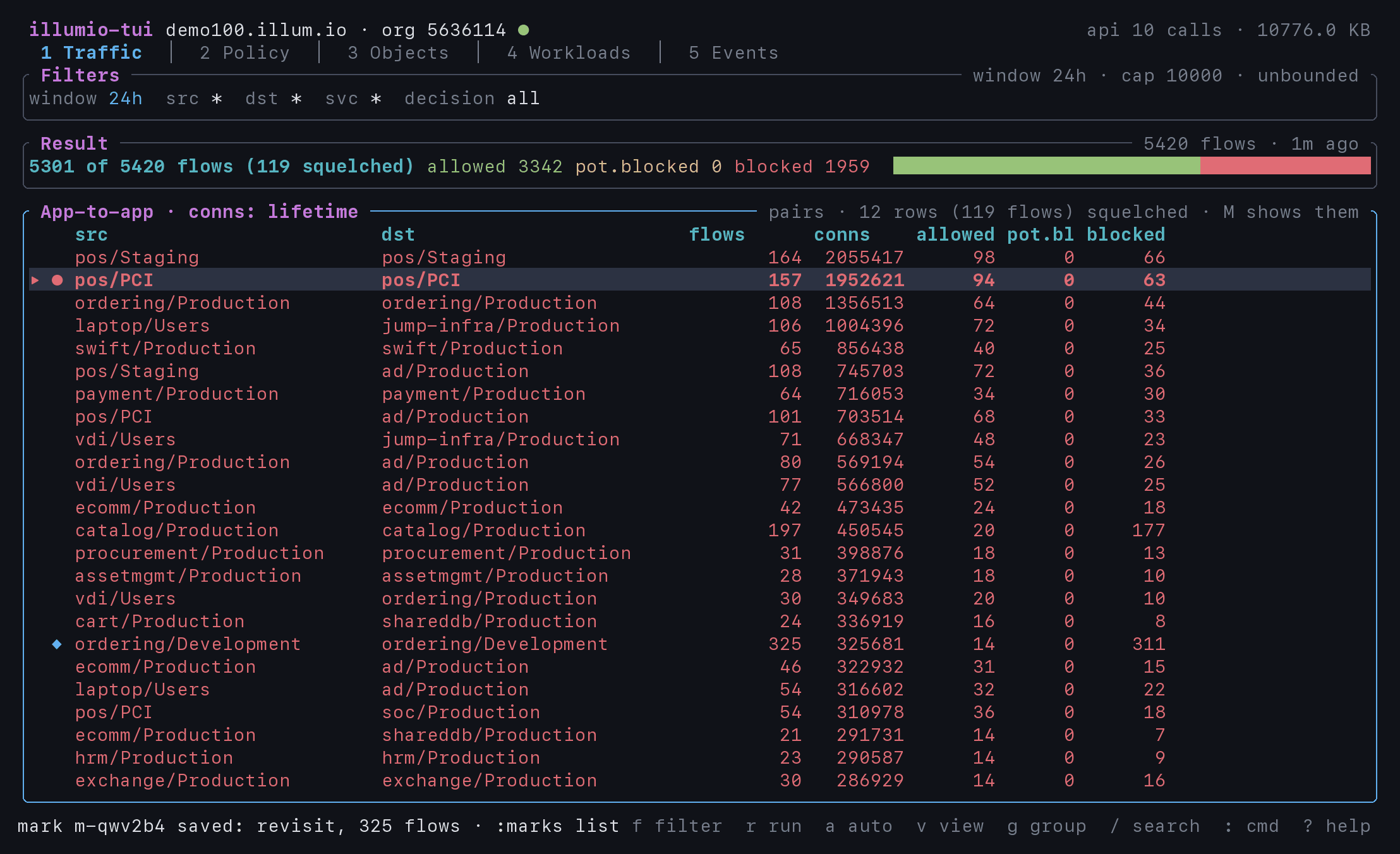
One squelch on app=monitoring → any 5666/tcp takes 119 flows out of every view (5301 of 5420 flows (119 squelched)). A critical mark puts ● on pos/PCI↔pos/PCI, a revisit puts ◆ on ordering/Development with its 311 blocked flows and expires in 7 days on its own.
PCE cost
None. Marks live in marks.toml next to the config and apply to the TUI and the CLI’s traffic commands alike.
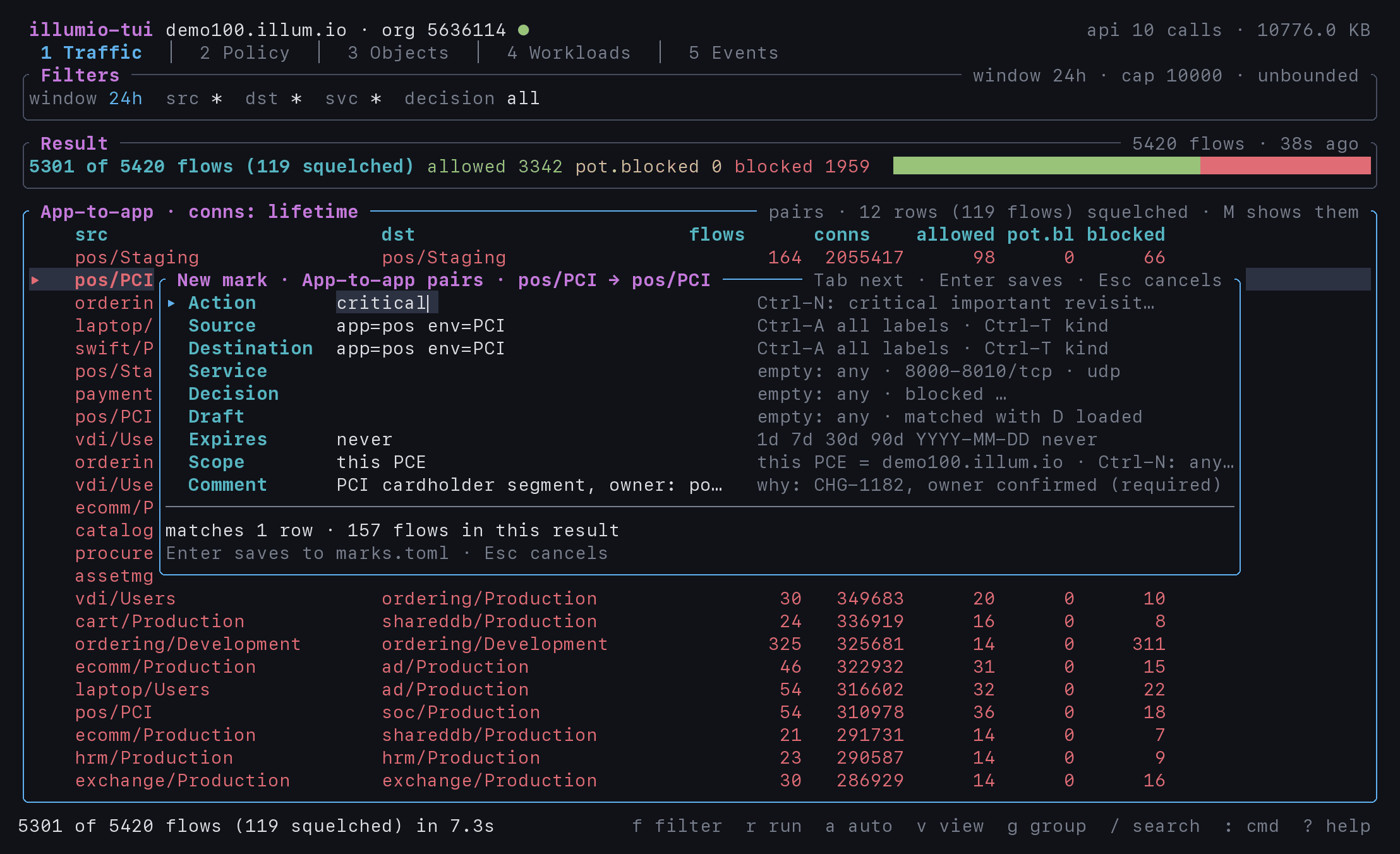
The New mark form over the App-to-app view for pos/PCI to pos/PCI: action critical, source and destination prefilled as app=pos env=PCI, expiry never, scope this PCE, a comment naming the owner, and a preview saying it matches 1 row and 157 flows
m on a pair: prefilled from the row, previews its matches, asks why.
The App-to-app view with 12 rows (119 flows) squelched in the title, a red dot before pos/PCI to pos/PCI and a blue diamond before ordering/Development, and the status line confirming the revisit mark saved for 325 flows
The gutter: ● critical, ◆ revisit; the squelched rows are gone, and the title says how many.
$ illumio-tui marks add --action squelch --src app=monitoring --dst any \
    --service 5666/tcp --comment "Nagios NRPE checks, known and wanted"
$ illumio-tui marks export --format toml > team-marks.toml   # share it; marks import reads it

2What would my draft do? D

problem
The draft holds new rules. Before you provision, you want to know which blocked flows they fix and what they leave blocked, on real traffic.
keys
D on any traffic view; D again goes back to the reported decisions; Esc cancels while it runs. CLI: --draft.
you see
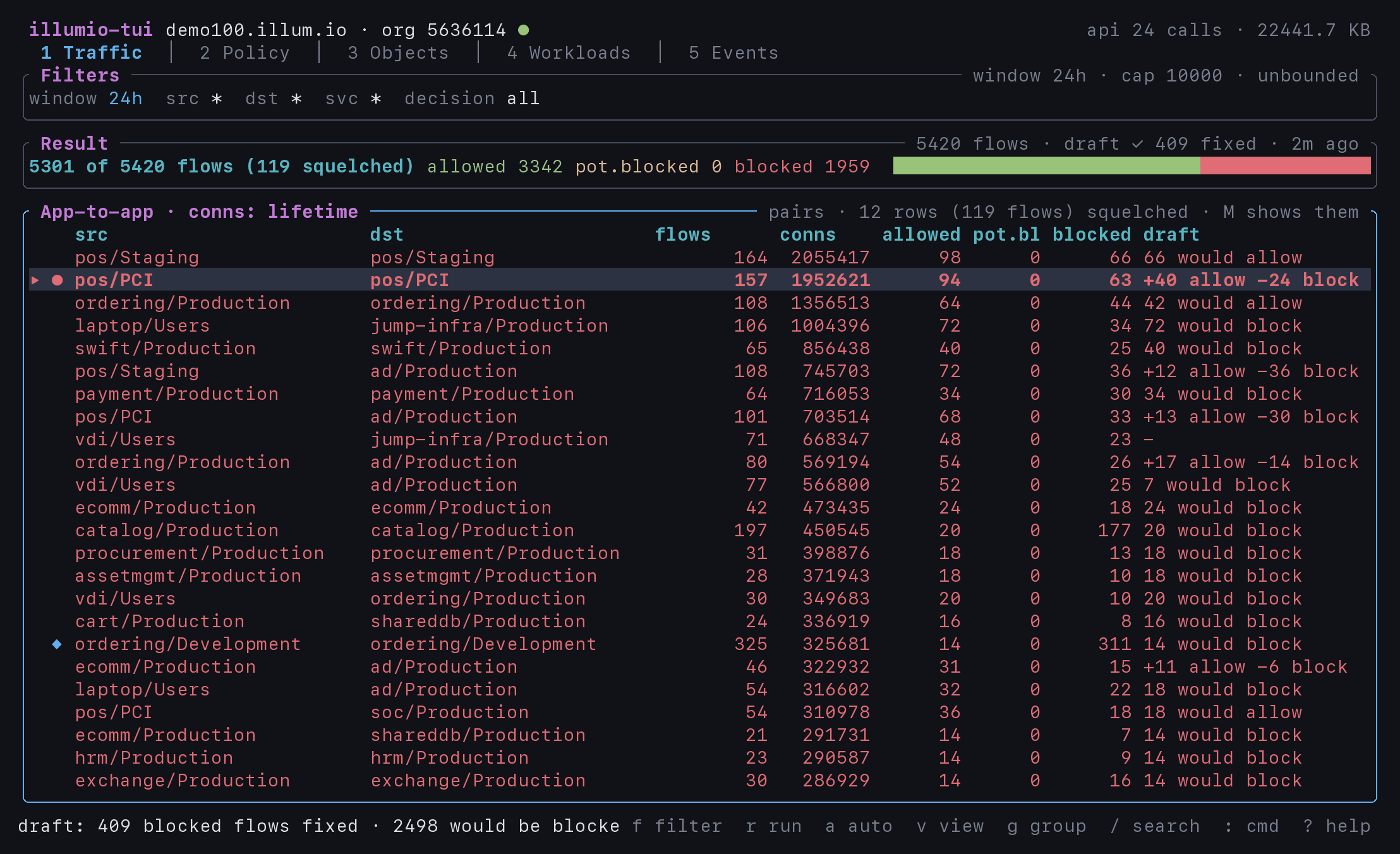
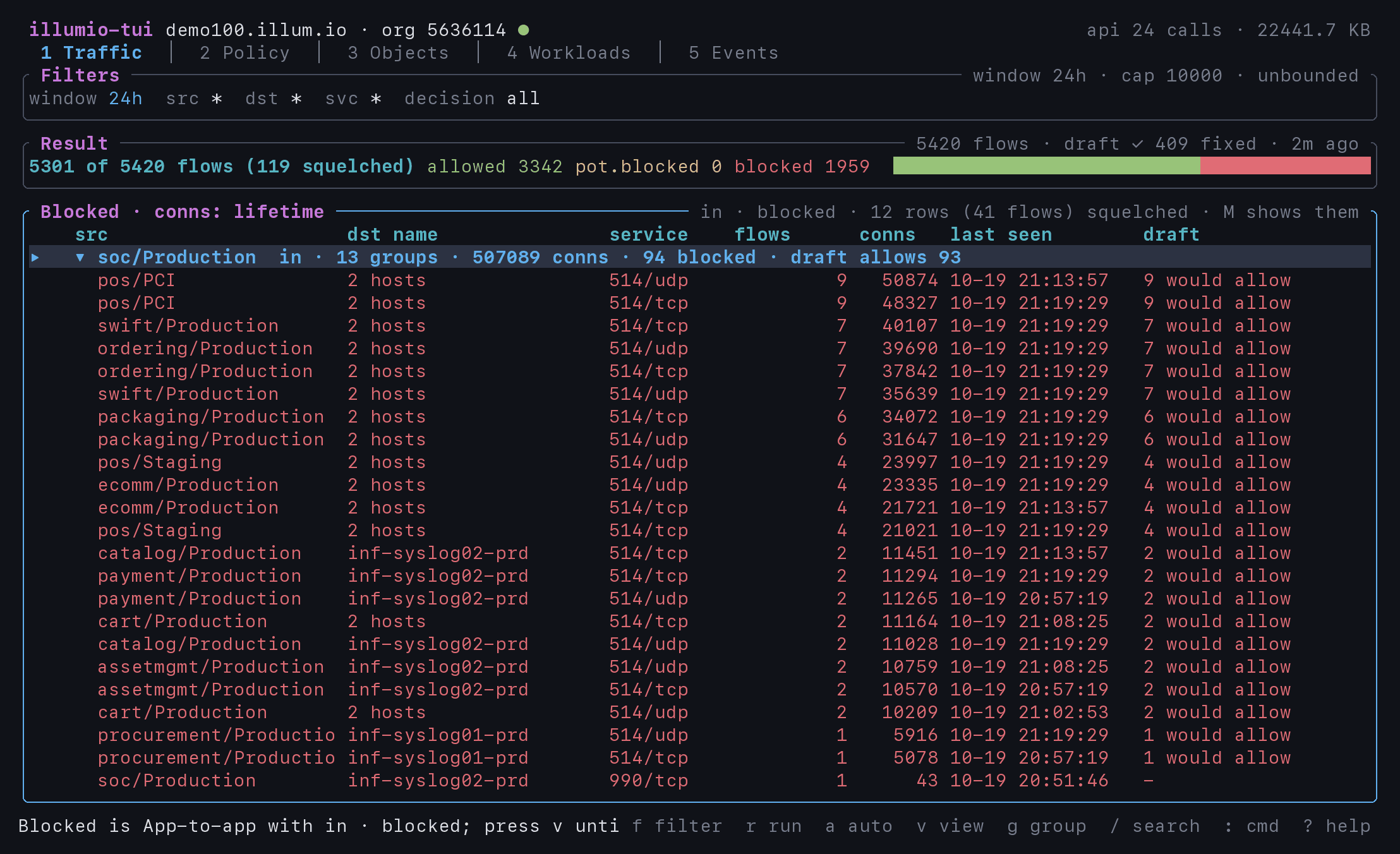
The Result header says draft ✓ 409 fixed. App-to-app gains a draft column (66 would allow, +40 allow -24 block); Blocked gets draft allows N per section: here syslog into soc/Production, 94 blocked flows of which the draft allows 93. Flows shows blocked → allowed per flow.
PCE cost
14 requests here: one PUT on the query you already ran, status polls and one download. No new query, no policy change, no armed writes. Cached for 2 minutes.
App-to-app with a draft column after D: 66 would allow, +40 allow -24 block, 72 would block and so on per pair; the Result header says draft 409 fixed; the status line says draft: 409 blocked flows fixed
App-to-app after D: per pair, what the draft would allow and block.
The Blocked view, inbound, soc/Production section: 13 groups, 94 blocked, draft allows 93, then syslog 514/udp and 514/tcp rows from pos/PCI, swift, ordering, packaging and others, each 'N would allow'
Blocked: the syslog ruleset in the draft fixes 93 of 94 blocked flows into soc/Production.

3Why is this flow allowed? E

problem
A VDI desktop reaches a domain controller on 53/udp. Which rule allows it, and where does that rule live?
keys
E on a flow (Flows, a one-flow pair, the app screen’s peers); j/k pick a rule; Enter opens it on Policy, ruleset and rule selected; w drafts a rule when none allows it. CLI: traffic explain.
you see
allowed by 1 rule (draft): allow, All workloads → role=dc, the services, ruleset 12. activedirectory | prod, scope app=ad & env=Production. Enter lands on that ruleset with the rule selected.
PCE cost
None for E: it reads the rule hrefs the PCE put on the flow after D and resolves them through the loaded draft policy. Without D first, it says so and offers it. The CLI makes one narrowed query with the draft evaluation: 11 requests.
E on win-endpoint-2 → acd-dc02-prd 53/udp (dns.exe), then Enter jumps to 12. activedirectory | prod on the Policy screen. GIF version.
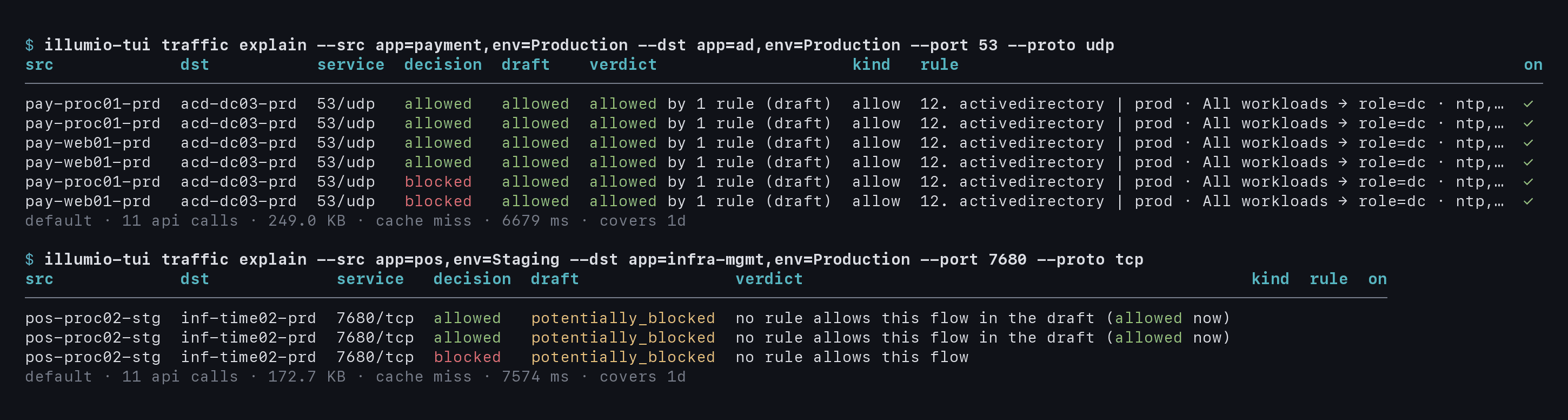
Two traffic explain runs. payment to ad on 53/udp: six flows, two reported blocked, all allowed in the draft by one allow rule in 12. activedirectory | prod, All workloads to role=dc. pos/Staging to infra-mgmt on 7680/tcp: three flows, no rule allows this flow in the draft, one of them blocked now
The same answer on the CLI, flow by flow: a blocked DNS flow the draft fixes, and a 7680/tcp flow no rule allows.

4Policy from traffic: the generator

problem
infra-mgmt/Production is two NTP servers. Seven apps query them on 123/udp, one more peer uses 7680/tcp. You want the allow rules for exactly that, without seven near-identical rules.
keys
A on a row (or :app infra-mgmt/Production) opens the app screen, G (or :gen) the generator. h/l or ←/→ move the slider from app·all to role·all; c on the fan-in line cycles off → Any → All Workloads; Space checks a peer; N keeps only the traffic new since a baseline; p previews every rule; Enter plans the writes into one confirm; n cancels it. CLI: gen, read-only.
you see
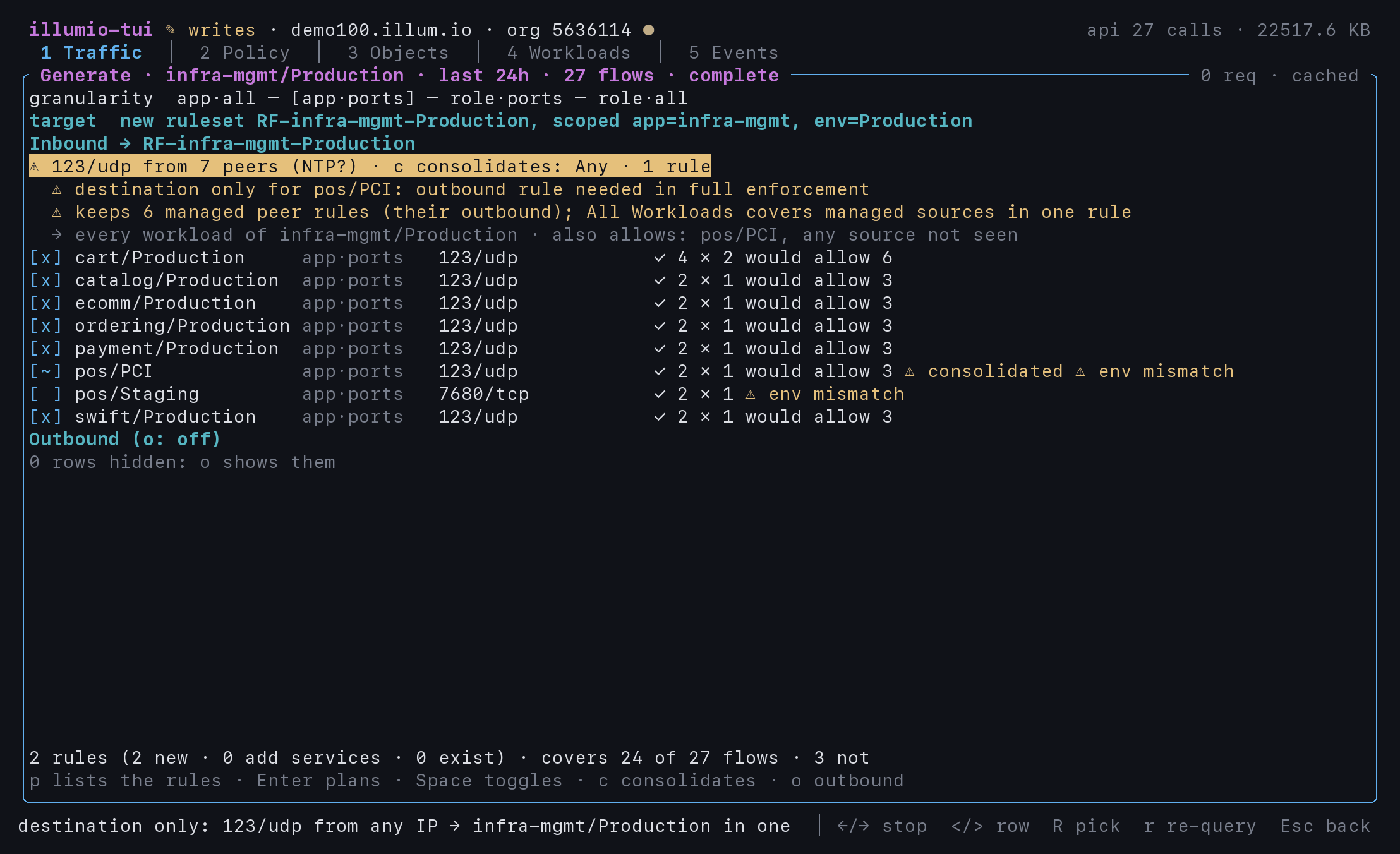
The fan-in line 123/udp from 7 peers (NTP?). With c on Any, one rule from the built-in Any IP list covers the port, with its catch spelled out: destination only for pos/PCI, 6 managed peers keep their own rules for their outbound. Checking pos/Staging takes coverage from 24 to 27 of 27 flows. Enter: 4 requests: 1 rule_set, 3 rules · planned with 1 read, each with method, path and body.
PCE cost
The app screen 1 request, the generator 0 (the draft rulesets were cached), the plan 1 read. The same traffic result feeds all of it.
G from the app screen, the slider, c through Any and All Workloads, Space on pos/Staging, p, Enter to the confirm and n: nothing was sent. GIF version.
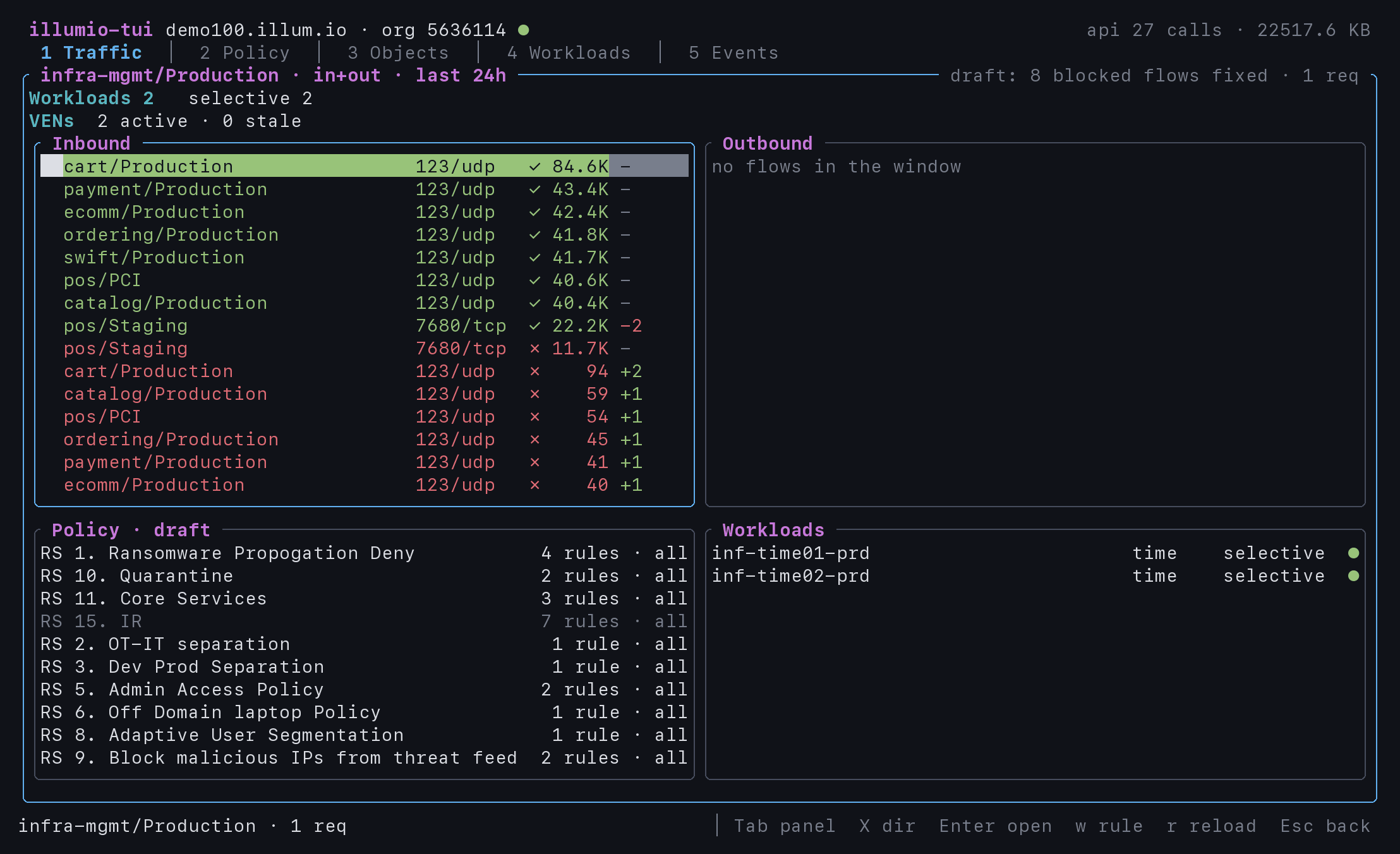
The app screen for infra-mgmt/Production: 2 workloads in selective, 2 active VENs, inbound peers on 123/udp and 7680/tcp with allowed and blocked marks and draft deltas, no outbound flows, the rulesets that cover the app and the two inf-time workloads; header says draft: 8 blocked flows fixed, 1 req
A: the app screen, peers in and out, its policy and workloads.
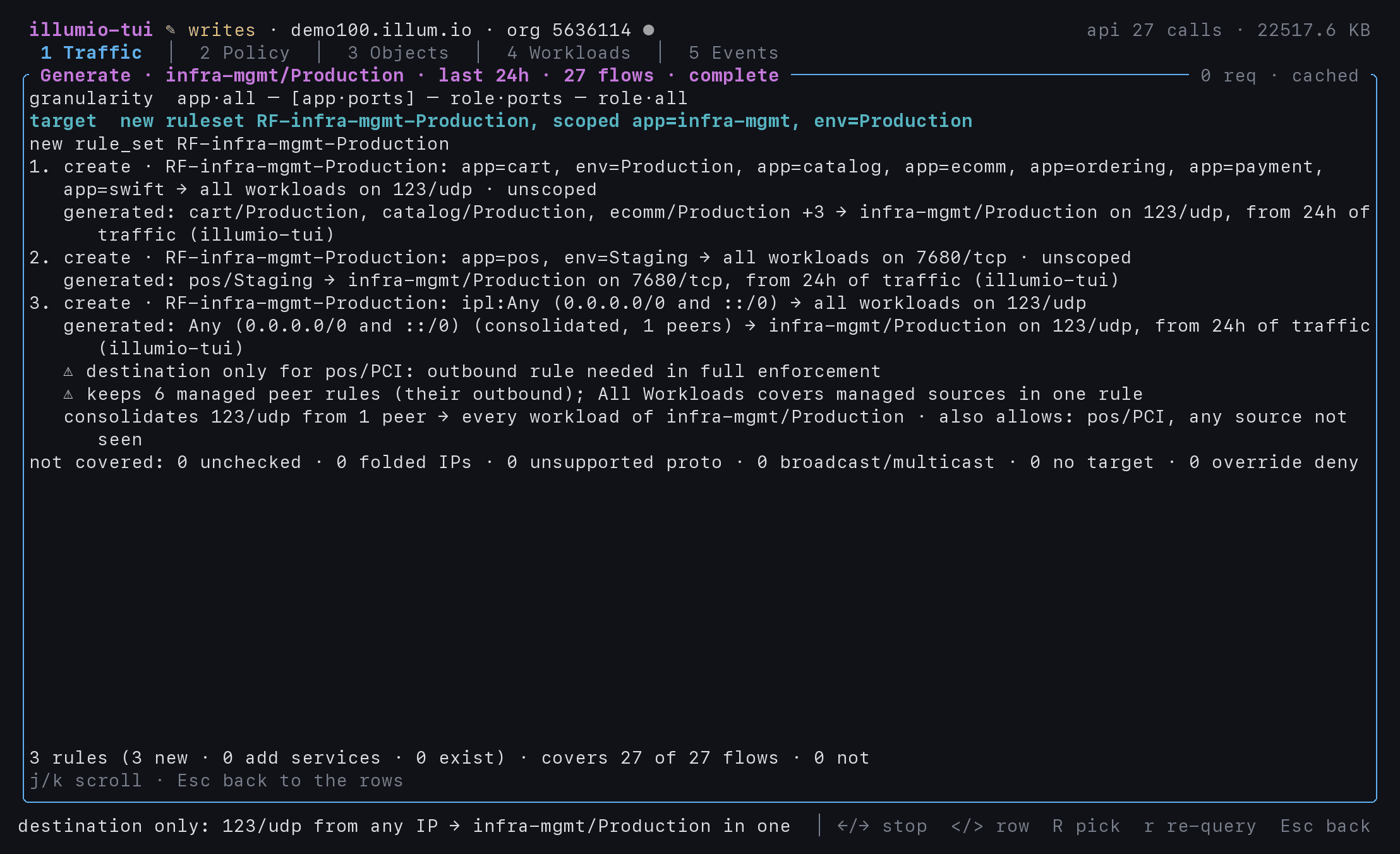
The generator preview: a new ruleset RF-infra-mgmt-Production and three rules, NTP from the six checked app peers, 7680/tcp from pos/Staging, and 123/udp from the Any IP list with its warnings; 3 rules covering 27 of 27 flows, nothing not covered
p: every rule, its description, and what it also allows.
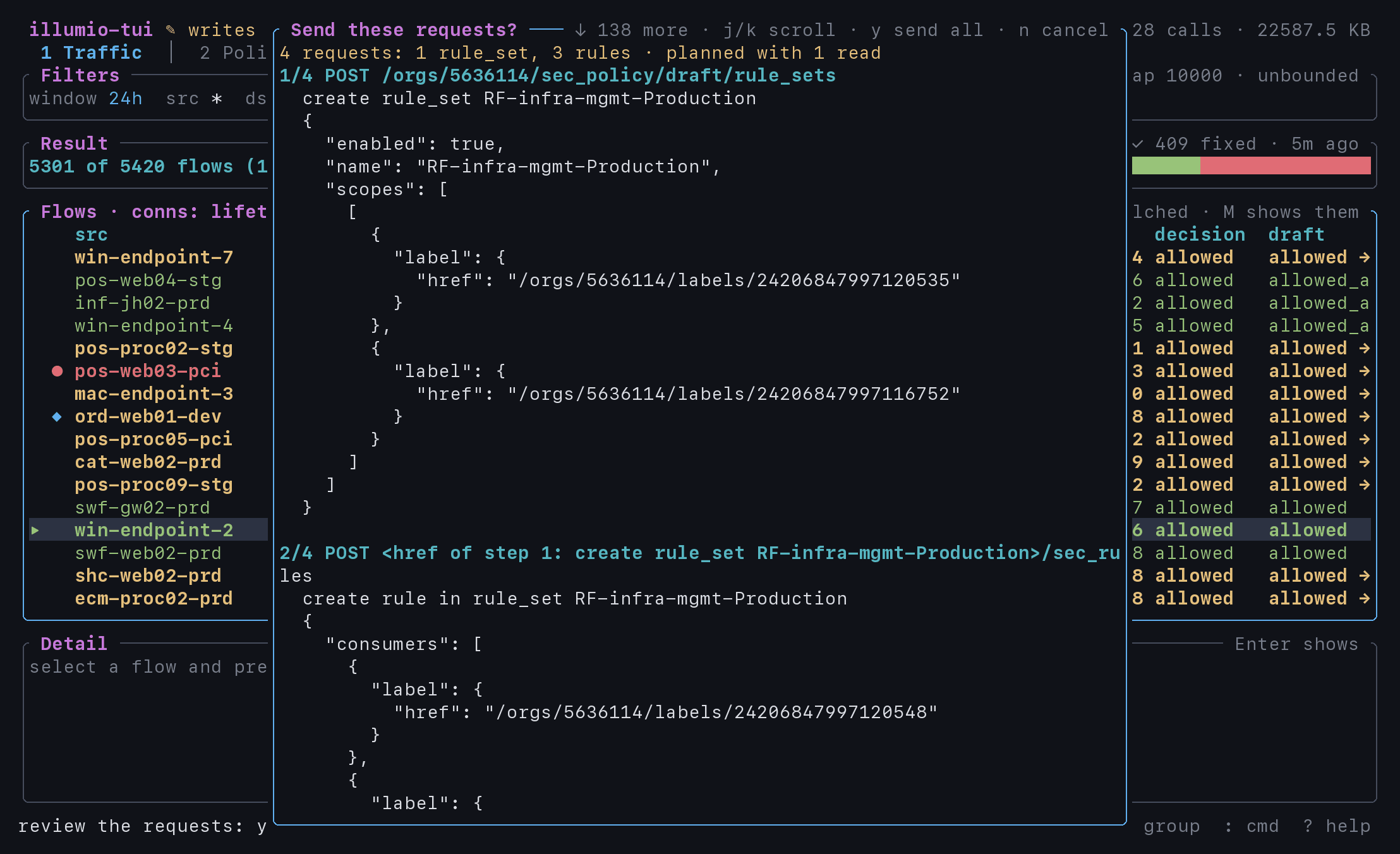
The Send these requests overlay: 4 requests, 1 rule_set and 3 rules, planned with 1 read; step 1 POST to the draft rule_sets with the full JSON body, step 2 POST to the new ruleset's sec_rules; y send all, n cancel
The single confirm: every request in order, bodies in full. It was answered with n.
The generator for infra-mgmt/Production at the app ports stop: the fan-in line 123/udp from 7 peers consolidated to Any as one rule, with warnings, and one row per peer app with checkboxes, services and would-allow counts
c: seven NTP clients, one rule from Any, the catch first.
$ illumio-tui gen infra-mgmt/Production --window 24h --json \
    | jq -c '.data.consolidations[] | {service, peers, reason}'
{"service":"123/udp","peers":7,"reason":"infra:ntp"}

5Bulk labels and enforcement on Workloads

problem
The shared infrastructure apps (NTP, monitoring, syslog) should move to full enforcement together, and one of them carries two different loc labels.
keys
4, x groups by app and env, f filters by label (app=infra-mgmt,monitoring,soc env=Production), V on a group header marks the group, Space marks one workload, M picks the enforcement mode, L the labels; Enter reviews; Esc cancels. CLI: workloads enforce and workloads relabel.
you see
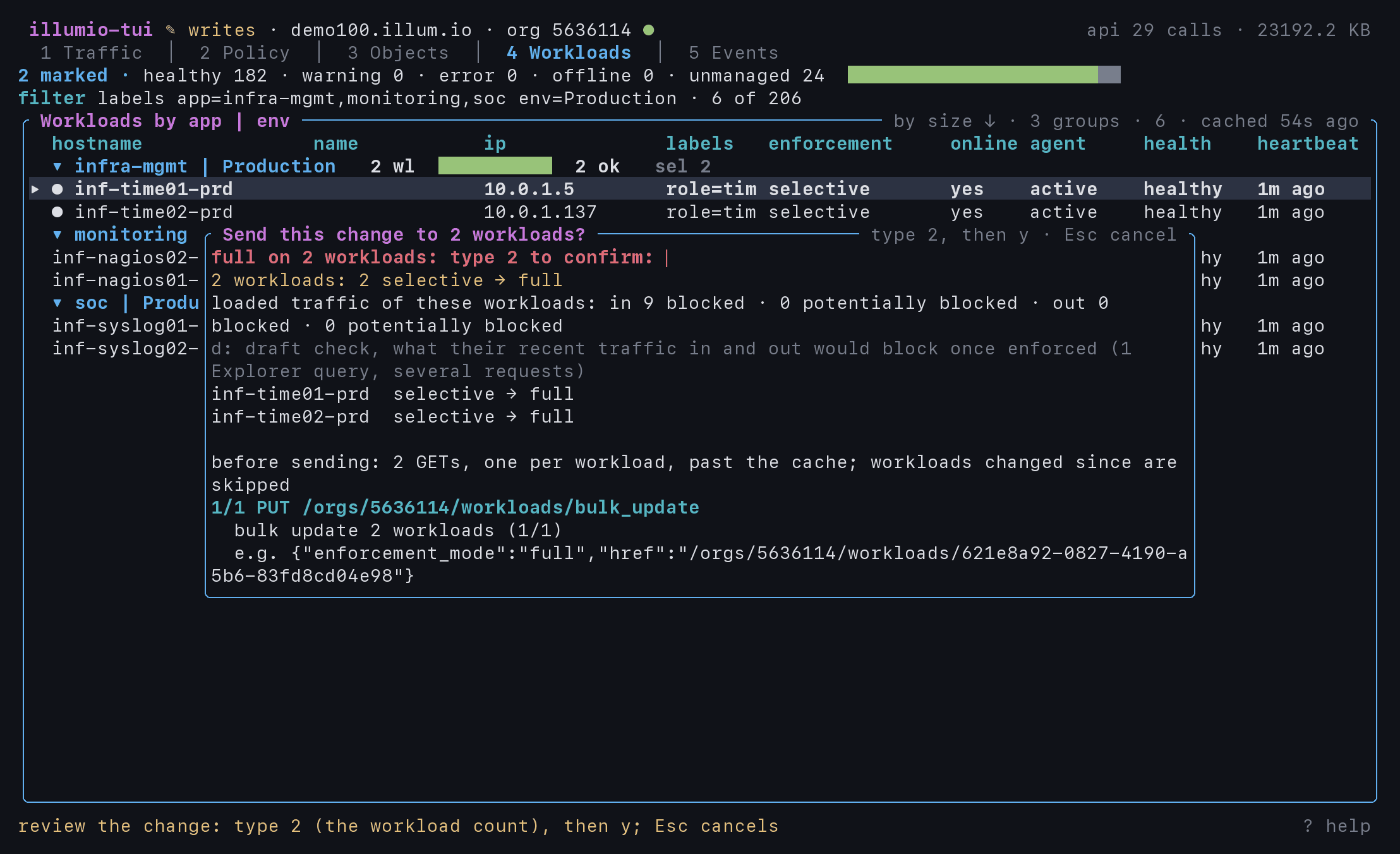
6 of 206 in three groups with VEN health and enforcement per group. M → full: 2 workloads: 2 selective → full; the confirm wants the count typed (full on more than one workload), shows the loaded traffic these workloads would block (in 9 blocked), offers d for a draft check, and lists the one bulk_update. L shows each key’s common value or (mixed: 2).
PCE cost
Grouping, filtering, marking and planning: none (one workload list, cached). Sending would re-read the 2 workloads first and skip any changed since the plan.
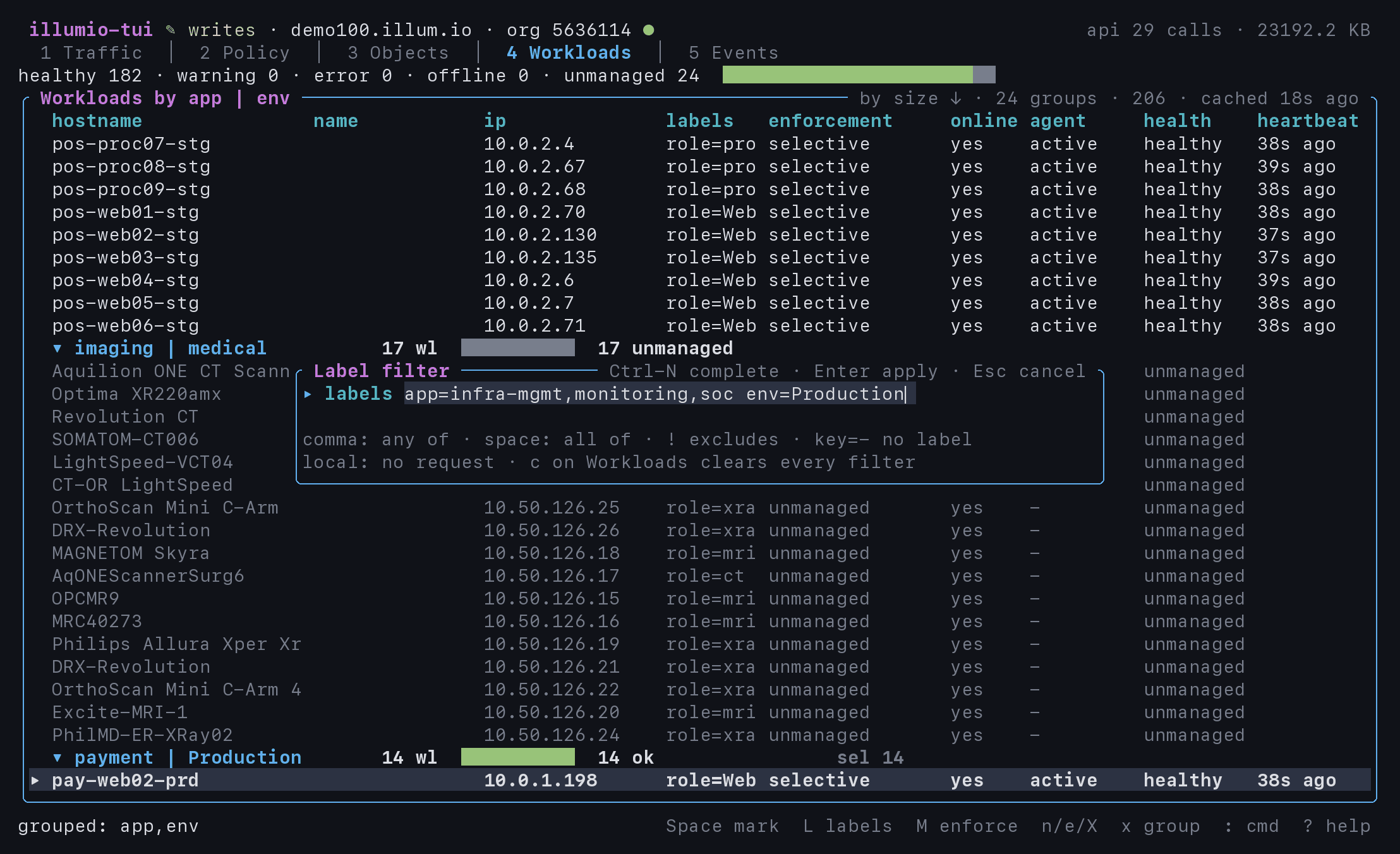
Workloads grouped by app and env with the label filter overlay open: app=infra-mgmt,monitoring,soc env=Production, with the grammar help: comma any of, space all of, ! excludes, key=- no label; local, no request
x then f: comma is any of, space all of, ! excludes.
The Send this change to 2 workloads overlay: full on 2 workloads, type 2 to confirm; 2 selective to full; loaded traffic in 9 blocked; d for a draft check; both inf-time workloads listed; 2 GETs before sending; 1 PUT bulk_update with an example body
M → full → Enter: the typed count, the traffic it would block, the request. Esc: cancelled, nothing sent.
$ illumio-tui workloads relabel --set loc=ny --label app=infra-mgmt --dry-run
2 workloads: 1 to relabel (loc=ny) · 1 labels already so (skipped) · no re-read (the selection read ran 223 ms before, in this run) + 1 write: 1 bulk_update
workload        change                      href
inf-time01-prd  loc=ca → loc=ny             /orgs/5636114/workloads/621e8a92-...
inf-time02-prd  skipped: labels already so  /orgs/5636114/workloads/bd1b6de4-...

6From visibility to enforcement: :readiness, :enforce, watch, rollback

problem
Which apps can go to full enforcement today, what stops the others, how do you close the gaps, and how do you undo a move exactly?
keys
:readiness lists every app of the result on screen (s sorts, / searches, D evaluates the draft first); Enter on an app, :enforce <app> or e in the app overlay opens the enforcement overlay: five steps, Tab or 1–5. 1 Readiness the numbers, verdict and warnings. 2 Rules the gaps: G the generator for the app, w an allow rule for the gap, m an accept-blocked mark. 3 Provision the app’s pending changes, P provisions them through the usual preview. 4 Enforce j/k full or selective, v the visibility level, Enter the bulk confirm with the typed count (an app that is not ready asks for the word enforce first). 5 Watch r the blocked-since query, R previews the rollback.
you see
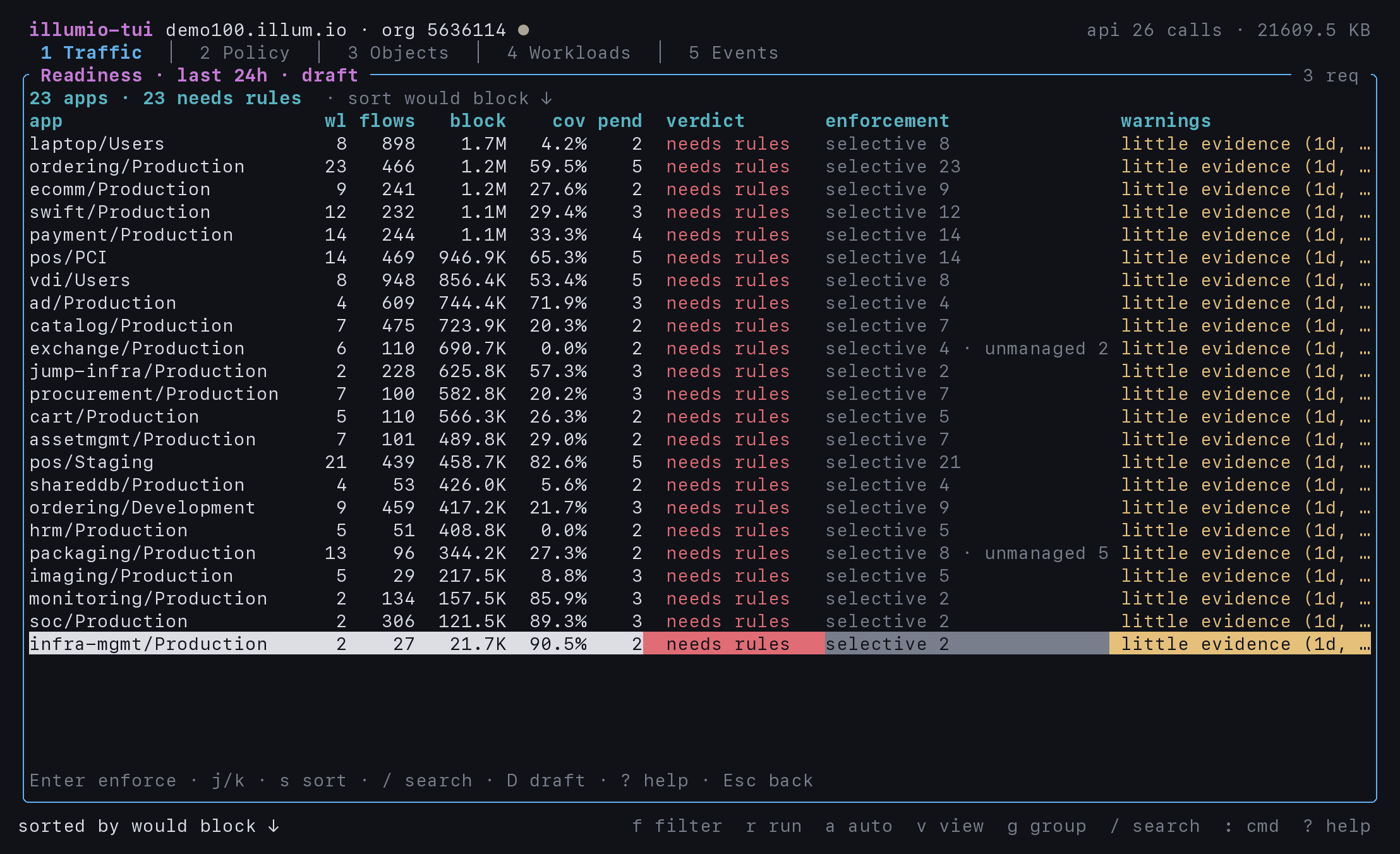
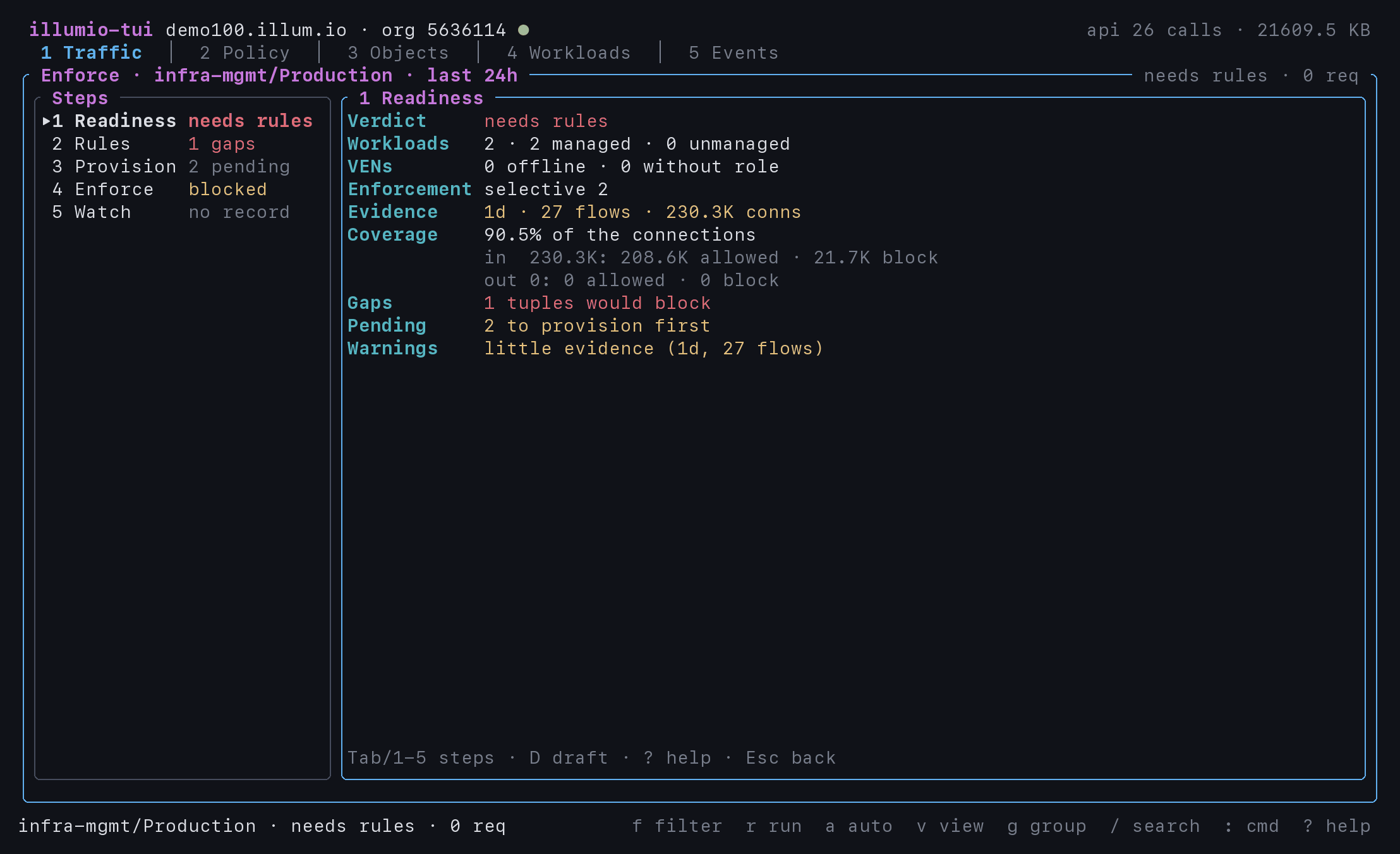
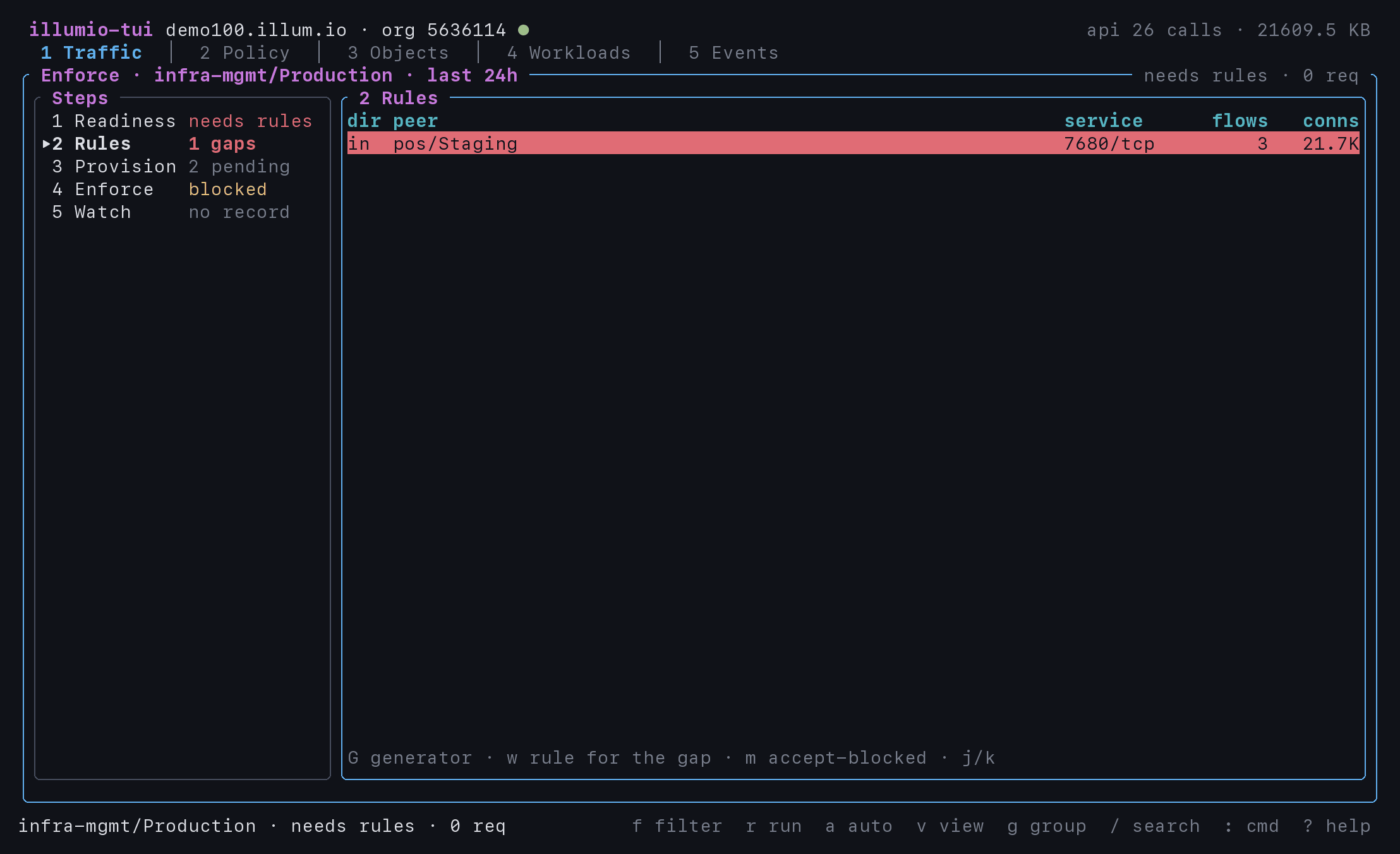
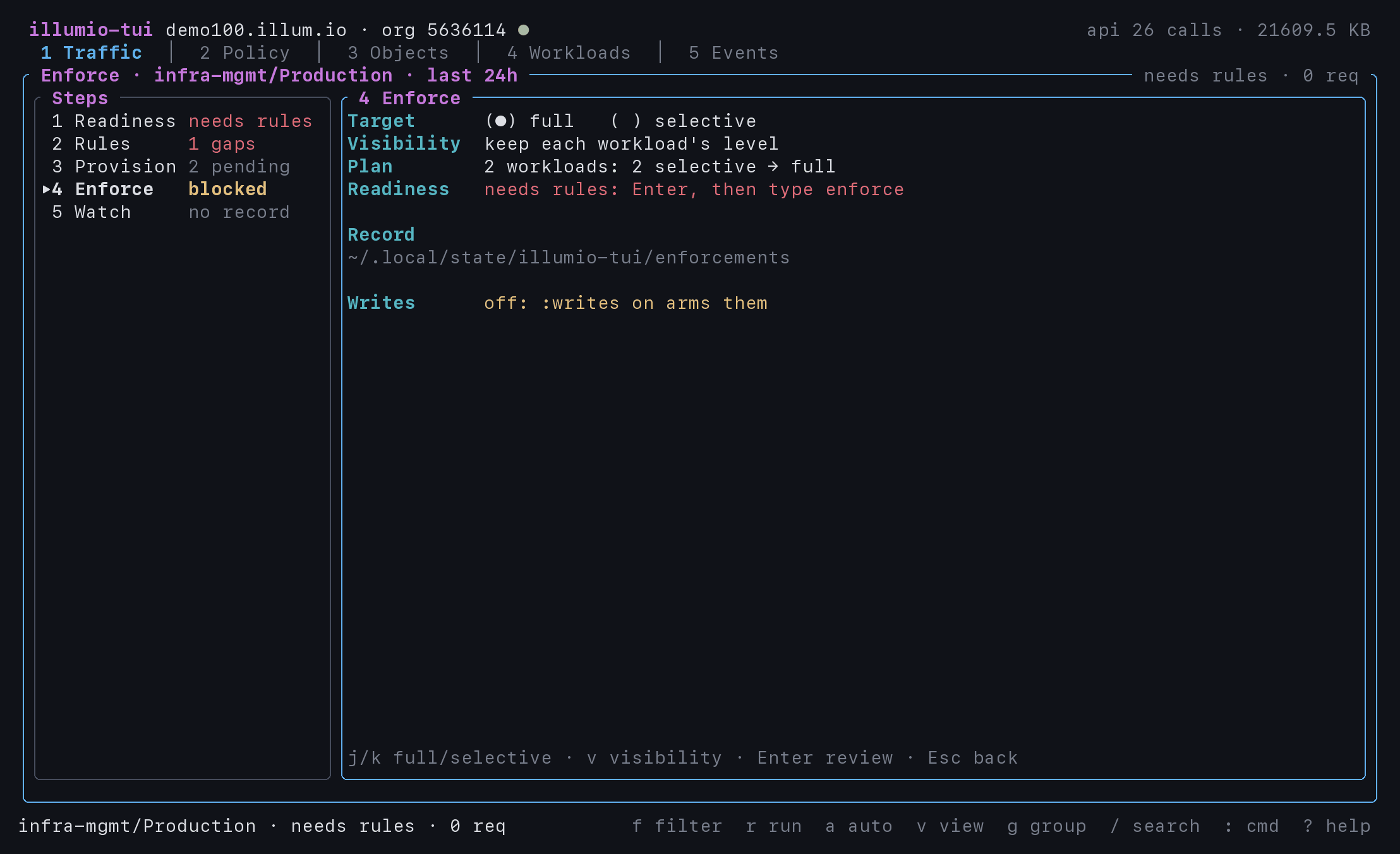
All 23 labelled apps of the demo PCE are needs rules over the last 24 hours; infra-mgmt/Production is closest at 90.5%. Its overlay: two workloads in selective, one gap (7680/tcp from pos/Staging, 3 flows), two pending changes, and step 4 blocked: the plan 2 workloads: 2 selective → full, the record directory, and writes off.
PCE cost
:readiness reuses the query on screen and its D; it read the workloads, pending changes and draft rulesets once (3 requests, cached). Opening the overlay: 0. Writes are the bulk move and its change record, exactly as the CLI writes them. r on Watch is one query, only when pressed; nothing refreshes by itself.
The Readiness overlay over the last 24 hours with the draft: 23 apps, all needs rules, sorted by would-block connections; columns app, workloads, flows, would block, coverage, pending, verdict, enforcement and warnings; infra-mgmt/Production selected at the bottom with 27 flows, 21.7K would block, 90.5% coverage and 2 pending; 3 requests
:readiness: every app of the result on screen, a verdict each; Enter opens the overlay for one.
The enforcement overlay for infra-mgmt/Production, step 1 Readiness: verdict needs rules, 2 managed workloads, no offline VENs, selective 2, evidence 1 day 27 flows 230.3K connections, coverage 90.5% (208.6K allowed, 21.7K would block inbound), 1 gap, 2 pending, warning little evidence; the steps list shows 2 Rules 1 gaps, 3 Provision 2 pending, 4 Enforce blocked, 5 Watch no record; 0 requests
Step 1 after D: the numbers behind the verdict, the five steps on the left.
Step 2 Rules: one gap, inbound from pos/Staging on 7680/tcp, 3 flows, 21.7K connections; the hint line offers G generator, w rule for the gap, m accept-blocked
Step 2: the gap as a policy tuple; G, w or m close it.
Step 4 Enforce: target full selected, visibility keeps each workload's level, plan 2 workloads 2 selective to full, readiness needs rules so Enter then type enforce, the change record directory, writes off with :writes on arms them; hint j/k full or selective, v visibility, Enter review
Step 4, the plan before any confirm. Not ready: Enter would ask for the word enforce. It was not pressed.

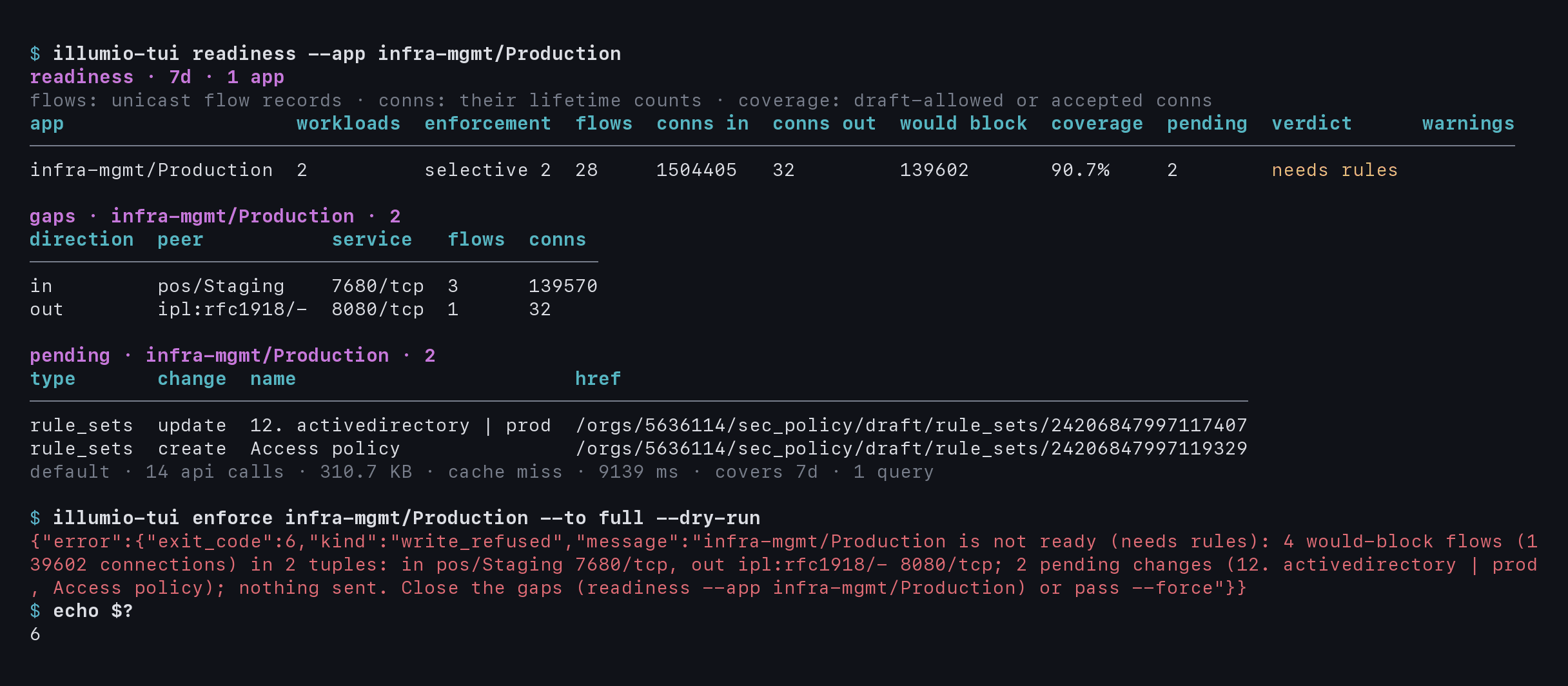
The same job on the CLI, for scripts and cron: readiness for every app, readiness --app X for its gaps and pending changes, enforce X --to full --dry-run (exit 6 until ready) then --yes --confirm-count N, enforce X --watch (exit 7 when something is blocked since), enforce X --rollback. Over 7 days, all apps: one Explorer query with the draft evaluation, 25 requests, 43 s; one app: 14 requests, 9 s; --watch: one query, 8 requests.

readiness --app infra-mgmt/Production: 2 workloads in selective, 28 flows, 1504405 connections in, 32 out, 139602 would block, coverage 90.7%, 2 pending, verdict needs rules; gaps: in pos/Staging 7680/tcp 3 flows, out ipl:rfc1918 8080/tcp 1 flow; pending: two rulesets; then enforce --to full --dry-run refused with exit code 6, write_refused, listing the would-block tuples and pending changes, nothing sent
The gate on the CLI: readiness names the gaps; enforce refuses with exit 6 until they are closed (or --force).
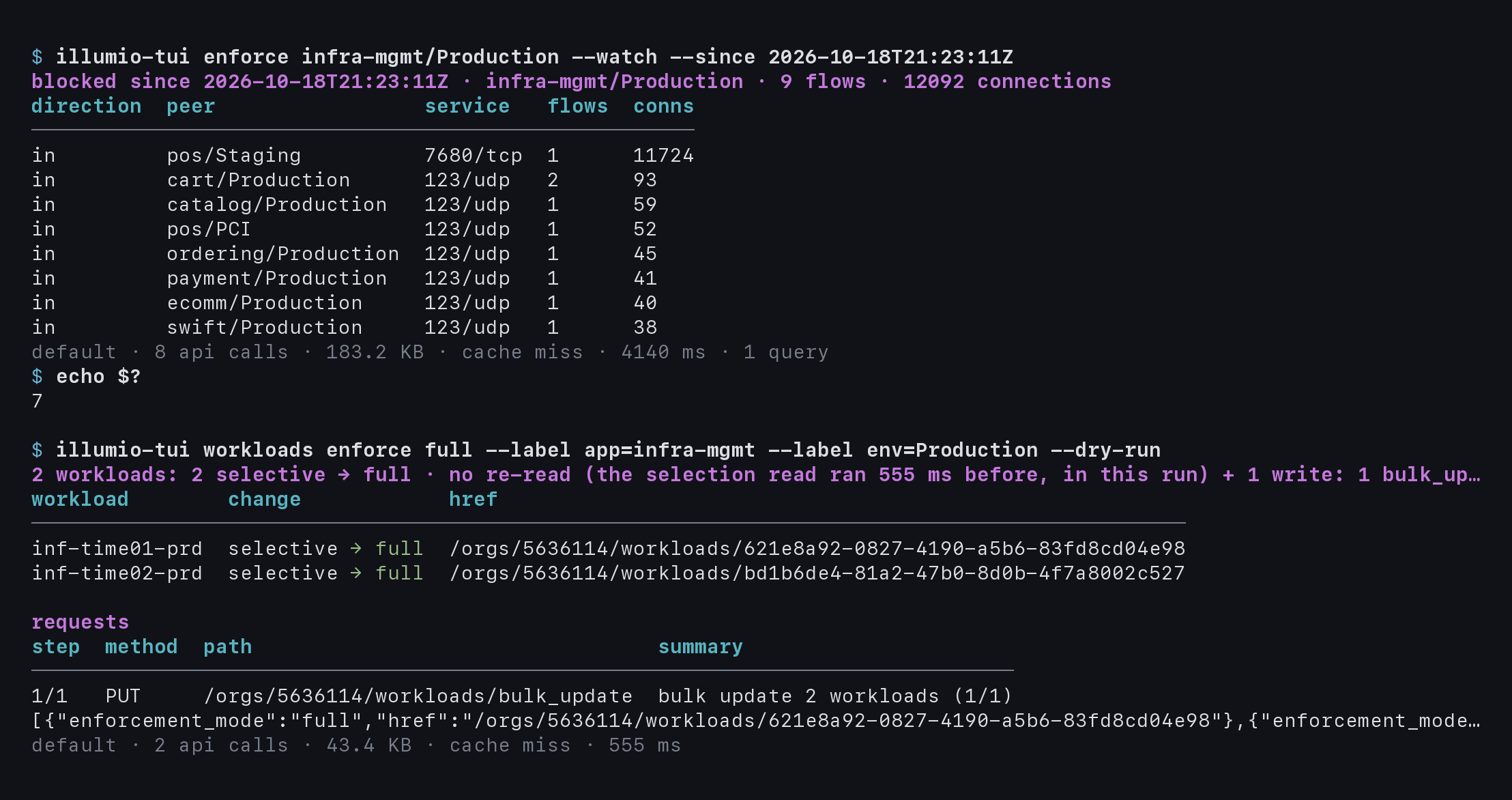
enforce infra-mgmt/Production --watch since a time 24 hours ago: 9 flows, 12092 connections blocked, 7680/tcp from pos/Staging and 123/udp from seven apps; exit code 7. Then workloads enforce full for app=infra-mgmt env=Production as a dry run: 2 selective to full, one bulk_update PUT and its body
--watch exits 7 when something is blocked, for cron or CI; the move itself is a bulk plan you see before --yes.
$ illumio-tui readiness --json | jq -r '.data.apps | sort_by(-.coverage.ratio) | .[:5][]
    | "\(.app)\t\(.verdict)\t\(.coverage.ratio*1000|floor/10)%\t\(.gap_count) gaps"' | column -t -s $'\t'
infra-mgmt/Production  needs_rules  90.3%  1 gaps
soc/Production         needs_rules  89.5%  6 gaps
monitoring/Production  needs_rules  86%    3 gaps
pos/Staging            needs_rules  82.8%  34 gaps
ad/Production          needs_rules  72.2%  37 gaps
$ illumio-tui enforce infra-mgmt/Production --to full --yes --confirm-count 2   # once ready; writes a change record
$ illumio-tui enforce infra-mgmt/Production --rollback --dry-run                # the record's before modes, exactly

The TUI shots use the last 24 hours, the CLI runs 7 days: the coverage and gap counts differ with the window.

7Find rules fast: f, t, I

problem
Which rules, in any ruleset, touch pos or ordering? Which workloads does one of them really cover, and can you switch it off for a test?
keys
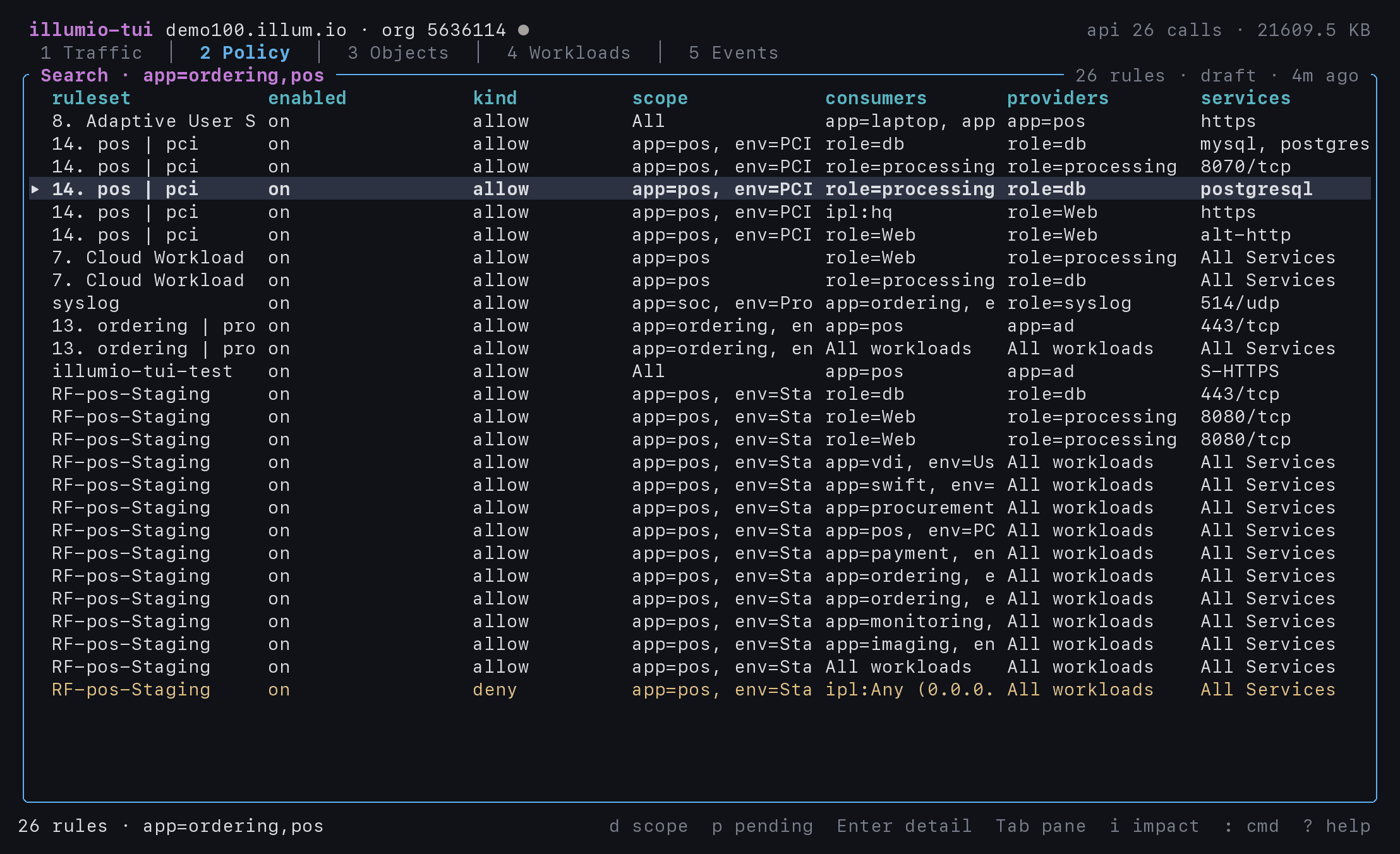
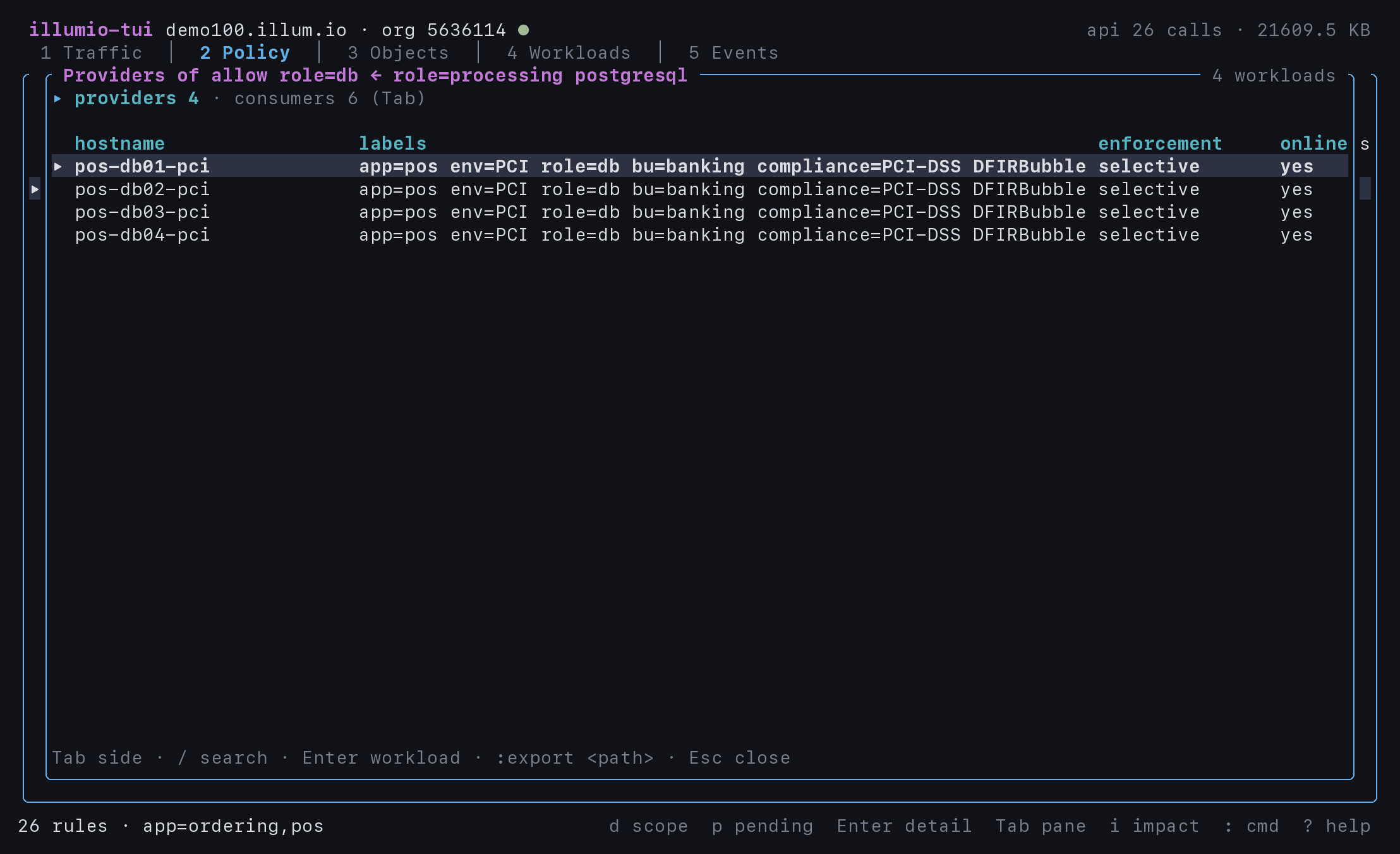
On Policy, f searches every loaded ruleset: app=ordering,pos (a label in a scope, consumer or provider, directly or through a label group; comma is any of), ipl:Corp, svc:443/tcp or svc:PostgreSQL, wl:web01, href:, disabled, enabled, deny, allow, intra, extra; terms apart by spaces all hold. scope:, src: and dst: say where a label sits (src:/dst: also take ipl:, wl: and all; scope:global), !env=prod finds exclusion actors, a leading - leaves a term out: src:role=web dst:role=db extra (extra-scope rules from web to db), scope:app=payment -svc:443/tcp (payment rules not covering 443), src:!env=prod (consumers that say All except prod), src:all -deny (allow rules open to All Workloads). The header says how many matched of the rules loaded. Enter opens the rule in its ruleset, c clears. I lists the workloads a rule matches, providers first, Tab the consumers, Enter jumps to one on Workloads. t enables or disables a rule or ruleset (a draft change, writes armed). CLI: policy search, policy rules impact <href> --list providers|consumers, policy rules enable|disable, policy rulesets enable|disable.
you see
Search · app=ordering,pos: 26 rules across 7 rulesets, in evaluation order, with scope, consumers, providers, services and the rule’s own enabled ((ruleset off) when its ruleset is disabled). I on role=processing → role=db, postgresql in 14. pos | pci: 4 providers (pos-db01..04-pci) and 6 consumers, with labels, enforcement and online.
PCE cost
None: search and I use the loaded policy and the cached workload list (i reads it once if no screen has). The CLI search is one rulesets read and the name index, cached. t is one PUT through the usual confirm.
Policy screen in search mode: Search app=ordering,pos, 26 rules, draft; a flat list with ruleset, enabled, kind, scope, consumers, providers and services, from 8. Adaptive User Segmentation, 14. pos | pci, 7. Cloud Workload Migration, syslog, 13. ordering | prod, illumio-tui-test and RF-pos-Staging, the last one a deny rule from ipl:Any
f app=ordering,pos: every rule that names either app, across rulesets, no request.
Providers of allow role=db from role=processing postgresql: 4 workloads, providers 4 and consumers 6 with Tab to switch; pos-db01-pci to pos-db04-pci with their labels app=pos env=PCI role=db bu=banking compliance=PCI-DSS, selective enforcement, online yes
I on a search row: the four database workloads behind the rule; Tab shows the six consumers.
$ illumio-tui policy search --label app=shop,crm --service 443/tcp --table
$ illumio-tui policy search ipl:Corp deny --csv > corp-deny.csv
$ illumio-tui policy search src:role=web dst:role=db extra --table
$ illumio-tui policy search scope:app=payment -svc:443/tcp --json
$ illumio-tui policy rules impact /orgs/1/sec_policy/draft/rule_sets/7/sec_rules/3 --list consumers --csv
$ illumio-tui policy rules disable /orgs/1/sec_policy/draft/rule_sets/7/sec_rules/9 --dry-run

8Small things

  • Ctrl-U empties the line in every text input, as in a shell: the filter editor, the mark and rule forms, the : prompt. Ctrl-N / Ctrl-P complete labels, IP lists, services and values without a request.
  • Shell completions for bash, zsh and fish ship with the Homebrew formula and the .deb/.rpm; otherwise illumio-tui completions zsh > ~/.zfunc/_illumio-tui (PowerShell: illumio-tui completions powershell | Out-String | Invoke-Expression in your profile). Every subcommand, flag and enum value completes, and --profile completes your profile names. Labels, apps, hostnames, services, IP lists and label groups complete from a per-profile names cache that the list commands, the TUI and illumio-tui completions refresh fill (--clear deletes it; completion_cache = false keeps PCE names off disk). The cache needs a profile from the config file with its own host and org_id: a PCE named by --host/--org-id or PCE_HOST/PCE_ORG_ID writes none. Completion never contacts the PCE.
  • :export <path> writes the table on screen as CSV, the same format as the CLI’s --csv.
  • :snapshot [label] saves the policy, labels and workloads to a local snapshot file (the reads snapshot save makes, mostly cache hits once the screens loaded); the status line shows the path. illumio-tui snapshot diff compares two of them.
  • When a newer release is out, the header shows ↑ 0.5.9 in the accent colour: the TUI asks GitHub once a day, in the background, and never counts it as a PCE call. :news shows the release notes (the releases newer than yours, else your version’s) in a scrollable overlay; the first start after an upgrade says updated to 0.5.8 · :news for what’s new once. check_updates = false or ILLUMIO_TUI_NO_UPDATE_CHECK=1 turns the check off; see Know when there is a new release.
  • Apple Terminal garbles 24-bit colour before macOS 26, so there the theme is mapped to the xterm 256 colours by itself; ILLUMIO_TUI_COLORS=256 or truecolor overrides it anywhere.

One app, start to finish

  1. illumio-tui readiness ranks every app; infra-mgmt/Production is closest, 90% covered.
  2. readiness --app infra-mgmt/Production: the gaps are 7680/tcp from pos/Staging and 8080/tcp out; two rulesets wait for provisioning.
  3. In the TUI, r once for 24 hours, m squelches the Nagios noise, D overlays the draft.
  4. E on the 7680/tcp flow: no rule allows this flow. E on a DNS flow: the activedirectory rule, Enter to see it.
  5. A, G: NTP from 7 peers folds into one Any rule with c, Space adds pos/Staging, p says 27 of 27 flows covered, Enter and y write the ruleset and 3 rules; P in Policy’s pending overlay provisions them.
  6. :readiness (or readiness --app) again until ready; :enforce infra-mgmt/Production, step 4, Enter and the typed count (CLI: enforce --to full --dry-run, then --yes --confirm-count 2).
  7. enforce --watch from cron the next morning (or r on step 5): exit 0, or exit 7 and the tuples; R or --rollback if it has to go back.

On the demo PCE the recordings stop at step 5’s confirm with n, and at step 6’s plan and dry run: it is shared.

4CLI: getting started

From install to a useful answer, in eight short steps.

1. Connect

Install the binary, then give it a PCE: a dotenv file with the illumio-mcp-server names, or a profile in ~/.config/illumio-tui/config.toml (see Configure).

$ cat pce.env
PCE_HOST=pce.example
PCE_ORG_ID=1
API_KEY=api_xxxxxxxxxxxx
API_SECRET=xxxxxxxxxxxxxxxx
$ illumio-tui --env-file pce.env health
field   value
ok      true
host    demo100.illum.io
org_id  5636114
status  [{"generated_at":"2026-10-19T21:21:07+00:00","listen_only_m…
writes  false
default · 1 api call · 0.1 KB · cache none · 2102 ms

The last line goes to stderr on every command: what it cost. To keep the connection, illumio-tui profile add demo --from-env-file pce.env turns the same file into a profile (no request).

2. Look around

$ illumio-tui labels --key app
key  value           deleted  href
app  kubernetes               /orgs/5636114/labels/24206847997120485
app  guestbook                /orgs/5636114/labels/24206847997120486
app  monitoring               /orgs/5636114/labels/24206847997120532
...
$ illumio-tui workloads --label app=infra-mgmt,monitoring
hostname          ip          labels                          enforcement  online  health
inf-time02-prd    10.0.1.137  app=infra-mgmt env=Production…  selective    true    healthy
inf-time01-prd    10.0.1.5    app=infra-mgmt env=Production…  selective    true    healthy
inf-nagios02-prd  10.0.1.132  app=monitoring env=Production…  selective    true    healthy
inf-nagios01-prd  10.0.1.34   app=monitoring env=Production…  selective    true    healthy

Columns trimmed for the page; the table also has name, agent, sync, heartbeat and href.

3. Ask Explorer

$ illumio-tui traffic query --window 24h --group app,env
src                   dst                    flows  conns    allowed  pot.blocked  blocked
pos/Staging           pos/Staging            164    2055417  98       0            66
pos/PCI               pos/PCI                157    1952621  94       0            63
ordering/Production   ordering/Production    108    1356513  64       0            44
laptop/Users          jump-infra/Production  106    1004396  72       0            34
...
default · 8 api calls · 10783.1 KB · cache miss · 4914 ms · covers 1d
$ illumio-tui traffic groups --window 1h --by in --app infra-mgmt/Production
$ illumio-tui app infra-mgmt/Production --window 24h --table

4. Get answers

$ illumio-tui traffic explain --src app=payment,env=Production \
    --dst app=ad,env=Production --port 53 --proto udp
$ illumio-tui gen infra-mgmt/Production --table        # proposes rules, writes nothing
$ illumio-tui readiness --app infra-mgmt/Production

Their output is in Workflows 3, 4 and 6.

5. Pick an output

A table at a terminal, JSON when piped. --table, --json and --csv force one. --human (-H) prints byte counts like ls -h (121K, 1.5M) in tables, CSV and the stderr meta line; JSON keeps integers. JSON is always {"data": ..., "meta": ...}, so jq takes it apart:

$ illumio-tui gen infra-mgmt/Production --json | jq -r '.data.rules[]
    | "\(.action)\t\(.consumers|join(","))\t→ \(.providers|join(","))\t\(.services|join(","))"' | column -t -s $'\t'
create  app=cart,env=Production,app=catalog,app=ecomm,app=ordering,app=payment,app=swift  → all workloads  123/udp
$ illumio-tui traffic groups --window 24h --services --show blocked --csv > still-blocked.csv
$ head -3 still-blocked.csv
src,dst,service,flows,conns,bytes,allowed,pot.blocked,blocked,allowed_conns,pot_blocked_conns,blocked_conns,unknown_conns
pos/Staging,pos/Staging,8080/tcp,8,75533,0,0,0,8,0,0,75533,0
payment/Production,payment/Production,8080/tcp,7,70438,0,0,0,7,0,0,70438,0

6. Read the exit code

CodeMeaningTypical cause
0success
1generic failureI/O, a record that could not be rewritten
2arguments or configurationan unknown label, a 30-day window without --yes, a missing --confirm-count
3authenticationa wrong key or secret
4PCE error, or GitHub unreachablea failed request, an incomplete write; update check without a network
5rate limited429 / 503 after backoff; GitHub’s rate limit for update check
6write refusedwrites not enabled; enforce on an app that is not ready
7blocked since enforcement, or would blockenforce --watch found blocked flows; policy impact --fail-on-blocked found flows the draft would newly block (would_block)
8exposedexposure --fail-on-exposed found a risky service allowed from outside its destination’s group
9snapshots differsnapshot diff --fail-on-change found a change
10outdatedupdate check --fail-if-outdated found a newer release

Errors are JSON on stderr: {"error":{"exit_code":6,"kind":"write_refused","message":"..."}}.

7. Write, on purpose

  • Arm it: writes = true in the profile or ILLUMIO_WRITES=1. Without it every write exits 6, even a dry run.
  • Look first: --dry-run prints the method, path and body of every request and sends nothing.
  • Then send: --yes, plus --confirm-count N for full or selective on several workloads or any change to more than 25.
  • Audited: every sent write goes to ~/.local/state/illumio-tui/writes.jsonl with the body and the status.
$ ILLUMIO_WRITES=1 illumio-tui policy provision --all --dry-run
method   POST
path     /orgs/5636114/sec_policy
summary  provision 9 rule_sets, 2 services
counts   rule_sets=9, services=2

8. Complete it

$ illumio-tui completions zsh > ~/.zfunc/_illumio-tui   # bash, fish and powershell too
$ head -1 ~/.zfunc/_illumio-tui
#compdef illumio-tui

Packaged installs (Homebrew, .deb, .rpm) ship the scripts already.

5The CLI

The same library, scriptable: JSON for agents, tables for humans.

Output is a table at a terminal and JSON when stdout is piped; force either with --table or --json. --csv prints the full table as CSV for spreadsheets, and :export <path> does the same from the TUI.

# connectivity, objects, workloads, events
$ illumio-tui health
$ illumio-tui labels --key app
$ illumio-tui labels --unused --json    # by the PCE's usage flags
$ illumio-tui iplists --table
$ illumio-tui where-used label env=Production    # scopes, rules, groups, pairing profiles, workloads; all cached
$ illumio-tui where-used iplist Corp --csv
$ illumio-tui hygiene --table    # unused labels, groups, IP lists, services; workloads missing labels
$ illumio-tui workloads --label app=web --online true
$ illumio-tui workloads --unlabeled --json    # no app, env or role label
$ illumio-tui workloads --health warning,error --ven-version '23.2.*'
$ illumio-tui workloads ven-summary --csv    # health, versions, enforcement, messages; one read
$ illumio-tui workloads --label app=shop,crm --group   # any of, one request; per app|env
$ illumio-tui events --since 1h --severity err
$ illumio-tui events --type sec_rule --diff    # each change as -/+ lines
$ illumio-tui events --exclude-type =user.login --severity warning+   # local filters
$ illumio-tui events --actor =alex@ryte.de --exclude-actor 'agent:*'   # by actor, local too

# policy, draft by default, every href resolved to a name
$ illumio-tui policy rulesets
$ illumio-tui policy rules "Web-DB" --impact --json
$ illumio-tui policy pending
$ illumio-tui policy impact --table    # what provisioning would change: objects, rules, traffic
$ illumio-tui policy impact --window 7d --fail-on-blocked --json

# Explorer traffic: flows, app-to-app, blocked, label groups, the mesh
$ illumio-tui traffic query --window 24h --src app=web --dst app=db --json
$ illumio-tui traffic query --window 1h --group app,env
$ illumio-tui traffic query --window 1h --blocked
$ illumio-tui traffic groups --window 1h --keys app,env,role
$ illumio-tui traffic mesh --window 1h --no-user --json
$ illumio-tui traffic query --window 30d --dry-run
# what is new since Friday's change window (local time), against the 30 days before it
$ illumio-tui traffic groups --by pairs --since 2026-10-23T18:00 --baseline 30d --yes
$ illumio-tui traffic groups --by in --show blocked --since 2026-10-24 --baseline 7d --changes new,changed
$ illumio-tui traffic explain --src app=web --dst app=db --port 5432 --proto tcp

# which risky services (RDP, SMB, SSH, databases …) reach what, and under which decision
$ illumio-tui exposure --table
$ illumio-tui exposure --service rdp,smb --only exposed --json

# one app: its profile, and the allow rules its traffic needs (never written)
$ illumio-tui app shop/prod --window 24h --json
$ illumio-tui gen shop/prod --granularity role-ports --outbound --table
$ illumio-tui gen shop/prod --consolidate 5666/tcp=any --json

# snapshots: a local baseline of policy, labels and workloads, compared later at no PCE cost
$ illumio-tui snapshot save --label "before the Q4 change"
$ illumio-tui snapshot list
$ illumio-tui snapshot diff --table    # previous against latest
$ illumio-tui snapshot diff latest now --section rulesets,workloads
$ illumio-tui workloads --baseline-snapshot latest --changes new,changed,gone --table
$ illumio-tui readiness --trend --table    # gaps per app over the snapshots saved --with-readiness

# connection profiles
$ illumio-tui profile add demo --from-env-file path/.env
$ illumio-tui profile list
$ illumio-tui profile use prod
# updates: one request to GitHub's release list, never the PCE
$ illumio-tui update check    # --fail-if-outdated exits 10
$ illumio-tui news            # what's new since your version; news 0.5.6.. for a range
where-used label env=Production, pairing-profiles list, pairing-profiles create … --dry-run (the request it would send, nothing sent), and traffic groups --services --window 24h --baseline 7d --changes new,changed: the new and changed service pairs, with the decisions the baseline saw. Lines wider than the terminal are cut at its edge. GIF version.

Explorer, without the clicking

traffic query submits the PCE's asynchronous Explorer query, polls with backoff, downloads the result, flags truncation, and resolves every label href to key=value.

Filters read like you think: app=web, ip:10.0.0.5, ipl:NAME, wl:HOST, fqdn:NAME. A comma means AND, repeating the flag means OR. Add --exclude-src, --exclude-dst, --exclude-service, --port, --proto, --process and --decision as needed: --dst env=prod --exclude-src app=monitoring --exclude-service 22/tcp goes into Explorer’s own exclude lists, at no extra cost. A port range is FROM-TO/PROTO with tcp or udp, both ends included: --exclude-service 8000-8100/tcp, or --port 8000-8100 --proto tcp to include it. --exclude-service svc:NAME takes a service object’s ports and port ranges. fqdn: is a destination filter only: on --src or --exclude-src it exits 2. An unknown label value fails locally, before the PCE sees anything.

--group app,env folds flows into label pairs; --blocked keeps blocked and potentially blocked flows, grouped by destination group and port. traffic groups prints one row per source and destination group with connections, bytes and decisions (--services: one per group pair and port/proto); traffic mesh one row per user, process, source, destination, service and destination process, with --no-user and --no-process to merge. --keys picks the label keys (default: the profile's scope keys). --app shop/prod --direction in spends the cap on one app: its labels go into the query (two queries for both, merged). flows counts flow records; conns and bytes are the lifetime counts of those records, as in the PCE UI, and JSON and CSV add them per decision (allowed_conns, pot_blocked_conns, blocked_conns, unknown_conns). --transmission unicast (or broadcast, multicast; :unicast in the TUI) leaves out the other kinds in the query itself; the default keeps every kind, where workloader counts unicast only.

illumio-tui app shop/prod prints the app overlay as one JSON envelope for agents: workloads and VENs, peers and policy; --table and --csv --section print it per section.

illumio-tui gen shop/prod prints the generator's proposal: the target ruleset, one row per peer (kind intra, app, ip_list with its ip_list and ips, ip, workload or folded_ips), the rules with their exact PCE bodies, the IP lists to create, the fan-in ports under consolidations (--consolidate 5666/tcp=any|all switches one to its single rule) and a coverage preview. A capped result exits 2, an incomplete one 4. --baseline 7d proposes only for the flow records the 7 days before the window lacked (--changes new,changed also for a key whose decision changed); the rest are left out, neither covered nor uncovered, and counted in preview.seen_before_flows (with --table/--csv, a new since 7d before: N flows seen before line on stderr), and data.compare holds both windows and the counts, like meta.compare of traffic.

snapshot save keeps the policy (draft and active rulesets with their rules, label groups, IP lists, services, enforcement boundaries), the labels and the workloads (labels, enforcement mode, the VEN’s status and version) in one local JSON file under $XDG_DATA_HOME/illumio-tui/snapshots/<profile>/: the same cached reads as every command, eight GETs, counted in meta. --what picks sections, --with-readiness adds every app’s readiness (its one Explorer query, through the cost guard). snapshot diff A B (default previous latest; a time prefix, latest, previous or now for a live read of the sections the other side has) lists what was added, removed or changed per section, with the changed fields and -/+ lines; rules read as in policy pending --diff. Snapshots of another profile or PCE are never compared (exit 2). list, rm, prune --keep N (N ≥ 1) and a diff of two files send nothing and resolve only the profile’s name, no credentials. Only files named like a snapshot count; latest, previous and prune skip unreadable ones and never delete them. A PCE that answers 404 or 403 for the boundaries gets a snapshot without them and a warning; a diff then lists boundaries as not compared. The files hold what the reads returned, never credentials. :snapshot [label] saves one from the TUI.

A snapshot is also the baseline of the views without a time window. workloads --baseline-snapshot latest (a time prefix or previous too) compares the listed workloads with the snapshot’s (one unfiltered list read, every filter applied locally to both sides, so a workload that moved out of the filter is never taken for gone): rows gain change (new, changed, gone, same; --changes picks, default the first three) and was (app: shop→cart · ven: active→stopped · health: healthy→offline), and meta.compare names the snapshot and the counts. readiness --trend adds each app’s trend: its verdict and gap count in the newest 14 snapshots saved --with-readiness, then the live result when it is judged on the same 7d draft basis; the table draws it as a sparkline, as does :readiness. Both read the files only, no extra request; another PCE’s snapshot is refused (exit 2) or, for the trend, skipped with a warning.

--impact on policy rules counts the workloads each rule matches as providers and consumers, across the ruleset's scopes, label groups and exclusions, from one cached workload read; iplists gives every list its size.

Built for agents

Every command prints one envelope on stdout: your data, plus a meta block that says what it cost.

$ illumio-tui traffic query \
    --window 1h --group app,env --json
{
  "data": [ ... ],
  "meta": {
    "profile": "prod",
    "elapsed_ms": 4120,
    "api_calls": 8,
    "bytes": 412733,
    "cache": "miss",
    "truncated": false,
    "window": {
      "start": "2026-10-10T11:00:00Z",
      "end": "2026-10-10T12:00:00Z"
    },
    "covered": "1h",
    "cap": 10000,
    "incomplete": false
  }
}

Envelope shape with illustrative values. cache is one of hit, miss, bypass or none; a write adds meta.write.

Errors go to stderr as JSON, so a pipeline never mistakes a failure for data:

{"error":{"exit_code":2,"kind":"args","message":"expensive query: window is 30d (> 7d); re-run with --yes to confirm"}}
1
generic failure
2
arguments or configuration
3
authentication
4
PCE error
5
rate limited
6
write refused by the guard, or enforce on an app that is not ready
7
flows blocked since an enforcement (enforce --watch)
9
two snapshots differ (snapshot diff --fail-on-change)
141
stdout closed by its reader (| head): the command stops quietly, no error printed

Agents and scripts: schema and --fields

JSON is the default whenever stdout is not a terminal, so an agent gets the envelope without asking. Every envelope names its schema in meta.schema; illumio-tui schema lists them all (plus the shared envelope, meta and error), and illumio-tui schema workloads ven-summary prints that envelope’s JSON Schema (draft 2020-12). No profile, no request. Every envelope the CLI’s tests read is checked against its schema, so the schema is the contract.

$ illumio-tui schema
$ illumio-tui schema workloads ven-summary     # or a schema name: write, envelope, meta, error
$ illumio-tui workloads --label app=shop --fields hostname,health,labels.value --json
$ illumio-tui labels --csv --fields key,value > labels.csv

--fields keeps only the named fields of data (each element of a list), dotted paths reach into nested objects and through lists and keep the nesting; meta is never filtered. JSON names come from the schema (of the shape the flags print). With --csv the names are the column headers, not the JSON names, picked and ordered; schema COMMAND lists them in its $comment. Either way the names are checked before any request (exit 2, listing the valid ones), with a table it is exit 2, and it never changes what is asked of the PCE. Failures go to stderr as {"error": {...}} with the exit codes above; argument errors clap catches print its usage text, exit 2.

6Cool things you can do with the CLI

Recipes for cron, CI and spreadsheets, each with its real output from the demo PCE.

Writes below are dry runs. The connection flags are left out; each command ran with --env-file.

Gate a pipeline on readiness

One Explorer query judges every app against the draft; jq -e turns the verdicts into an exit code your CI understands.

$ illumio-tui readiness --json > readiness.json      # 7d, 25 requests, 43 s
$ jq -e '.data.apps | all(.verdict == "ready" or .verdict == "enforced")' readiness.json
false
$ echo $?
1
$ jq '[.data.apps[] | select(.verdict == "ready")] | length' readiness.json
0

RDP from anywhere, as a CI gate

One Explorer query over the RDP and SMB ports; --fail-on-exposed exits 8 when any destination takes RDP allowed from outside its own app, after printing the rows and the traffic explain command that names the rule letting it in. A truncated result without an exposed row is exit 4, never a silent pass.

# the demo PCE, 24h; rows and commands trimmed
$ illumio-tui exposure --window 24h --service rdp,smb --fail-on-exposed --table > exposed.txt; rc=$?
$ cat exposed.txt
exposure · 1d · 19 rows · 19 exposed
  rdp: 8 destinations · 8 exposed (allowed from other apps) · 0 potentially blocked · 0 blocked
  smb: 11 destinations · 11 exposed (allowed from other apps) · 0 potentially blocked · 0 blocked
one row per destination group and risky service · flows: flow records · conns: their lifetime counts
status   service  ports              dst                     sources                         flows  conns   allowed  pot.blocked  blocked
─────────────────────────────────────────────────────────────────────────────────────────────────────────────────────────────────────────
exposed  rdp      3389/tcp,3389/udp  jump-infra/Production   2 apps                          118    849316  80       0            38
exposed  rdp      3389/tcp,3389/udp  ordering/Production     intra, 1 app, 2 ext (internet)  12     83893   7        0            5
exposed  rdp      3389/tcp,3389/udp  ecomm/Production        intra, 1 app, 1 ext             10     64121   6        0            4
…
exposed  smb      445/tcp            ad/Production           7 apps, 1 ext                   30     329963  20       0            10
exposed  smb      445/tcp            exchange/Production     intra, 1 ext                    4      43495   2        0            2
exposed  smb      445/tcp            swift/Production        intra, 1 ext                    2      22505   1        0            1
…

which rule allows it (one Explorer query each, run on demand):
rdp  jump-infra/Production   illumio-tui traffic explain --dst app=jump-infra,env=Production --port 3389 --proto tcp --window 24h
rdp  ordering/Production     illumio-tui traffic explain --dst app=ordering,env=Production --port 3389 --proto tcp --window 24h
rdp  ecomm/Production        illumio-tui traffic explain --dst app=ecomm,env=Production --port 3389 --proto tcp --window 24h
…
9 more: --json has every command
$ echo $rc
8
$ [ $rc -eq 8 ] && mail -s "RDP/SMB exposed" alex@ryte.de < exposed.txt   # 4: incomplete, 2: arguments

Squelch hides rows from the table, never from the gate: an exposed row made only of squelched flows still exits 8, and the output says 1 exposed row squelched.

Your own list goes in the profile: [profiles.prod.exposure] extra = { nfs = ["2049/tcp"] } adds to the defaults, services = {...} replaces them.

Alert on what enforcement broke

enforce --watch exits 7 when anything was blocked since the change; cron mails you only then.

$ illumio-tui enforce infra-mgmt/Production --watch --table || mail -s "blocked since enforcement" sec@example
blocked since 2026-10-18T21:23:11Z · infra-mgmt/Production · 9 flows · 12092 connections
direction  peer                 service   flows  conns
in         pos/Staging          7680/tcp  1      11724
in         cart/Production      123/udp   2      93
in         catalog/Production   123/udp   1      59
...

A nightly “what is new” mail

Every morning, the last 24 hours against the 7 days before them: what started talking and what changed decision. Two Explorer queries a day, 13 s; jq -e keeps the mail away on a quiet night.

# crontab -e: 06:00 every day
0 6 * * * illumio-tui traffic groups --services --window 24h --baseline 7d --changes new,changed --json > /var/tmp/new.json 2>>/var/tmp/new.log && jq -e '.data | length > 0' /var/tmp/new.json >/dev/null && jq -r -f ~/new.jq /var/tmp/new.json | mail -s "new traffic" alex@ryte.de

$ cat ~/new.jq
def g: map(select(. != "-")) | join("/");
.data[] | "\(.change)  \(.src|g) → \(.dst|g)  \(.service)  was \(.baseline_decision // "unseen")"
$ illumio-tui traffic groups --services --window 24h --baseline 7d --changes new,changed --json > new.json
$ jq -c .meta.compare.counts new.json
{"new":56,"changed":4,"gone":181,"same":556}
$ jq -r -f ~/new.jq new.json | sort | head -6
changed  ordering/Development → ipl:rfc1918  445/udp  was allowed,blocked
changed  ordering/Production → ipl:rfc1918  445/udp  was allowed
changed  pos/Staging → ipl:rfc1918  445/udp  was allowed,blocked
changed  vdi/Users → ordering/Production  3389/udp  was allowed,blocked
new  cart/Production → ipl:rfc1918  445/tcp  was unseen
new  cart/Production → ipl:rfc1918  80/tcp  was unseen

The status line and any warning (a truncated side) go to new.log. --changes new,changed,gone also lists what went quiet; --show blocked narrows it to new blocked flows, the ones an enforced app owner hears about first. The exit code stays 0 either way, so the test is on the rows, not on $?.

Propose the rules too: the same baseline in the generator lists only the rules the new traffic needs, for each app worth a look.

$ illumio-tui gen cart/Production --window 24h --baseline 7d --table
new since 7d before: 33 flows seen before
rules proposed from flow records; nothing is written
ruleset             action  consumers → providers          services                            unscoped
RF-cart-Production  create  all workloads → all workloads  80/tcp, 443/tcp, 445/tcp, 8080/tcp  false
demo · 13 api calls · 2360.3 KB · cache miss · 8726 ms · covers 1d · 2 queries

What changed in the PCE this week

The PCE keeps no history of its rulesets, labels or workloads. A snapshot every night (eight cached GETs) and a diff on Monday answer “what changed in policy” and “which workloads lost labels or changed enforcement”; --fail-on-change exits 9 when something did, so a quiet week sends no mail.

# crontab -e: a snapshot at 02:30, the last 60 kept; Monday 07:00 the week's changes
30 2 * * * illumio-tui snapshot save --label nightly >/dev/null 2>>/var/tmp/snapshot.log && illumio-tui snapshot prune --keep 60 >/dev/null
0 7 * * 1 illumio-tui snapshot diff "$(illumio-tui snapshot list --json | jq -r '[.data[] | select(.problem == null and .taken_at < (now - 7*86400 | todate))] | last.id // "previous"')" latest --fail-on-change --table > /var/tmp/week.txt 2>>/var/tmp/snapshot.log; [ $? -eq 9 ] && mail -s "PCE changes this week" alex@ryte.de < /var/tmp/week.txt

$ illumio-tui snapshot save --label first --table
snapshot 2026-10-27T233054Z · ~/.local/share/illumio-tui/snapshots/demo/2026-10-27T233054Z.json · 539753 bytes
section    items  bytes
────────────────────────
policy     236    203877
labels     134    21951
workloads  216    313749
demo · 8 api calls · 920.2 KB · cache miss · 2908 ms
$ illumio-tui snapshot list --table
snapshots · demo · 2
id                  taken_at                     label  sections                 bytes   problem
────────────────────────────────────────────────────────────────────────────────────────────────
2026-10-27T232643Z  2026-10-27T23:26:43.340678Z  first  policy,labels,workloads  539753
2026-10-27T233054Z  2026-10-27T23:30:54.516853Z  first  policy,labels,workloads  539753
demo · 0 api calls · 0.0 KB · cache none · 10 ms

A week with changes reads like this (illustrative: made-up rows, not output from the demo PCE, where nothing changed between the two snapshots above):

$ illumio-tui snapshot diff previous latest --table
snapshot diff · 2026-10-20T023000Z → 2026-10-27T023000Z · 4 changes
section       added  removed  changed
─────────────────────────────────────
rulesets      0      0        1
labels        1      0        0
label-groups  0      0        0
iplists       0      0        0
services      0      0        0
boundaries    0      0        0
workloads     0      1        1

changes
section    change   scope  name            fields
─────────────────────────────────────────────────────────────────
rulesets   changed  draft  Shop-Prod       rules
  -allow role=db ← role=web PostgreSQL
  +allow role=db ← role=web PostgreSQL (disabled)
labels     added           env=Staging
workloads  changed         host-2.example  labels,enforcement_mode
  -label env=Development
  +label env=Staging
  -enforcement_mode: visibility_only
  +enforcement_mode: full
workloads  removed         host-9.example

The jq picks the newest readable snapshot taken over a week ago, whatever was saved by hand in between (previous until there is one). --section workloads narrows the mail to the fleet, --json gives the same changes to a script (.data.changes[] | select(.fields | index("labels"))). A diff of two files reads nothing from the PCE; snapshot diff latest now reads only the sections the snapshot holds.

Two more answers from the same files. Which VENs went offline since last week? The live list against the week-old snapshot, the offline filter on both sides (one workloads read, the file). Is each app getting closer to enforcement? Save readiness with the nightly snapshot (its one Explorer query, through the cost guard) and readiness --trend draws each app’s gaps over the last 14 nights, coloured by verdict; in the TUI the trend column of :readiness shows the same.

# the nightly snapshot keeps readiness too
30 2 * * * illumio-tui snapshot save --with-readiness --label nightly >/dev/null 2>>/var/tmp/snapshot.log && illumio-tui snapshot prune --keep 60 >/dev/null

$ illumio-tui workloads --baseline-snapshot 2026-10-20 --health offline --changes changed --table
$ illumio-tui readiness --trend --table

--max-results caps the one unfiltered read of the whole fleet, before any filter; a list cut by the cap judges nothing gone (gone not judged: list cut at N, meta.compare.counts.gone null), as a workload past the cap would read as gone.

On the demo PCE, right after a snapshot with readiness (so each app has two points, both the same, and nothing changed yet; trimmed to five apps):

$ illumio-tui workloads --baseline-snapshot latest --table
(no rows)
demo · 1 api call · 619.0 KB · cache miss · 746 ms · vs snapshot 10-28 00:33 · 0 new · 0 changed · 0 gone

$ illumio-tui readiness --trend --table
readiness · 7d · 23 apps
flows: unicast flow records · conns: their lifetime counts · coverage: draft-allowed or accepted conns
app                     workloads  enforcement                flows  conns in  conns out  would block  coverage  pending  verdict      warnings     trend
─────────────────────────────────────────────────────────────────────────────────────────────────────────────────────────────────────────────────────────
ad/Production           4          selective 4                615    8635043   0          1669888      80.6%     3        needs rules               ██
exchange/Production     6          selective 4 · unmanaged 2  97     1270093   983433     2050744      8.9%      3        needs rules  2 unmanaged  ██
infra-mgmt/Production   2          selective 2                27     781563    0          73819        90.5%     2        needs rules               ██
pos/PCI                 14         selective 14               498    6571528   2501786    2980293      67.1%     7        needs rules               ██
soc/Production          2          selective 2                306    3066502   329004     372992       89.0%     3        needs rules               ██
…
demo · 24 api calls · 16302.5 KB · cache miss · 41724 ms · covers 7d

A week with changes reads like this (illustrative: made-up rows; the demo PCE had none to show):

$ illumio-tui workloads --baseline-snapshot 2026-10-20 --changes new,changed --table
hostname          name  ip            labels                                enforcement  online  agent   sync     heartbeat  health   href                             change   was
──────────────────────────────────────────────────────────────────────────────────────────────────────────────────────────────────────────────────────────────────────────────────────────────────────
pay-web01                10.4.1.11     app=payment env=Production role=web   selective    true    active  applied  1m         healthy  /orgs/1/workloads/0b6c…   changed  app: crm→payment
pay-db02                 10.4.1.22     app=payment env=Production role=db    selective    true    active  applied  1m         healthy  /orgs/1/workloads/7d21…   changed  mode: visibility→selective
pay-api03                10.4.1.33     app=payment env=Production role=api   visibility   true    active  applied  2m         healthy  /orgs/1/workloads/a90e…   new
demo · 1 api call · 619.0 KB · cache miss · 702 ms · vs snapshot 10-20 02:30 · 1 new · 2 changed · 0 gone

Answer “why” in one line

The ticket says “7680 to the time servers is blocked”; one command says why, flow by flow, against the draft.

$ illumio-tui traffic explain --src app=pos,env=Staging --dst app=infra-mgmt,env=Production --port 7680 --proto tcp
src             dst             service   decision  draft                verdict
pos-proc02-stg  inf-time02-prd  7680/tcp  allowed   potentially_blocked  no rule allows this flow in the draft (allowed now)
pos-proc02-stg  inf-time02-prd  7680/tcp  blocked   potentially_blocked  no rule allows this flow

Review generated policy before it exists

gen writes nothing: keep its proposal as JSON, diff it against last week’s, review it in a pull request, then write it from the TUI.

$ illumio-tui gen infra-mgmt/Production --json | jq '.data.rules' > proposal.json
$ git diff --no-index last-week.json proposal.json
$ jq -r '.[] | "\(.ruleset): \(.services|join(",")) → \(.providers|join(","))"' proposal.json
RF-infra-mgmt-Production: 123/udp → all workloads

Everything still blocked, as a spreadsheet

One row per group pair and port, full columns, RFC 4180: the list an app owner can sign off.

$ illumio-tui traffic groups --window 24h --services --show blocked --csv > still-blocked.csv
default · 8 api calls · 10783.1 KB · cache miss · 5040 ms · covers 1d
$ wc -l < still-blocked.csv
504
$ sed -n 6p still-blocked.csv
pos/PCI,soc/Production,514/udp,9,50786,0,0,0,9,0,0,50786,0

A label and VEN hygiene report

Grouped workloads give one summary line per app and env with VEN health and enforcement: unmanaged devices stand out.

$ illumio-tui workloads --group app,env --table | grep ' workloads · '
ordering | Production · 23 workloads · healthy 23 · selective 23
pos | Staging · 21 workloads · healthy 21 · selective 21
imaging | medical · 17 workloads · unmanaged 17
packaging | Production · 13 workloads · healthy 8, unmanaged 5 · selective 8
exchange | Production · 6 workloads · healthy 4, unmanaged 2 · selective 4
...
$ illumio-tui workloads --unlabeled --group app,env      # no app, env or role label
(no rows)

Unused IP lists for a cleanup ticket

Every IP list no draft rule names, as CSV to attach to the ticket. Two cached reads (the IP lists and the draft rulesets), built-ins and lists pending deletion left out. Draft policy only: a list still in provisioned policy shows until you provision. On a PCE that keeps deny rules off the ruleset list, the rows say certain false (a deny rule may name them) and a warning says so; a ruleset list cut short lists none at all. Each row is a candidate: check it with where-used iplist NAME before it goes, since virtual services and firewall settings are not searched.

$ illumio-tui hygiene --kind ip_list --csv --fields name,href,certain > unused-ip-lists.csv
demo · 2 api calls · 118.2 KB · cache miss · 1298 ms · unused: 2 IP lists · not searched: active policy (draft only), virtual services, virtual servers, enforcement boundaries, container workloads and their profiles, cloud resources, label mapping rules, RBAC scopes, firewall settings
$ cat unused-ip-lists.csv
name,href,certain
link local,/orgs/5636114/sec_policy/draft/ip_lists/24206847997117021,true
multicast,/orgs/5636114/sec_policy/draft/ip_lists/24206847997117025,true
$ illumio-tui hygiene --kind workload --table    # and the workloads missing role, app, env or loc

Bulk changes: dry run, then the count

A filter selects, --dry-run shows every workload’s change and request; --yes --confirm-count N sends only when N matches.

$ illumio-tui workloads enforce full --label app=infra-mgmt --label env=Production --dry-run
2 workloads: 2 selective → full · no re-read (the selection read ran 555 ms before, in this run) + 1 write: 1 bulk_update
workload        change            href
inf-time01-prd  selective → full  /orgs/5636114/workloads/621e8a92-0827-4190-a5b6-83fd8cd04e98
inf-time02-prd  selective → full  /orgs/5636114/workloads/bd1b6de4-81a2-47b0-8d0b-4f7a8002c527
$ illumio-tui workloads enforce full --label app=infra-mgmt --label env=Production --yes --confirm-count 2

Share noise filters with the team

Marks are a TOML file: export yours, commit it, and everyone’s views and CLI reports drop the same known noise.

$ illumio-tui marks export --format toml > team-marks.toml
$ cat team-marks.toml
# illumio-tui marks. The tool rewrites this file: comments are not kept, put text in `comment`.

[[mark]]
id = "m-5awn1n"
action = "squelch"
src = { labels = { app = "monitoring" } }
dst = "any"
service = "5666/tcp"
expires = "2027-01-17T21:24:40.736238Z"
comment = "Nagios NRPE checks, known and wanted"
created = "2026-10-19T21:24:40.736238Z"
created_on = "demo100.illum.io"
$ illumio-tui marks import team-marks.toml               # on a colleague's machine

Saved filters: type it once

Name a filter and keep it in the profile: :save prod-blocked in the TUI (Traffic, Policy, Events, Workloads), :filters to pick one, :load to apply it, or --save-filter and --filter on traffic, policy search, events and workloads. Fields hold exactly what you type into f; a flag replaces its field. Saving never contacts the PCE; applying behaves like f and Enter, cost confirm included.

$ illumio-tui traffic groups --src env=prod --exclude-dst app=backup --decision blocked --save-filter prod-blocked
saved traffic filter prod-blocked to ~/.config/illumio-tui/config.toml
$ illumio-tui traffic groups --filter prod-blocked --window 1d   # the flag wins
$ illumio-tui filters default traffic prod-blocked   # the TUI opens with it
screen   default       previous  config_path
traffic  prod-blocked  -         ~/.config/illumio-tui/config.toml
$ illumio-tui filters list
screen   name          default  summary
traffic  prod-blocked  yes      src env=prod · dst !app=backup · decision blocked
$ cat ~/.config/illumio-tui/config.toml
...
[profiles.demo.filters.traffic.prod-blocked]
decisions = ["blocked"]
dst = "!app=backup"
src = "env=prod"

[profiles.demo.filter_defaults]
traffic = "prod-blocked"

A default is in force when the TUI starts (and after :profile) without a request of its own: Traffic still waits for r, and asks first when the default is expensive. In :filters it is marked * and * toggles it; :default NAME|off does the same. The CLI never applies it unless you pass --default-filter.

Pending changes and provisioning in a pipeline

See what waits in draft, diff it, and print the exact provision request before anyone sends it.

$ illumio-tui policy pending
object_type  change_type  name                                   href
rule_sets    create       16. payment | prod - vdi browser only  /orgs/5636114/sec_policy/draft/rule_sets/24206847997117727
rule_sets    create       syslog                                 /orgs/5636114/sec_policy/draft/rule_sets/24206847997119395
...
$ illumio-tui policy pending --diff --table
$ ILLUMIO_WRITES=1 illumio-tui policy provision --all --dry-run
summary  provision 9 rule_sets, 2 services

Check before you provision

Before the change window: what the draft would change, on real traffic. policy impact counts the pending objects, lists each pending ruleset’s rules added, removed and changed with the workloads they match active → draft, and re-evaluates one traffic query against the whole draft (the PCE always evaluates all of it). --fail-on-blocked exits 7 when a flow’s draft decision is stricter than today’s (allowed → potentially blocked or blocked, potentially blocked → blocked), after the report; without one, a truncated or incomplete result, or flows the draft re-evaluation did not reach, is exit 4, never a silent pass. Nothing pending is exit 0 and sends no query. An extra-scope rule ends its text with (extra-scope). Newly allowed means the draft allows a flow blocked or potentially blocked today; blocked → potentially blocked shows only in the transition table.

$ illumio-tui policy impact --window 24h --limit 3 --fail-on-blocked --table > impact.txt; rc=$?
$ cat impact.txt
changes · 13 pending changes
object_type  change_type  count
───────────────────────────────
rule_sets    create       8
rule_sets    update       3
services     create       2

rules · 11 pending rulesets · 50 added · 0 removed · 0 changed
providers, consumers: workloads matched, active → draft (- not in force)
ruleset                                change  kind           rule                                                          providers  consumers
────────────────────────────────────────────────────────────────────────────────────────────────────────────────────────────────────────────────
16. payment | prod - vdi browser only  added   allow          allow app=payment, env=Production ← app=vdi, env=Users 443/…  -→14       -→8
16. payment | prod - vdi browser only  added   deny           deny app=payment, env=Production ← app=vdi, env=Users All S…  -→14       -→8
syslog                                 added   allow          allow role=syslog ← app=ordering, env=Production, role=db 5…  -→2        -→6
jump-infra | Production                added   allow          allow role=jumpbox ← env=Users, role=contractor, app=vdi, a…  -→2        -→6
jump-infra | Production                added   allow          allow role=jumpbox ← app=vdi, env=Users, role=admin S-RDP, …  -→2        -→2
13. ordering | prod                    added   allow          allow app=ad ← app=pos 443/tcp (extra-scope)                  -→0        -→35
illumio-tui-test                       added   allow          allow app=ad ← app=pos S-HTTPS (extra-scope)                  -→4        -→35
Access policy                          added   allow          allow all, iplist:Any (0.0.0.0/0 and ::/0) ← app=jump-infra…  -→216      -→2
Access policy                          added   deny           deny all ← all rdp, S-SSH                                     -→216      -→216
test-alex                              create                 (no rule changes)
…  (40 more added rules in 4 rulesets)

traffic · 24h · 5233 flow records · 2329 newly blocked · 447 newly allowed
reported → draft       flows  conns
──────────────────────────────────────
allowed → pot.blocked  1646   10605577
allowed → blocked      683    2253082
blocked → allowed      447    953838
blocked → pot.blocked  1152   1162090
unchanged              1305

newly blocked or potentially blocked · top 3 of 142 pairs
flows: flow records the draft moves · conns: their lifetime counts
src             dst                   services                                                      flows  conns   reported → draft
────────────────────────────────────────────────────────────────────────────────────────────────────────────────────────────────────────────────────────────────────
vdi/Users       ipl:internet/-        443/tcp                                                       478    129380  allowed → pot.blocked 478
laptop/Users    ipl:internet/-        443/tcp                                                       475    123806  allowed → pot.blocked 351 · allowed → blocked 124
ipl:internet/-  ordering/Development  21/tcp, 22/tcp, 23/tcp, 25/tcp, 53/tcp, 53/udp, 80/tcp, 110…  204    38958   allowed → blocked 204

newly allowed · top 3 of 66 pairs
flows: flow records the draft moves · conns: their lifetime counts
src                  dst                  services                                                      flows  conns   reported → draft
───────────────────────────────────────────────────────────────────────────────────────────────────────────────────────────────────────────
pos/Staging          pos/Staging          22/tcp, 23/tcp, 80/tcp, 143/tcp, 389/tcp, 443/tcp, 445/tcp,…  65     148618  blocked → allowed 65
ordering/Production  ordering/Production  22/tcp, 23/tcp, 80/tcp, 110/tcp, 161/udp, 443/tcp, 1433/tcp…  46     127676  blocked → allowed 46
pos/PCI              pos/PCI              3306/tcp, 5432/tcp, 8070/tcp, 8080/tcp, 8443/tcp              40     53038   blocked → allowed 40

not counted:
  workload enforcement modes and labels: not pending, never provisioned
  rule coverage: virtual services, virtual servers and enforcement boundaries are not counted (the traffic section shows their effect)
  a partial provision: the PCE evaluates the whole draft
$ echo $rc
7
$ [ $rc -eq 7 ] && mail -s "the draft would block flows" alex@ryte.de < impact.txt

The same summary sits in front of the request with ILLUMIO_WRITES=1 illumio-tui policy provision --all --dry-run --impact (and, computed before the send, with --yes). With named targets the changes section marks which objects are in the request, and a warning says the rules and traffic sections still cover the whole draft. Cost: the pending list, the object lists, the draft and active rulesets, active label groups and IP lists and one workloads read (all cached; only when a ruleset is pending), then one Explorer query re-evaluated against the draft (POST, polls, one PUT update_rules, one download). Not counted: workload enforcement and labels (never pending), virtual services and enforcement boundaries in rule coverage. The check and the provision are two steps: provision --all sends what is pending when it runs, later draft edits included; name the targets the check saw to provision only those.

Know when there is a new release

update check asks GitHub once and names the newer release and the upgrade command for how you installed it (Homebrew, Scoop, winget, the MSI, a .deb/.rpm, or the release page). No self-update: your package manager installs it. news prints the release notes newer than your binary (else your version’s) as markdown; news 0.5.6.. the releases after 0.5.6, news 0.5.6..0.5.8 up to 0.5.8. Your version’s notes and older ones are built in, so news --offline works without a network.

$ illumio-tui update check
illumio-tui 0.5.9 is available (you have 0.5.8)
upgrade: brew upgrade illumio-tui
$ illumio-tui update check --fail-if-outdated     # the cron or CI one-liner: exit 10 when a newer release is out
$ illumio-tui news 0.5.6.. --json | jq -r '.data[].version'

A weekly mail with the notes, only when there is something new (exit 10; no network, exit 4, stays quiet):

0 9 * * 1 illumio-tui update check --fail-if-outdated >/dev/null 2>&1; [ $? -eq 10 ] && illumio-tui news | mail -s "illumio-tui update" alex@ryte.de

One request, GET https://api.github.com/repos/alexgoller/illumio-tui/releases?per_page=30: unauthenticated, 3 s, through your proxy variables, drafts and prereleases left out; never the PCE, never its credentials. The answer is cached for a day in $XDG_CACHE_HOME/illumio-tui/update.json: update check always asks, news reads the cache while it is fresh, and no other command goes online for this. --json follows the schemas update-check and news. The TUI’s once-a-day check reads the same cache; turn it off with check_updates = false at the top of config.toml or ILLUMIO_TUI_NO_UPDATE_CHECK=1.

Tab through it all

Subcommands, flags, enum values, files and your profile names complete in bash, zsh, fish and PowerShell, without a request. PCE names (app=shop, wl:web01, svc:SSH, shop/prod) complete from a local names cache: one explicit refresh, then the lists you read anyway keep it current. It needs a profile from the config file (host and org id from there, not from flags or the environment), holds object names in plain text (mode 0600), and completion_cache = false turns it off.

$ illumio-tui completions zsh > ~/.zfunc/_illumio-tui
$ illumio-tui completions fish > ~/.config/fish/completions/illumio-tui.fish
$ illumio-tui completions refresh          # 5 reads; --clear deletes the cache

7Writes, on purpose

Off unless the profile says yes. Planned, shown, confirmed, audited.

illumio-tui writes labels, IP lists, services, unmanaged workloads, pairing profiles (CLI), and policy: rulesets, allow and deny rules, provisioning, and the labels of VEN-managed workloads. None of it happens by accident:
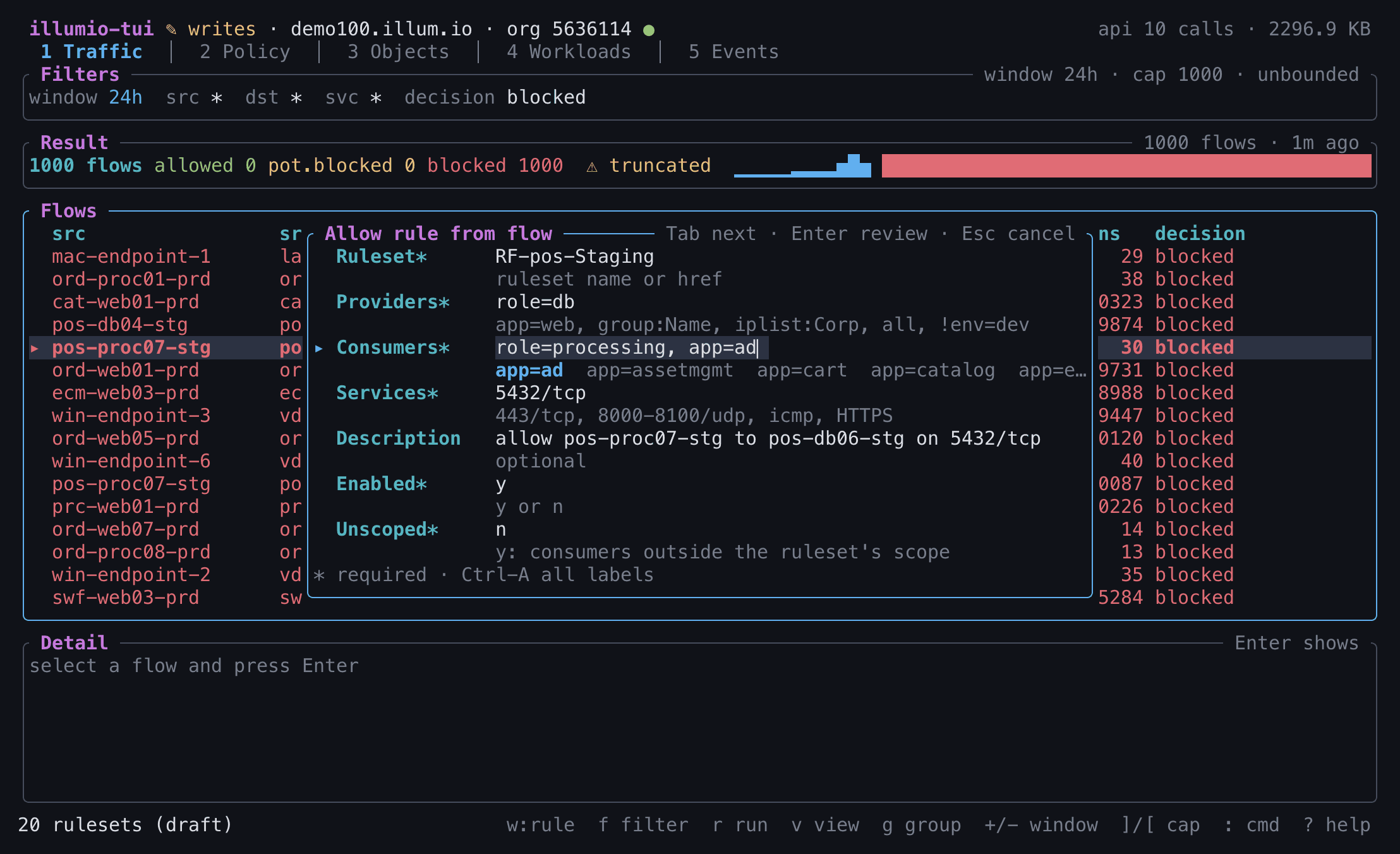
  • The profile gates it. Without writes = true (or ILLUMIO_WRITES=1) every write is refused with exit code 6, even a dry run.
  • The CLI needs --yes. --dry-run prints the exact method, path and JSON body and sends nothing; with neither flag nothing is sent. Nothing is ever retried.
  • The TUI starts with writes off. :writes on arms them for the session, the header shows ✎ writes, and n / e / x create, edit and delete (Workloads: X, as x groups there). The confirm overlay shows the summary, METHOD path and the whole body before y sends it once.
  • Bulk changes guard themselves. L / M on Workloads and workloads enforce / relabel on the CLI change many workloads in bulk_update requests of 100, after one confirm listing every change. Full or selective on several workloads, or any change to more than 25, needs their count typed (--confirm-count), and the CLI needs a filter or --all; d asks the draft policy what their traffic in and out would block, only when pressed. Before sending, a fresh read skips every workload changed since the plan; a chunk with a failure or an unknown outcome stops the rest, and each chunk’s audit entry lists every workload’s outcome.
  • Pending changes are diffed. On Policy, p lists what waits for provisioning; Enter shows a draft IP list, service or ruleset against active, and P provisions the marked entries after showing the exact change_subset.
  • Every sent write is audited to ~/.local/state/illumio-tui/writes.jsonl (mode 0600) with the body sent and the status received.
  • Updates send only what changes, and carry untouched list entries through exactly as the PCE returned them.
Writes armed with :writes on, w drafts an allow rule from a blocked flow, Ctrl-N completes labels, services and values in the rule and label forms, and the recording ends at the confirm with n: nothing was sent. GIF version.
The allow-rule form opened with w on a blocked pos Staging flow: ruleset RF-pos-Staging, providers role=db, consumers role=processing with app=ad being completed, the candidate strip app=ad, app=assetmgmt, app=cart, app=catalog under the field, service 5432/tcp
w on a blocked flow: the rule form pre-filled from its labels, Ctrl-N cycling label values.
The Send this request? overlay: create rule in the draft ruleset, impact 6 providers and 9 consumers, POST to the ruleset's sec_rules path and the whole JSON body with consumers, description, ingress services and providers; y sends, n cancels
The confirm overlay: summary, impact, POST path and the whole body before anything is sent.
$ illumio-tui labels add app=web --yes
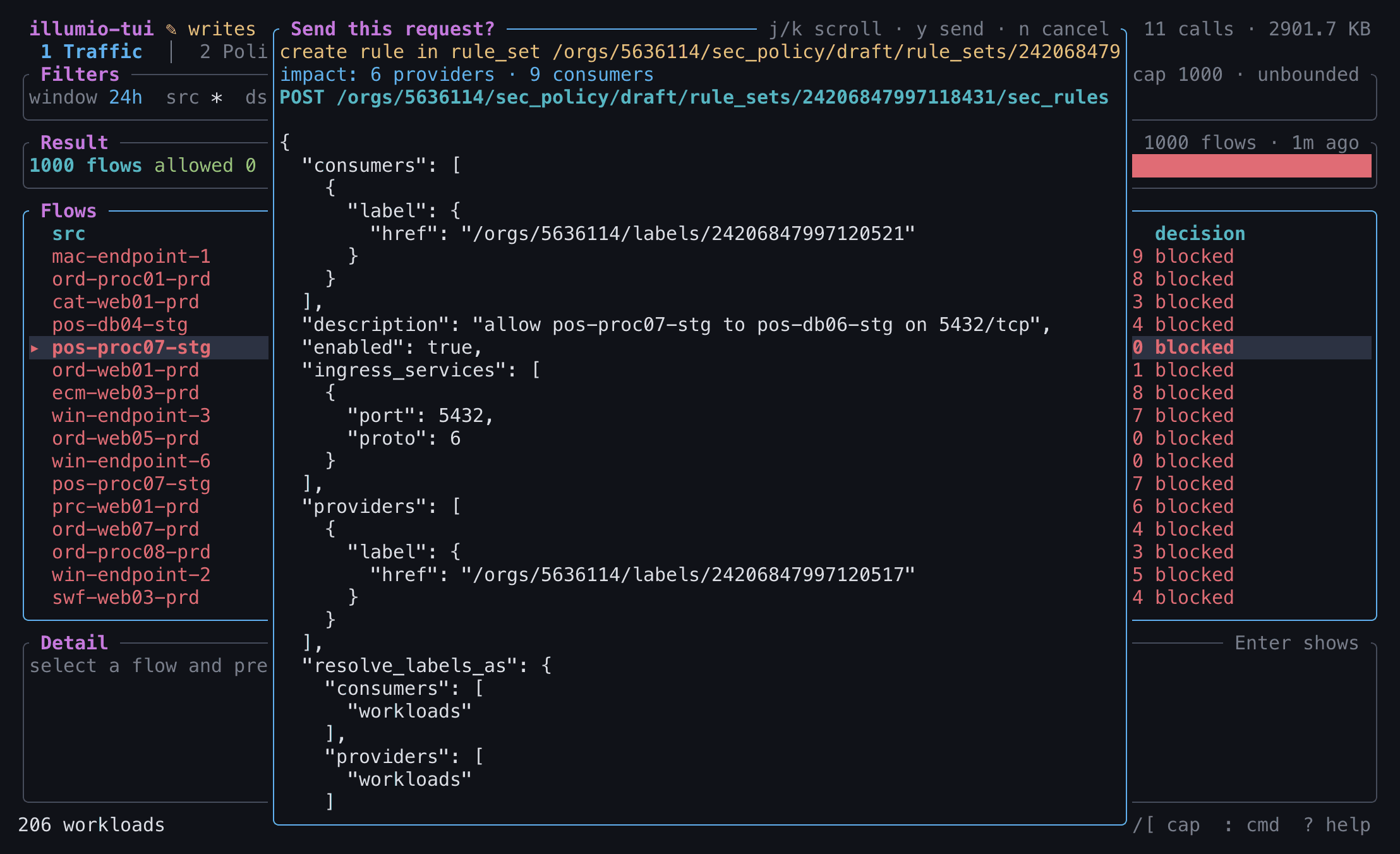
$ illumio-tui iplists update Corp --add-range 10.2.0.0/16 --dry-run
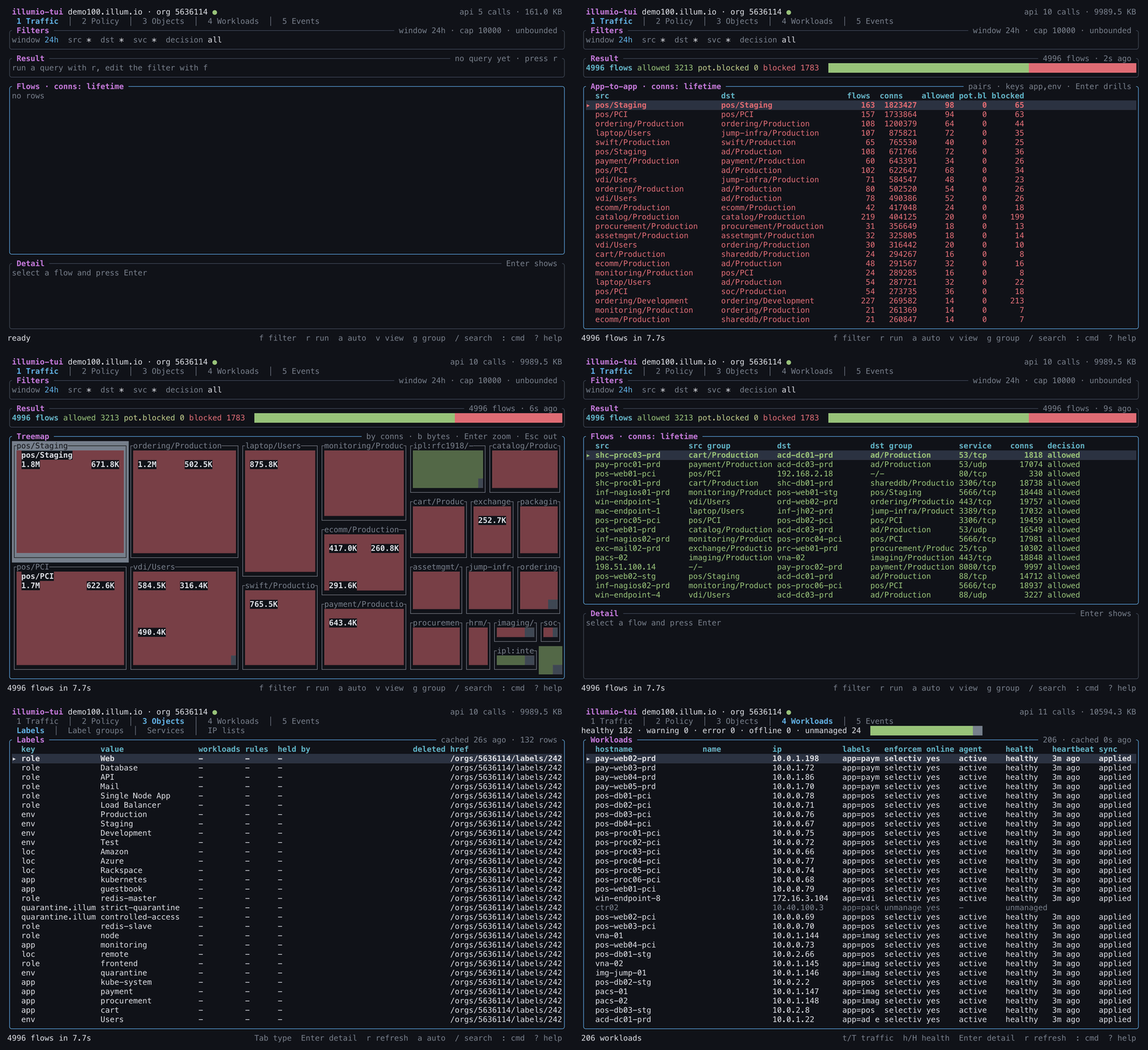
$ illumio-tui policy rules add Web-Tier --provider app=web --consumer iplist:Corp --service 443/tcp --dry-run --impact
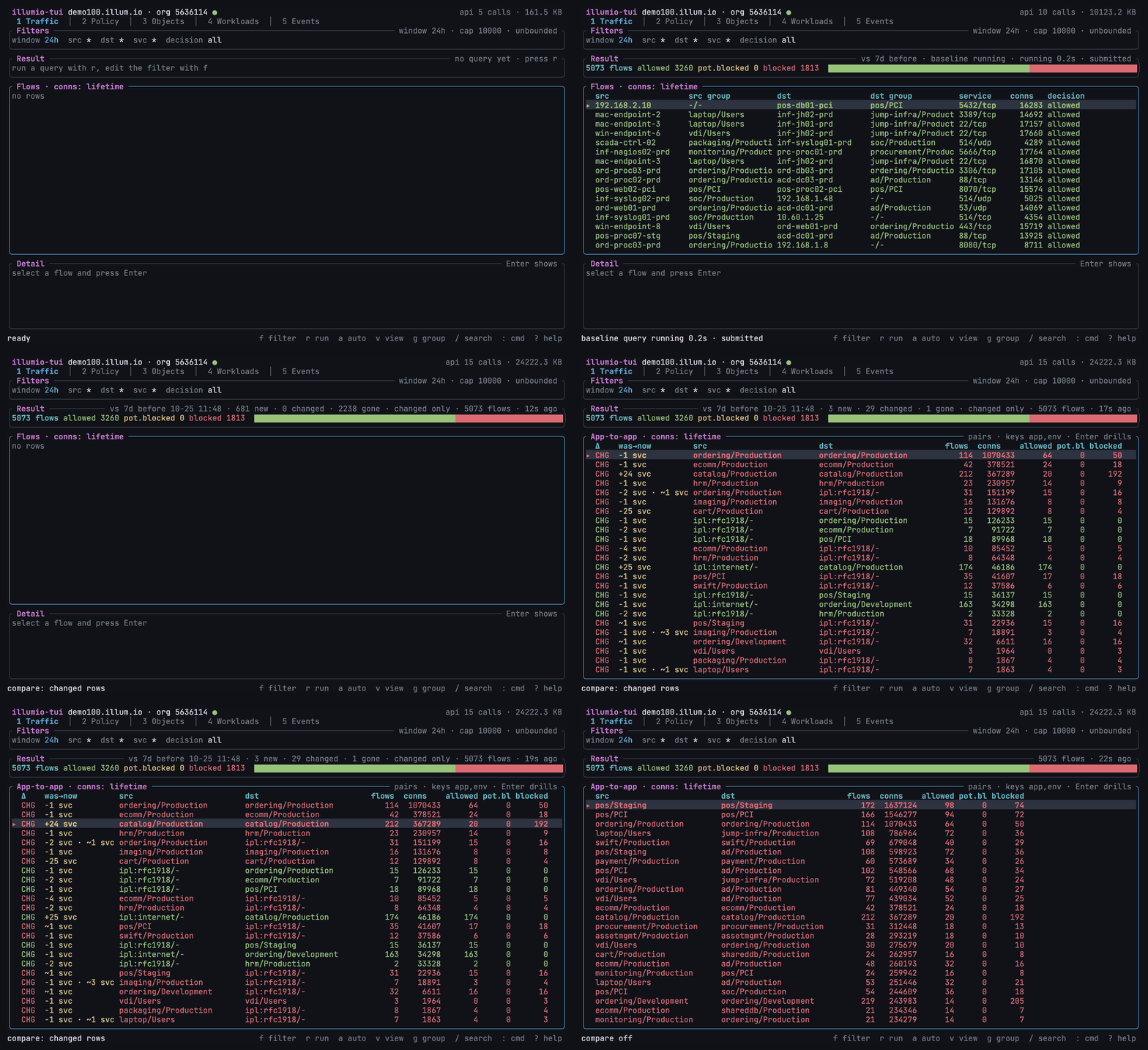
$ illumio-tui policy provision --all --dry-run
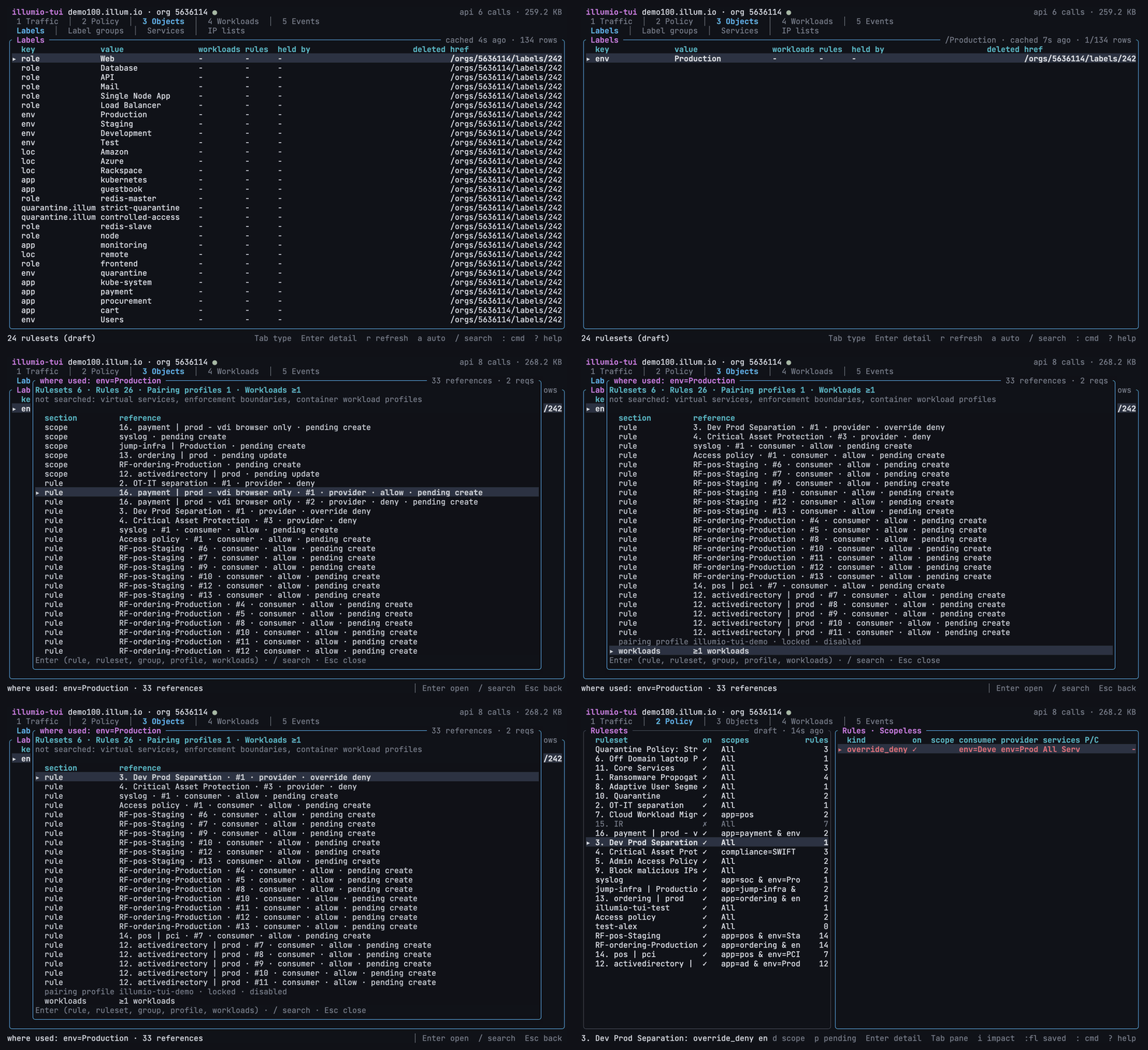
$ illumio-tui workloads enforce full --label app=shop --label env=prod --yes --confirm-count 14
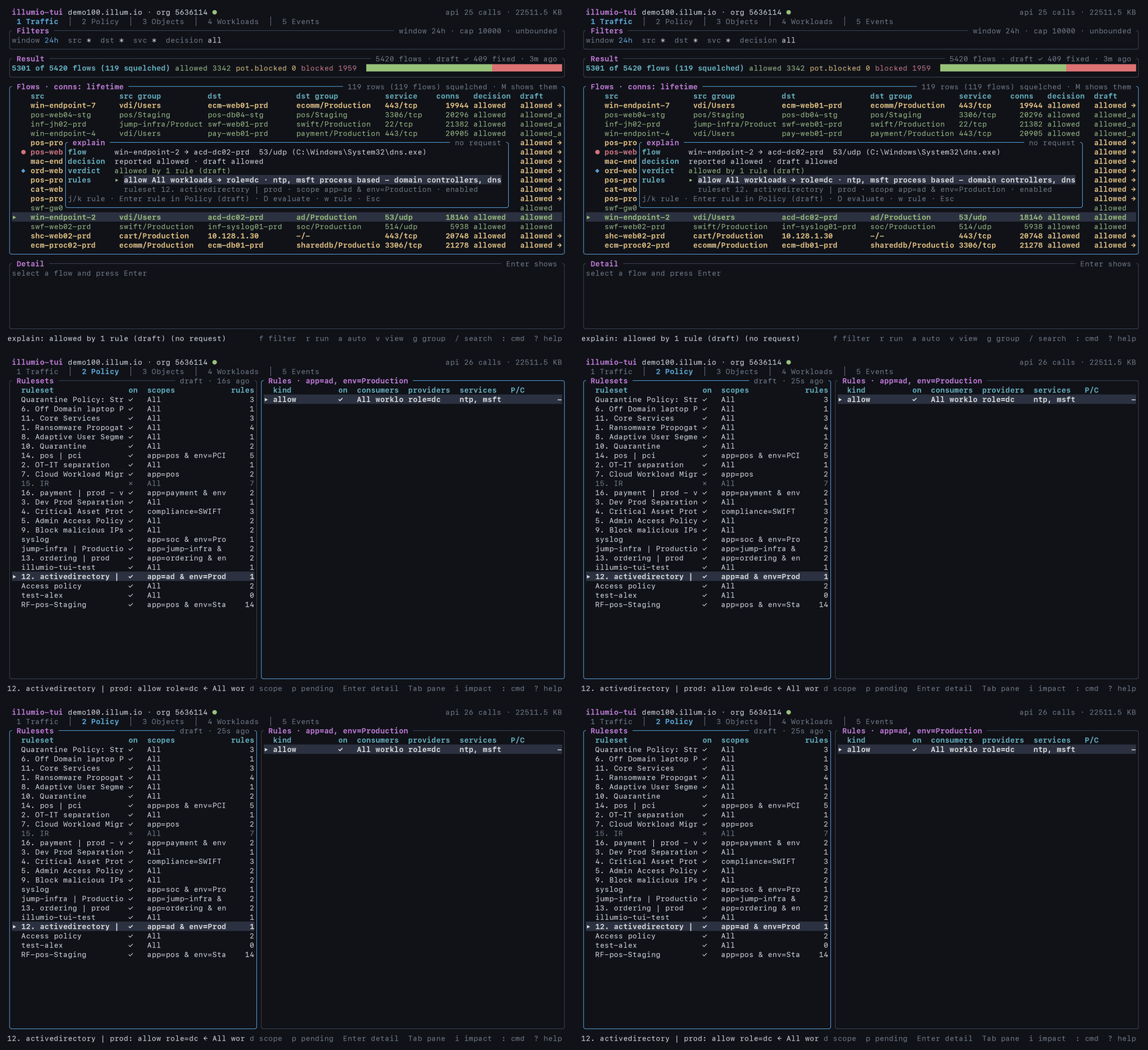
$ illumio-tui workloads relabel --set env=prod,role=- --label app=shop --dry-run
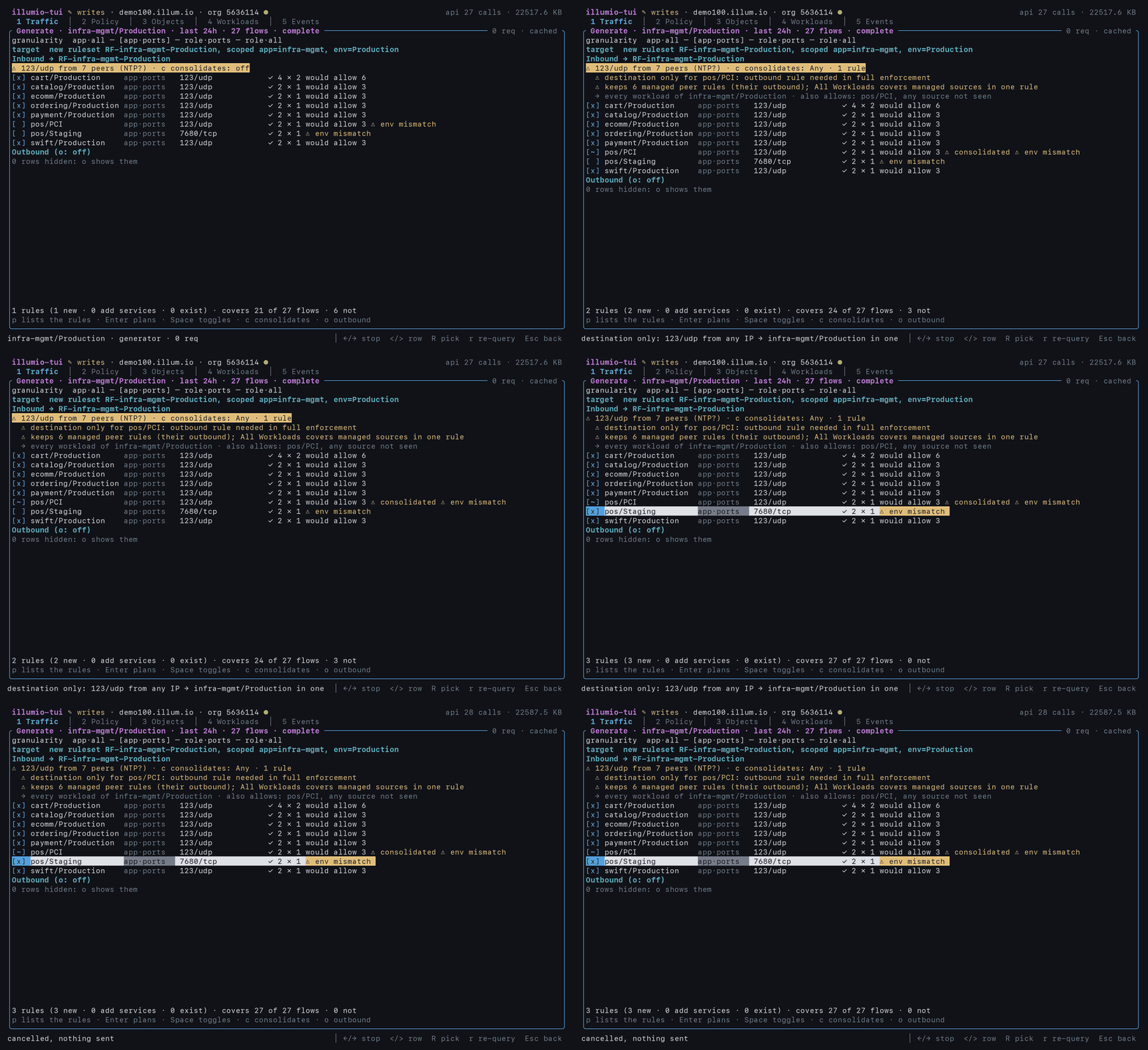
$ illumio-tui pairing-profiles create shop-prod --label app=shop --label env=prod --enforcement visibility_only --lifespan 7d --lock app,env --dry-run

$ illumio-tui pp delete shop-prod --yes
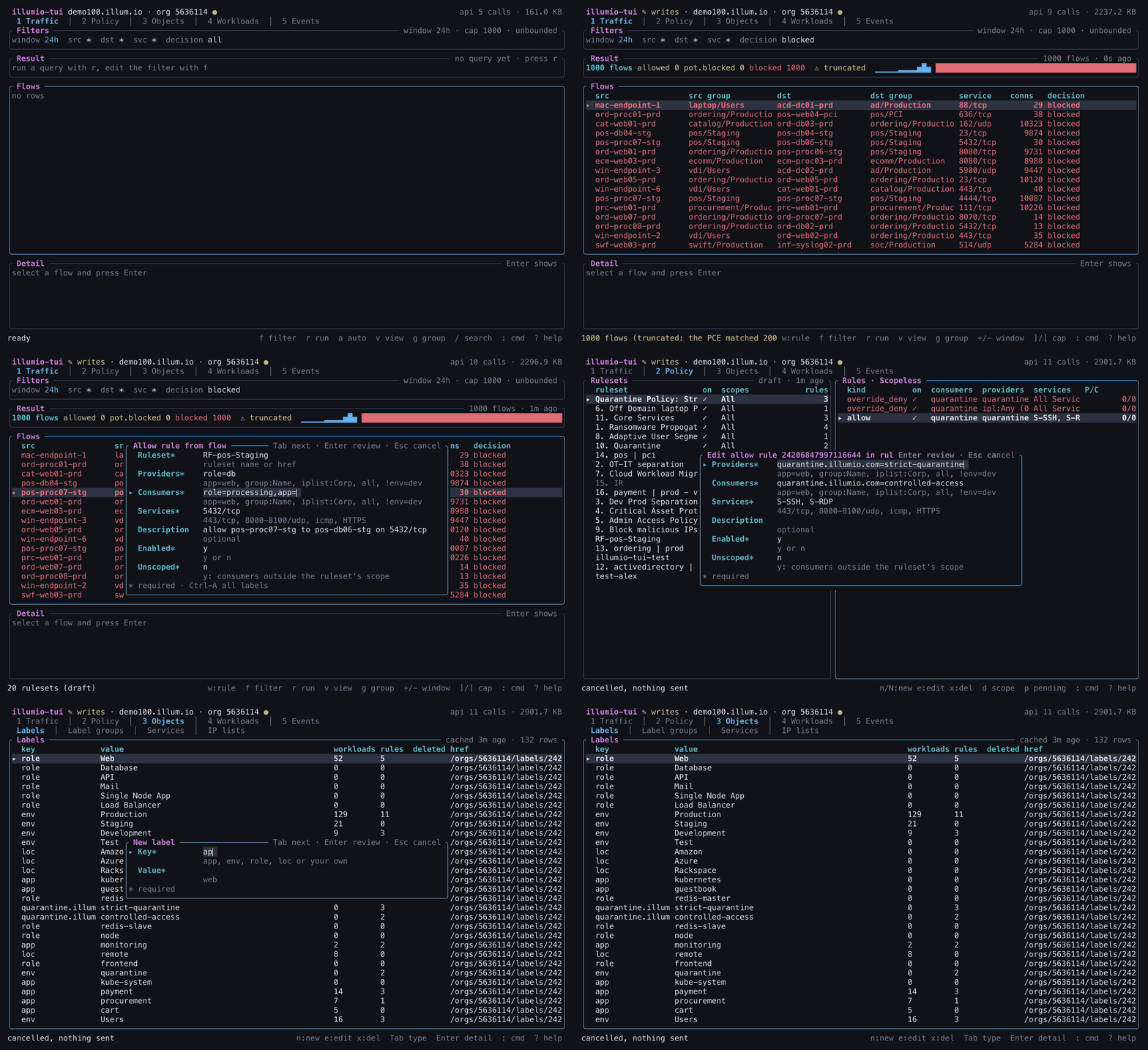
pairing-profiles create sends the name plus only the flags given, so the PCE's defaults apply to the rest; a taken name or an unknown label is exit 2 before anything is sent. The PCE locks every setting whose lock is not sent: --unlock names the ones to leave changeable at pairing. Pairing keys are left out: an activation code is a secret.

Rules use a compact token grammar: app=web, group:NAME, iplist:NAME, workload:HOST, all, and ! to exclude. --impact on a rule write reports the workloads it will touch before anything is sent. The README has the full reference.

8Configure

Environment variables or a profile file; flags override both for one run.

Environment variables

The connection uses the same names as illumio-mcp-server, so an existing setup just works:

PCE_HOST=pce.example
PCE_PORT=443
PCE_ORG_ID=1
API_KEY=api_xxxxxxxxxxxx
API_SECRET=xxxxxxxxxxxxxxxx
VariableEffect
PCE_TLS_VERIFYfalse skips certificate checks, like --insecure
ILLUMIO_PROFILEthe profile to use, like --profile
PCE_SCHEMEthe URL scheme, https by default
ILLUMIO_WRITES1 allows writes, like writes = true
ILLUMIO_AUTO_BACKFILL1 like traffic_auto_backfill = true
ILLUMIO_SCOPE_KEYSthe label keys a ruleset scope is made of
ILLUMIO_TIER_KEYthe label key a rule selects a tier by
ILLUMIO_IGNORE_KEYSlabel keys hidden from label columns
ILLUMIO_TUI_THEMEdark (default) or light
ILLUMIO_TUI_NO_UPDATE_CHECK1 turns off the TUI’s once-a-day update check, like check_updates = false
ILLUMIO_TUI_UPDATE_URLreplaces https://api.github.com for the update check and news (tests)
ILLUMIO_TUI_COLORS256 maps the theme to the xterm 256 colours (the default in Apple Terminal, which garbles 24-bit colour before macOS 26); truecolor forces 24-bit

--env-file .env loads a dotenv file for one run. Per-run flags: --host, --pce-port, --org-id, --profile, --config, --insecure, --no-cache, --human. The connection port flag is --pce-port because traffic query has its own --port filter.

Profiles

Write one from a dotenv file (- reads a paste from stdin) or flags; local, no request:

$ illumio-tui profile add demo --from-env-file path/.env
$ illumio-tui profile add prod --host pce.example --org-id 1 --api-key api_... \
    --api-secret-cmd "op read op://vault/pce/secret" --default

Flags override imported values. The secret comes from the env file, --api-secret-stdin, --api-secret (lands in shell history) or --api-secret-cmd (wins, no plaintext stored); a plaintext secret is stored as api_secret in a file of mode 0600. --force updates an existing profile's connection settings and keeps the rest (limits, labels, generator); the first profile becomes the default. Single-quote a value with a $: dotenv expands $VAR. The secret is never printed.

In ~/.config/illumio-tui/config.toml:

default_profile = "prod"
check_updates = false   # optional: no once-a-day update check in the TUI

[profiles.prod]
host = "pce.example"
org_id = 1
api_key = "api_..."
api_secret_cmd = "op read op://vault/pce/secret"
writes = true    # optional: allow writes

[profiles.prod.limits]
traffic_max_results = 10000     # starting row cap, at most 200000
traffic_default_window = "24h"
traffic_auto_backfill = false
requests_per_second = 2
auto_refresh_min_seconds = 60   # at least 60

[profiles.prod.labels]
scope_keys = ["app", "env"]
tier_key = "role"
ignore_keys = ["DFIRBubble"]

[profiles.prod.generator]
ruleset_name = "RF-{app}-{env}"  # the default
consolidate_min_peers = 5        # the default; at least 2

[profiles.prod.events]
exclude_types = ["=user.login", "agent.*"]  # hidden by default

api_secret_cmd fetches the secret from your password manager at run time; keep it non-interactive, because :profile runs it while the TUI owns the terminal. Switch profiles with profile use, --profile or :profile.

The label model

Rulesets are scoped by scope_keys (app, env by default) and rules select tiers by tier_key (role). The traffic views, traffic groups, traffic mesh and traffic query --blocked group by the scope keys, and the w rule form pre-fills from both. Labels print in scope-key order, then the tier key, then alphabetically.

ignore_keys hides housekeeping keys from label columns and the g picker; JSON output and the workload edit form keep them, the Labels tab shows them on i, and a scope or tier key is never ignored.

Event types hidden by default

exclude_types lists event types the Events screen and events hide unless asked: each a substring, a * glob or an exact type (=user.login), added as a !term to the type filter. The TUI's Type field starts with them (f drops one for the session); events --all-types shows every type. The tool reads this setting and never writes it.

Saved filters

[profiles.<name>.filters.<screen>.<filter>] holds named filters for Traffic, Policy, Events and Workloads in the f editors' text (a policy filter is one search query). :save and --save-filter write them, keeping every other setting; one that does not parse fails only when used. Names: letters, digits, . _ -, up to 64, not starting with -.

[profiles.demo.filters.traffic.prod-blocked]
src = "env=prod"
dst = "!app=backup"
service = "!53/udp, 8000-8100/tcp"
decisions = ["blocked", "potentially_blocked"]
window = "7d"                      # left out: the window in force stays

[profiles.demo.filters.policy]
deny-prod = "dst:env=prod deny"

[profiles.demo.filters.events.noise-free]
type = "!agent.*, !=user.login"
actor = "!system"
severity = "warning+"

[profiles.demo.filters.workloads.prod-unenforced]
labels = "env=prod"
enforcement = "visibility_only"
managed = true

[profiles.demo.filters.workloads.unhealthy-vens]
health = ["warning", "error", "offline"]
ven_version = "23.2.*"              # exact, or a * glob

[profiles.demo.filter_defaults]       # one per screen, a saved filter's name
traffic = "prod-blocked"
events = "noise-free"

filter_defaults names each screen's default: the TUI applies it at startup and after :profile, before the screen loads and without an extra request; the CLI only with --default-filter. One that names no filter or does not parse is ignored with a warning. Removing a filter that is a default removes the default. An events filter's type terms get exclude_types on top, so both apply.

Risky services

[profiles.demo.exposure]              # what exposure and 9 look for
extra = { nfs = ["2049/tcp"], kafka = ["9092/tcp"] }
# services = { rdp = ["3389/tcp", "3389/udp"], ssh = ["22/tcp"] }   # replaces the list

The default list: rdp, smb, netbios, rpc, winrm, ssh, telnet, vnc, mssql, mysql, postgres, oracle, mongodb, redis and ldap with their usual ports. Each entry is PORT/PROTO or FROM-TO/PROTO; a malformed one is a config error that names it (exit 2 on the CLI, the status line in the TUI), before any request.

The generator

ruleset_name names a ruleset the policy generator creates, as a template over the scope keys (RF-shop-prod); every {key} must be a scope key and every scope key must appear. consolidate_min_peers is how many inbound peers on one port make it a fan-in line; DNS, NTP, Kerberos, LDAP, SMB, syslog, SNMP and monitoring-agent ports need 3.

9Gentle on the PCE, by construction

Your PCE is shared, expensive and important. This tool treats it that way.

Most tools that hammer a management plane do it by accident: a refresh loop nobody asked for, a retry storm, an Explorer query over ninety days that someone fired off to see what happens. illumio-tui is built so that none of that can happen quietly. Every request is caused by you, throttled, cached where it can be, counted, and shown back to you.

  • 2 req/s, burst 5One token bucket shared by every request (requests_per_second in the profile). 429 and 503 pause the whole client with exponential backoff and jitter, honouring Retry-After. POSTs are never retried.
  • Counted, alwaysEvery call and byte goes into meta.api_calls and meta.bytes, and into the TUI header. You always know what you spent.
  • Cached 15 / 5 / 1 minLabels, label groups, IP lists and services for 15 minutes; policy and workloads for 5; events for 1. One traffic result is kept until the filter changes; draft decisions for 2 minutes.
  • 5 requests to startThe TUI opens with health plus the four object lists. The first visit to Workloads and to Events costs one request each; going back costs none.
  • No auto-refresh by defaulta turns it on per screen, never faster than every 60 seconds, with a countdown; it switches itself off after a failed refresh.
  • 24 h, 10 000 rowsExplorer queries default to a 24-hour window and a 10 000-row cap, at most 200 000. Truncation comes from the PCE's own row count and is always reported; B and --backfill re-run the window at a larger cap, one query per rung, asking above 10 000.
  • Draft view on requestD and --draft ask the PCE to re-evaluate your own query against draft policy: one PUT on that query resource, polls and one download per query, cached. It changes no policy, so it needs no armed writes; it is never sent without the key, the flag, or a successful write of yours: that re-evaluates the draft decisions on screen (or a w rule's flows) once, visibly, with Esc on Traffic to cancel, and only where D would run without asking. A draft answer a write overtook is never cached.
  • --yes above 7 days or 10 000 rowsExpensive queries stop with exit code 2 and tell you why, until you confirm on purpose.
  • --dry-runPrints the exact Explorer request body and sends nothing. See the query before the PCE does.

10Roadmap

New in the 0.5 line (v0.5.0 to v0.5.7): PCE names in shell completion from a local per-profile cache, with completions refresh (#64); the intra- and extra-scope rule form, with what a rule means and warnings as you type (#65); profile add from an env file or flags (#66); event type filters with excludes, exact types and per-profile defaults (#67); the policy search grammar with scope:, src:, dst: and negation (#68); saved filters (#70) and a default filter per screen (#74); VEN health on Workloads (#72); events by actor (#71); a schema command and --fields for agents and scripts (#73); where-used for labels, groups, IP lists and services (#75); pairing profiles in the CLI (#76); traffic compare with a baseline, what is new, changed or gone (#77); pairing profiles in where-used (#78). The changelog has the notes of every release.

Open now:

  • winget: automatic submissions once the first winget-pkgs PR is merged (#69).
  • An idea: an MCP mode, the same read and write layer, with its throttle and guards, as tools for an agent.

Every idea from the list in issue #5 has shipped. New ideas are welcome in the issue tracker.

What it leaves to others: workloader is the established batch tool for the PCE, and the two work side by side. illumio-tui is for interactive analysis, rule drafting and agents; for bulk import and export, automated labelling, VEN lifecycle, rule and port usage reports and running across many PCEs, use workloader.

Suggestions and bug reports are welcome in the issue tracker.

Licence and links

illumio-tui is free software under the GNU General Public License v3.0 only. It is an independent project and is not an official Illumio product.

The design was written up as a spec and approved before any code existed; each implementation plan was then carried out task by task, every task independently reviewed before the next one started. AI coding agents in Claude Code did the implementation and review work, under the owner's direction.